Facebook Google Gemini AI Sentiment Analysis Google Sheets Marketing

Automate Facebook Comment Sentiment Analysis with AI

Extract all comments from your Facebook posts, analyze customer sentiment using Google Gemini AI, and store actionable insights in Google Sheets—fully automated.

Download Template JSON · n8n compatible · Free
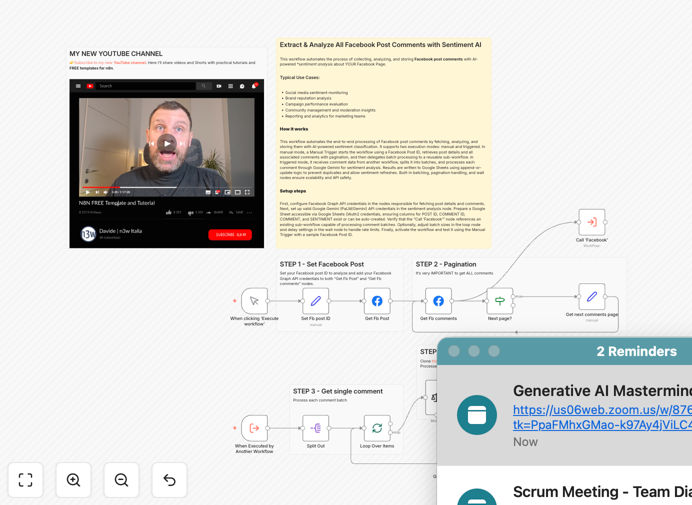
Facebook comment sentiment analysis workflow diagram showing data flow from Facebook to AI analysis to Google Sheets

What This Workflow Does

Manual monitoring of Facebook comments is time-consuming, inconsistent, and misses critical insights buried in hundreds of responses. This n8n workflow solves that by automating the entire process of collecting, analyzing, and organizing Facebook post comments using AI-powered sentiment analysis.

The system connects to the Facebook Graph API to extract every comment from your specified posts, processes them through Google Gemini's advanced natural language model to determine sentiment (positive, negative, neutral), and stores the structured results in Google Sheets for easy reporting and trend analysis. It handles pagination automatically, ensuring no comment is missed, even on highly active posts.

Beyond simple sentiment scoring, this automation provides actionable business intelligence. Marketing teams can measure campaign reception, customer support can identify urgent issues, and brand managers can track reputation shifts—all without manual data collection or spreadsheet work.

How It Works

The workflow operates in two complementary modes, giving you flexibility for both ad-hoc analysis and ongoing monitoring.

1. Manual Execution Mode

Start by entering a specific Facebook Post ID. The workflow fetches the post details, then retrieves all comments (including nested replies) using pagination handling. It batches comments for efficient processing and calls a sub-workflow to analyze each batch through Google Gemini's sentiment classification.

2. Triggered Execution Mode

When activated by another workflow or scheduled trigger, it receives comment data directly, splits it into manageable batches, processes sentiment analysis, and updates your Google Sheet with "append or update" logic to prevent duplicates while allowing sentiment re-evaluation if comments are edited.

3. Data Storage & Output

Each analyzed comment is saved with its Post ID, Comment ID, original text, sentiment classification, and timestamp. The Google Sheet becomes a searchable database of audience sentiment that can be connected to dashboards, alert systems, or CRM platforms for further action.

Who This Is For

This template is ideal for social media managers, marketing teams, brand managers, customer support leads, and agencies managing multiple client accounts. If you regularly analyze Facebook engagement, track brand sentiment, measure campaign performance, or need to identify customer issues quickly, this automation eliminates hours of manual work each week.

Businesses running product launches, promotional campaigns, or community management will find particular value. The system scales effortlessly—whether you're monitoring a single post or dozens across multiple pages—providing consistent, unbiased sentiment analysis at any volume.

What You'll Need

  1. Facebook Graph API Access: A Facebook App with Page access token and appropriate permissions (pages_read_engagement, pages_read_user_content).
  2. Google Gemini API Key: Access to Google's AI Studio or Vertex AI to generate an API key for sentiment analysis.
  3. Google Sheets: A spreadsheet (new or existing) with write permissions via Google OAuth credentials.
  4. n8n Instance: Self-hosted n8n or n8n.cloud account with workflow execution capabilities.
  5. Facebook Page ID: The numeric ID of the Facebook Page you want to monitor (found in Page settings).

Pro tip: For ongoing monitoring, schedule this workflow to run daily or weekly. Combine it with a dashboard tool like Google Data Studio or Tableau to visualize sentiment trends over time and share insights with stakeholders.

Quick Setup Guide

Import and configure this workflow in under 15 minutes:

  1. Download & Import: Click the download button above to get the JSON file. In your n8n instance, create a new workflow and import the JSON.
  2. Configure Facebook Credentials: Add your Facebook Graph API credentials to both the "Get Fb Post" and "Get Fb comments" nodes. Test with a recent post ID.
  3. Set Up Google Gemini: Add your Google Gemini API key to the "Google Gemini Chat Model" node. Adjust the prompt if needed for your industry terminology.
  4. Connect Google Sheets: Authenticate with Google OAuth and specify your target spreadsheet ID. The workflow will create columns if they don't exist.
  5. Test & Schedule: Run the workflow manually with a test post ID. Once confirmed, add a Schedule Trigger node for automatic periodic execution.

Key Benefits

Save 10+ hours weekly on manual comment monitoring. What previously required a team member to read and categorize hundreds of comments now happens automatically in minutes, freeing up resources for strategic work.

Gain real-time brand sentiment visibility. Instead of quarterly sentiment reports, get daily or weekly insights that let you respond to emerging issues before they escalate, protecting brand reputation.

Eliminate human bias in sentiment classification. AI applies consistent criteria across all comments, removing the variability and fatigue that affects manual rating, leading to more reliable trend data.

Create actionable marketing intelligence. Transform unstructured social comments into structured data that integrates with your CRM, support ticketing, or business intelligence tools for comprehensive customer understanding.

Scale monitoring without proportional cost increases. Whether you're analyzing 100 comments or 10,000, the workflow handles the volume with minimal additional setup, making it cost-effective for growing businesses.

Frequently Asked Questions

Common questions about social media sentiment analysis and automation

Social media sentiment analysis uses AI to automatically classify public comments and mentions as positive, negative, or neutral. It's crucial for businesses to understand brand perception, measure campaign impact, identify customer pain points, and track reputation in real-time without manually reading thousands of comments.

This automated approach transforms subjective social feedback into quantifiable data. Marketing teams can prove ROI, product teams can prioritize feature requests, and customer service can proactively address issues before they escalate on public platforms.

Modern AI models like Google Gemini achieve 85-95% accuracy in sentiment classification for social media text. They understand context, sarcasm, and emojis better than simple keyword matching. For business use, this accuracy is sufficient to identify trends, spot urgent issues, and gauge overall audience sentiment toward your brand or products.

The key advantage isn't perfect accuracy on every single comment, but consistent, scalable analysis across your entire comment history. You'll identify sentiment patterns and shifts that would be impossible to spot manually.

Yes, you can modify this template to monitor multiple Facebook pages or posts. The workflow can be scheduled to run periodically, collecting and analyzing comments from different sources into a centralized Google Sheet. This gives you a unified dashboard of sentiment across all your social media presence.

For multi-page monitoring, you would create a list of Page IDs or Post IDs and loop through them. Each page's comments would be analyzed separately but stored in the same spreadsheet with clear source identifiers for filtering and comparison.

Beyond basic sentiment, you can extract key topics, frequently mentioned products, common complaints, competitor mentions, and customer intent. Advanced workflows can categorize comments by issue type, identify influencers, track sentiment trends over time, and even trigger automated responses for specific comment types.

With additional AI processing, you could extract: product feature requests, shipping/delivery issues, pricing feedback, competitor comparisons, and customer service satisfaction indicators—all automatically categorized from unstructured comment text.

Manual monitoring of hundreds or thousands of comments takes hours each week and is prone to human bias and fatigue. Automation processes the same volume in minutes, provides consistent analysis 24/7, and generates structured data ready for reporting. This frees up marketing teams to focus on strategy rather than data collection.

Consider a medium-sized business with 5 posts weekly receiving 200 comments each. Manual review would take 5-10 hours weekly. This workflow completes the analysis in under 30 minutes with more consistent categorization.

AI may struggle with heavy sarcasm, cultural references, or mixed emotions in a single comment. It also can't replace human judgment for nuanced customer service issues. The best approach combines AI automation for scale with human review for edge cases and strategic decision-making based on the insights generated.

For business applications, we recommend using AI for initial filtering and trend identification, then having team members review flagged comments (especially negative ones) for appropriate response. This hybrid approach maximizes efficiency while maintaining quality.

Absolutely. You can extend this template to send Slack/Teams alerts, create support tickets, or notify your team via email when negative sentiment exceeds a threshold. This enables proactive reputation management—you can address issues before they escalate, rather than discovering problems days later.

Common alert triggers include: sudden increase in negative comments, specific complaint keywords, or sentiment dropping below a defined threshold. These alerts can be routed to different teams based on content (product issues to product team, shipping complaints to operations).

Yes! GrowwStacks specializes in building tailored automation solutions. We can create custom workflows that monitor multiple platforms (Instagram, Twitter, LinkedIn), integrate with your CRM, generate executive dashboards, and trigger specific business actions based on sentiment patterns.

Our team will work with you to understand your specific monitoring needs, brand voice, and integration requirements. We build solutions that fit your existing tech stack and business processes, not just generic templates.

  • Multi-platform social listening across all your channels
  • Custom sentiment categories specific to your industry
  • Integration with your existing CRM and support systems
  • Executive dashboards with real-time sentiment metrics

Need a Custom Social Media Monitoring Automation?

This free template is a starting point. Our team builds fully tailored automation systems for your specific business needs.