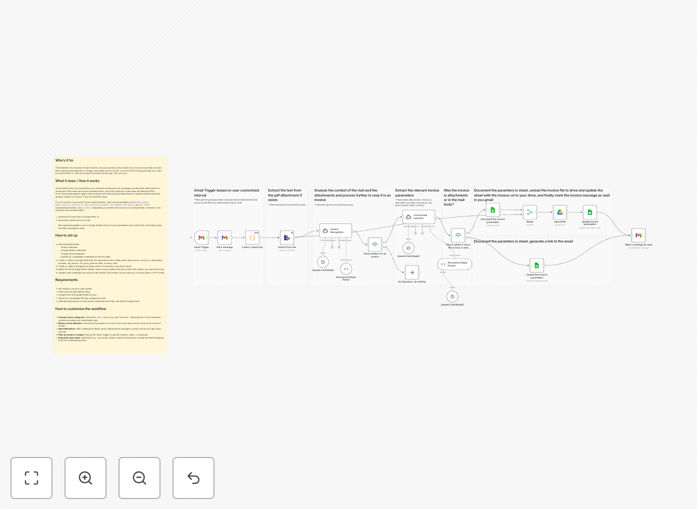
What This Workflow Does
This automation solves the tedious problem of manual invoice processing that plagues founders, finance teams, and solo operators. Instead of hunting through email inboxes for invoice PDFs or trying to remember "that one receipt from three months ago," this workflow automatically captures, organizes, and extracts critical financial data from incoming emails.
The system monitors your Gmail inbox, identifies invoice emails using AI, extracts structured data like invoice numbers, dates, amounts, and vendor information, saves attachments to Google Drive for secure storage, and logs everything to a master Google Sheet. This creates a single, searchable source of truth for all your expenses without any manual data entry.
How It Works
1. Email Monitoring & Attachment Processing
The workflow polls your Gmail inbox on a schedule, fetching new messages with their attachments. A JavaScript node restructures all attachments, and a PDF extraction node reads any attached invoice files to prepare them for data extraction.
2. AI-Powered Invoice Recognition
An "Invoice Recognition Agent" analyzes the email body and attachments using AI to determine whether the email actually contains an invoice. If not, the workflow stops here, preventing false positives and keeping your system clean.
3. Structured Data Extraction
For confirmed invoices, a second AI "Invoice Data Extractor" pulls structured fields including: invoice date, invoice number, vendor/provider name, net amount, VAT/tax, gross amount, currency, and category labels (like SaaS, hardware, or services).
4. File Storage & Data Logging
Depending on whether the invoice is in an attachment or email text, the workflow either uploads the file to a designated Google Drive folder or creates a direct link to the email. All extracted data plus the file link are then appended or updated in your master Google Sheet.
5. Completion & Organization
Finally, the Gmail message is marked as read (or archived based on your preference), completing the automated processing cycle and ensuring your inbox stays organized.
Who This Is For
This template is ideal for business owners who receive 10+ invoices monthly via email, finance teams tired of manual data entry, freelancers needing better expense tracking, and companies wanting to capture early payment discounts by processing invoices faster. It's particularly valuable for service businesses, agencies, consultants, and e-commerce operations with multiple vendor relationships.
What You'll Need
- An n8n instance (cloud or self-hosted)
- Gmail account with OAuth2 access enabled
- Google Drive and Google Sheets access
- OpenAI API key (or compatible AI service) configured in n8n
- Sufficient permissions to read emails, write to Drive, and edit Sheets
- A Google Sheet with columns for invoice data (template included)
Quick Setup Guide
- Download and import the JSON template into your n8n instance
- Authenticate connections for Gmail, Google Sheets, Google Drive, and OpenAI in the credential manager
- Create or select a Google Sheet with the expected columns (template provides structure)
- Designate a Google Drive folder where invoice attachments should be stored
- Adjust the Gmail trigger filters to match your specific inbox labels or search criteria
- Test with a sample invoice email to verify extraction accuracy
- Activate the workflow and set your preferred polling schedule
Key Benefits
Eliminate 5-15 hours of monthly manual work per employee spent searching emails, downloading attachments, and entering data into spreadsheets or accounting software.
Capture early payment discounts consistently by processing invoices immediately upon receipt rather than letting them sit in inboxes for days or weeks.
Improve financial visibility and accuracy with a centralized, searchable database of all invoices that updates in real-time as new invoices arrive.
Reduce human error in data entry that leads to payment mistakes, duplicate payments, or reconciliation headaches during month-end closing.
Scale your finance operations without adding headcount as your business grows and invoice volume increases proportionally.
Pro tip: Start by processing a specific category of invoices (like SaaS subscriptions) to fine-tune the AI extraction before expanding to all vendor invoices. This allows you to build confidence in the system while immediately automating your most predictable expenses.