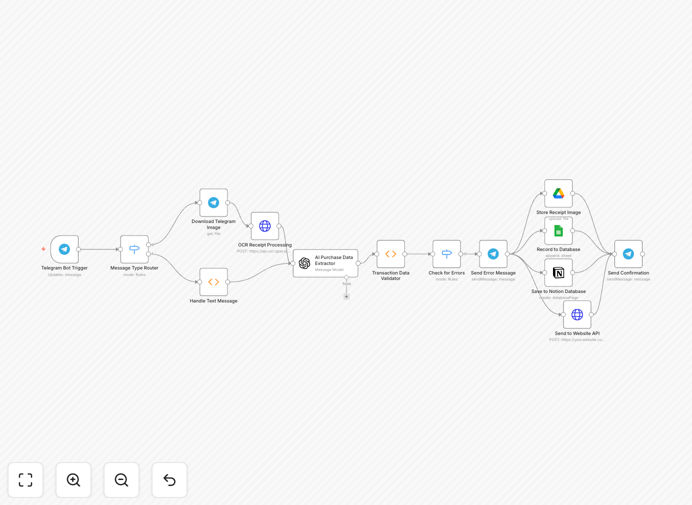
What This Workflow Does
Manual receipt processing is a time-consuming, error-prone bottleneck for businesses. Employees lose receipts, finance teams spend hours on data entry, and managers lack real-time visibility into spending. This workflow solves all that by creating a seamless, automated pipeline from receipt capture to structured record keeping.
It transforms your Telegram messenger into a powerful receipt submission tool. Anyone on your team can snap a photo of a receipt or send transaction details via text. The system automatically extracts the text using OCR, intelligently parses it with GPT-4 to identify vendor, amount, date, and category, then stores the structured data simultaneously in Google Sheets for accounting, Notion for collaborative tracking, and can push to any custom API. The original image is archived in Google Drive for audit trails.
How It Works
1. Receipt Submission via Telegram
A custom Telegram bot listens for messages. Users send a photo of a receipt or manually type details (e.g., "Lunch $45.60 at Cafe Central"). The bot acknowledges receipt immediately.
2. Image Processing & OCR Extraction
If a photo is sent, the workflow downloads the image and sends it to the OCR.space API. This service converts the image text into machine-readable data, handling different fonts, languages, and receipt formats.
3. AI-Powered Data Structuring
The raw OCR text is passed to OpenAI's GPT-4. Using a carefully crafted prompt, the AI identifies and extracts key fields: vendor name, total amount, transaction date, tax, payment method, and suggests a category (e.g., Meals, Travel, Office Supplies).
4. Validation & Error Handling
The workflow checks the extracted data for completeness and plausibility. If critical fields are missing or values seem anomalous, it can trigger a request for clarification back through Telegram or flag the entry for review.
5. Multi-Platform Storage
Validated data is written in parallel to a designated Google Sheet (creating a clean spreadsheet for accountants), a Notion database (for team visibility and search), and can be sent to another internal system via HTTP Request. The original receipt image is saved to a specific Google Drive folder.
6. Confirmation & Feedback
A final formatted message is sent back to the user in Telegram, summarizing what was recorded: "✅ Receipt stored: Cafe Central - $45.60 - 2025-04-15 - Category: Meals". This closes the loop and builds trust in the system.
Who This Is For
This automation is ideal for small to medium businesses, freelancers, consultants, and project teams who need to track expenses but want to avoid clunky expense report software. It's perfect for:
- Startups & SMEs: Teams without a dedicated finance department that need a simple, cost-effective way to track spending.
- Remote & Distributed Teams: Employees in different locations can submit receipts instantly without dealing with scans, emails, or paper.
- Freelancers & Consultants: Individuals who need to track billable expenses and client costs for accurate invoicing.
- Project Managers: Teams managing project budgets who need real-time visibility into expenses against allocations.
- Traveling Employees: Staff who incur travel, meal, and accommodation costs and need an easy way to document them on the go.
What You'll Need
- A Telegram Bot Token (created via @BotFather on Telegram).
- An OpenAI API key with access to GPT-4.
- An OCR.space API key (free tier available).
- Google Cloud Project with OAuth 2.0 credentials enabled for Google Sheets and Google Drive APIs.
- A Notion Integration Token and the ID of the database where you want to store entries.
- An n8n instance (cloud or self-hosted) to run the workflow.
Pro tip: Start with the free tiers for OCR.space and OpenAI to test the workflow. The Google Sheets and Notion integrations use OAuth, which is secure and doesn't require sharing sensitive login details.
Quick Setup Guide
- Download & Import: Click the download button above to get the JSON file. In your n8n instance, go to "Workflows" → "Import from file" and select the downloaded template.
- Configure Credentials: In the n8n workflow, click on each node (Telegram, OpenAI, OCR.space, Google Sheets, etc.) and set up the required credentials using the API keys you gathered.
- Update Resource IDs: In the Google Sheets node, replace the placeholder
YOUR_GOOGLE_SHEET_ID_HEREwith the ID of your actual spreadsheet. In the Notion node, replaceYOUR_NOTION_DATABASE_ID_HERE. - Test with a Photo: Activate the workflow. Send a photo of a simple receipt to your Telegram bot. Watch the execution in n8n to ensure all steps complete successfully.
- Customize (Optional): Adjust the GPT-4 prompt in the "Function" node to better match your expense categories. Modify the Google Sheets column mapping if your spreadsheet has a different structure.
Key Benefits
Eliminate 5–10 hours of manual data entry per month. Finance teams and business owners reclaim this time for analysis and strategic work instead of tedious typing and filing.
Capture 100% of expenses in real-time. Receipts are logged the moment they're incurred, preventing loss and giving managers immediate visibility into cash flow and budget status.
Reduce human error in data entry by over 90%. AI and OCR provide consistent, accurate extraction, eliminating typos in amounts, misread dates, and vendor name inconsistencies.
Create a single source of truth across departments. Data stored simultaneously in Sheets (for finance) and Notion (for projects) ensures everyone is aligned without manual duplication.
Streamline tax preparation and audit trails. All transactions are digitally recorded, categorized, and backed by the original receipt image, making quarterly and annual tax filing significantly faster and more defensible.