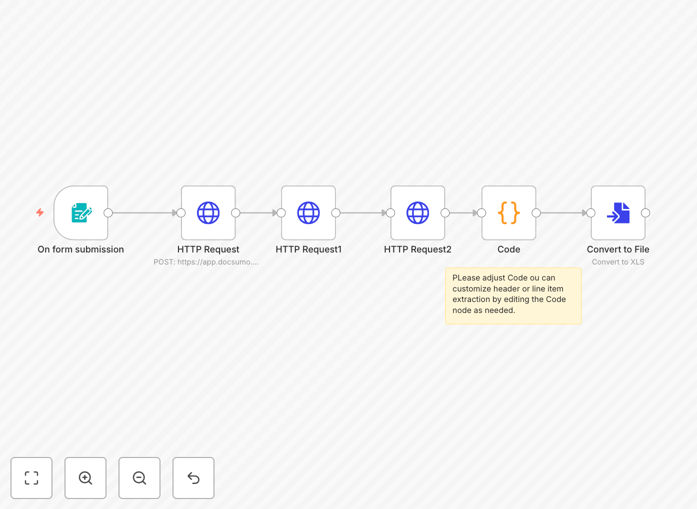
What This Workflow Does
Manual invoice processing is a notorious time-sink for businesses. Finance teams waste hours each week opening PDFs, manually typing numbers into spreadsheets, and cross-checking totals. This workflow eliminates that grind.
It automates the entire extraction pipeline: a user uploads an invoice PDF, the system sends it to DocSumo's AI engine for intelligent data recognition, parses out key details like invoice numbers, dates, line items, and totals, and then compiles everything into a clean, structured Excel file. The result is a ready-to-use dataset for accounting, reporting, or integration into your ERP—with zero manual typing.
Beyond simple extraction, this template handles the complexity of real-world invoices—different layouts, multiple line items, varying tax calculations—and delivers consistent, accurate data. It's designed for accounts payable teams, freelancers, and any business that receives invoices regularly.
How It Works
The automation follows a logical, step-by-step process to transform a raw document into actionable data.
1. Invoice Upload Trigger
The workflow starts when a user uploads an invoice PDF via an n8n form trigger. This can be a manual upload through a simple web form or an automated trigger from an email inbox, cloud storage folder, or file-sharing service.
2. Secure API Transmission
The uploaded file is securely transmitted to DocSumo's API using encrypted credentials stored in n8n. No API keys are hard-coded, ensuring security best practices are maintained.
3. AI-Powered Data Extraction
DocSumo's machine learning models analyze the document. They identify and extract structured fields: vendor name, invoice number, date, due date, line item descriptions, quantities, unit prices, taxes, and grand totals.
4. Data Structuring & Validation
The raw extracted data is processed within n8n. The workflow maps each line item, combines it with the header information (like invoice number), and validates totals to catch potential extraction errors or mismatches.
5. Excel File Generation
The structured data is formatted into rows and columns, then converted into an Excel (.xlsx) file. Each invoice becomes a row, with line items detailed in subsequent columns, ready for import into any accounting software or spreadsheet.
6. Output & Delivery
The final Excel file can be saved to a designated cloud folder (Google Drive, Dropbox), emailed to stakeholders, or sent to a database. The workflow can also trigger notifications in Slack or Teams to alert the team that processing is complete.
Who This Is For
This automation is ideal for any business or individual who processes invoices regularly:
- Small Business Owners & Freelancers: Who receive client invoices and need to track expenses without hiring a bookkeeper.
- Accounts Payable Teams: In companies that process dozens or hundreds of supplier invoices monthly, seeking to reduce processing time and errors.
- Finance Departments & CFOs: Looking to digitize paper trails, improve audit trails, and gain real-time visibility into payables.
- Consultants & Agencies: Who bill clients and need to reconcile incoming invoices against project budgets quickly.
- Startups Scaling Operations: Needing to automate back-office tasks to focus on growth without increasing administrative headcount.
What You'll Need
- A DocSumo Account & API Key: Sign up for DocSumo and obtain your API credentials from their dashboard.
- An n8n Instance: Either self-hosted n8n or a cloud account (n8n.cloud).
- Basic n8n Knowledge: Understanding of how to import a JSON workflow and configure credential nodes.
- Invoice PDFs to Process: Sample invoices to test the extraction accuracy.
- A Destination for the Excel File: Such as a Google Drive folder, local computer path, or email address for delivery.
Pro tip: Start with a small batch of 5-10 varied invoices (different vendors, formats) to fine-tune the field mapping in DocSumo before scaling to hundreds of documents.
Quick Setup Guide
Get this automation running in your environment in under 15 minutes:
- Download & Import: Click the "Download Template" button above and import the JSON file into your n8n instance.
- Configure DocSumo Credentials: In n8n, create a new HTTP Request credential. Add your DocSumo API key as a header (e.g., Authorization: Token YOUR_API_KEY).
- Update the Trigger: The workflow uses an n8n Form Trigger node by default. You can change this to a Schedule Trigger, Webhook, or watch a folder in Google Drive/Dropbox based on your intake method.
- Test with a Sample Invoice: Run the workflow manually once, uploading a test PDF. Check the extracted data in the debug panel and the final Excel output.
- Set Your Output Destination: Modify the final node to save the Excel file where you need it—email it, upload to cloud storage, or append to a database.
- Activate & Monitor: Turn the workflow on. Monitor the first few runs to ensure accuracy, then let it handle the rest automatically.
Key Benefits
Save 10+ Hours Per Month Per Employee: Eliminate manual data entry. What used to take an hour per batch of invoices now happens in seconds.
Near-100% Accuracy on Standard Invoices: AI extraction drastically reduces human typos, transposition errors, and missed line items, leading to more reliable financial data.
Faster Accounts Payable Cycles: Process invoices the day they arrive, capture early payment discounts, and improve vendor relationships with timely payments.
Scalable Processing Volume: Handle 10 invoices or 10,000 with the same setup. The system doesn't get tired or make more mistakes as volume increases.
Audit-Ready Data Trails: Every extraction is logged with timestamps and source files. Create an immutable record for compliance and financial auditing.
Seamless Integration Potential: The structured Excel output is a perfect bridge. Easily extend the workflow to push data directly into QuickBooks, Xero, NetSuite, or your custom database.