What This Workflow Does
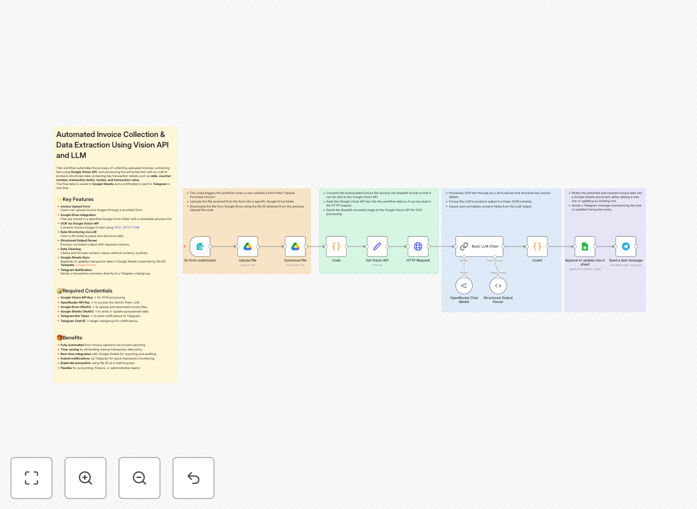
This automation solves the tedious and error-prone process of manual invoice data entry. Businesses receiving dozens or hundreds of invoices monthly waste countless hours manually typing vendor names, dates, amounts, and line items into accounting systems. The workflow automatically processes uploaded invoices through Google's Vision OCR to extract text, then uses Gemini LLM to intelligently structure the data into standardized fields in Google Sheets.
The system handles invoices in various formats from different vendors, eliminating the need for rigid templates. It can extract key fields like invoice number, date, vendor details, line items with quantities and prices, subtotals, taxes, and total amounts. The structured data then flows into your accounting system or analytics platform.
How It Works
1. Invoice Upload Trigger
The workflow activates when new invoices are uploaded to a designated cloud storage folder or received via email attachment. Supported formats include PDF, JPG, PNG, and other common document types.
2. Google Vision OCR Processing
Each invoice is sent to Google's Vision API which performs optical character recognition (OCR) to extract all text content. The API returns the raw text along with positional information about where each text segment appears on the page.
3. Gemini LLM Data Structuring
The extracted text is processed by Google's Gemini LLM which understands invoice semantics. The AI identifies and maps text segments to appropriate fields (vendor, date, amounts, etc.) regardless of invoice layout variations.
4. Google Sheets Integration
The structured data is written to designated columns in Google Sheets, creating a searchable database of invoice information. The sheet can include validation formulas and be connected to other business systems.
Who This Is For
This workflow benefits any business that processes more than 20 invoices per month. Ideal users include:
- Accounting departments drowning in manual data entry
- Small businesses without dedicated AP staff
- Companies with high-volume vendor transactions
- Organizations wanting better spend analytics
- Teams transitioning from paper to digital processes
What You'll Need
- Google Cloud account with Vision API and Gemini API enabled
- n8n instance (cloud or self-hosted)
- Google Sheets with prepared column headers
- A source for invoices (email, cloud storage, or form uploads)
Quick Setup Guide
- Download and import the JSON template into your n8n instance
- Configure your Google Cloud credentials in the Vision and Gemini nodes
- Set up your invoice source (Google Drive folder, email account, etc.)
- Connect to your destination Google Sheet and map the fields
- Test with sample invoices and refine field mappings as needed
Key Benefits
Save 5-15 minutes per invoice by eliminating manual data entry. What used to take an hour now happens automatically in minutes.
Reduce errors by 90% compared to human data entry. No more transposed numbers or missed fields.
Gain instant spend visibility with all invoice data structured and searchable in Google Sheets.
Process invoices 24/7 without waiting for staff availability. The system handles uploads anytime.
Scale effortlessly from 10 to 10,000 invoices without adding staff.