Gmail Google Sheets Slack Lead Generation

Extract Business Leads from Gmail to Google Sheets

Automate lead extraction with Slack notifications for your sales team

Download Template JSON · n8n compatible · Free
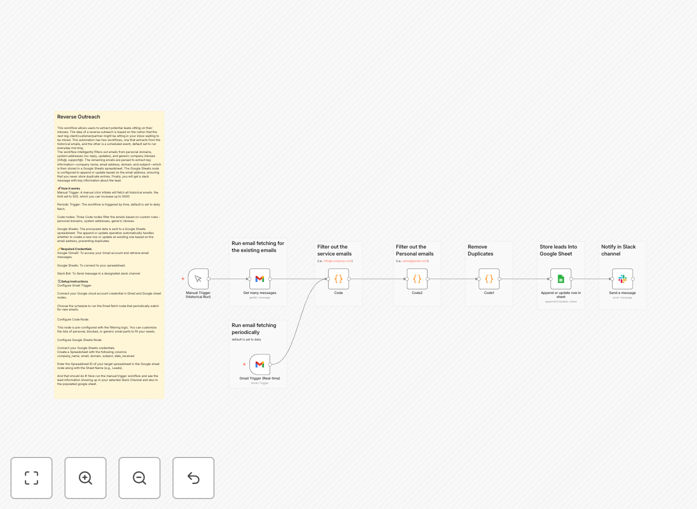
Workflow diagram showing Gmail to Google Sheets lead extraction process

What This Workflow Does

This automation transforms your inbox into a lead generation engine by identifying and extracting potential business contacts from incoming emails. The reverse outreach approach captures leads who are already reaching out to you, typically resulting in higher conversion rates than cold outreach.

The workflow intelligently filters out personal emails and system notifications, focusing only on messages likely to contain valuable business contacts. Extracted lead information is automatically organized in Google Sheets and your team receives instant Slack notifications about new potential opportunities.

How It Works

1. Email Scanning

The workflow scans your Gmail inbox using predefined filters to identify potential leads while excluding personal and system messages.

2. Data Extraction

Key information including company name, email address, domain, and subject line is extracted from each qualifying email.

3. Spreadsheet Update

Extracted lead data is added to your Google Sheets database, with intelligent duplicate prevention based on email addresses.

4. Team Notification

Your sales team receives Slack notifications with key details about each new lead for immediate follow-up.

Who This Is For

This workflow is ideal for:

  • Sales teams wanting to automate lead capture
  • Business development professionals
  • Marketing agencies managing multiple client pipelines
  • Startups looking to maximize every incoming opportunity
  • Any business receiving partnership or sales inquiries

What You'll Need

  1. Gmail account with incoming business emails
  2. Google Sheets spreadsheet for lead storage
  3. Slack workspace for notifications
  4. n8n instance (self-hosted or cloud)

Pro tip: Customize the filters to match your specific lead criteria for even better results.

Quick Setup Guide

  1. Download the template JSON file
  2. Import into your n8n instance
  3. Connect your Gmail, Google Sheets, and Slack credentials
  4. Configure your target spreadsheet and Slack channel
  5. Adjust filters to match your lead criteria
  6. Activate the workflow

Key Benefits

Save 5+ hours weekly by automating manual email scanning and data entry tasks.

Never miss a lead with automatic processing of all incoming emails.

Improve response times with instant Slack notifications to your team.

Better organized data with all leads automatically stored in your Google Sheets CRM.

Higher conversion rates from warm inbound leads versus cold outreach.

Frequently Asked Questions

Common questions about lead extraction automation and integration

Reverse outreach identifies potential leads from incoming emails rather than cold outreach. This workflow automates extracting business contacts from your Gmail inbox.

Traditional outreach requires finding and contacting potential customers. Reverse outreach capitalizes on prospects who are already reaching out to you, typically resulting in higher conversion rates.

This workflow eliminates manual email scanning by automatically identifying and recording potential leads from your inbox to a spreadsheet.

Sales teams typically spend hours each week reviewing emails for potential opportunities. This automation handles that process instantly, freeing up valuable time for actual selling.

It automatically excludes personal domains, system addresses (no-reply, updates), and generic company inboxes (info@, support@).

The workflow uses smart filtering to focus only on emails likely to contain valuable business contacts, ignoring newsletters, receipts, and other non-lead messages.

The workflow runs daily by default but can be configured to check more frequently based on your needs.

For high-volume inboxes, we recommend running every 6-12 hours. The schedule can be easily adjusted in the workflow settings.

It captures company name, email address, domain, subject line, and date received for each potential lead.

The extracted data provides your sales team with everything they need to quickly understand and follow up on each opportunity.

Sales teams can focus on qualified leads while the automation handles data collection and organization.

By eliminating manual data entry and ensuring no lead slips through the cracks, your team can spend more time building relationships and closing deals.

Yes, the workflow allows full customization of Slack message formatting and included lead information.

You can modify the notification template to highlight the most relevant details for your team and even include quick-action buttons.

Our team can build fully customized lead extraction workflows tailored to your specific business processes and CRM integration needs.

We specialize in creating automation solutions that match your exact workflow requirements, including integration with your existing tools and databases.

  • Custom filtering rules for your lead criteria
  • Direct integration with your CRM
  • Advanced lead scoring and routing
  • Team assignment logic

Need a Custom Lead Extraction Automation?

This free template is a starting point. Our team builds fully tailored automation systems for your specific business needs.