What This Workflow Does
This n8n workflow solves a critical problem for businesses using AI and automation: getting clean, structured text from websites reliably. Many websites deploy anti-bot measures (like Cloudflare) that block standard scraping attempts, breaking your automations and leaving your AI agents without data.
The workflow acts as a smart content extraction engine. You provide a URL, and it returns either the full article text or a summarized excerpt. Its key innovation is the automatic fallback system—if the initial extraction fails due to bot protection, it seamlessly switches to a dedicated scraping API, ensuring you always get the content you need.
This is particularly valuable for AI-powered workflows that need to analyze web content, create summaries, monitor competitors, or enrich CRM data. Instead of building complex scraping logic from scratch, this template gives you a production-ready solution in minutes.
How It Works
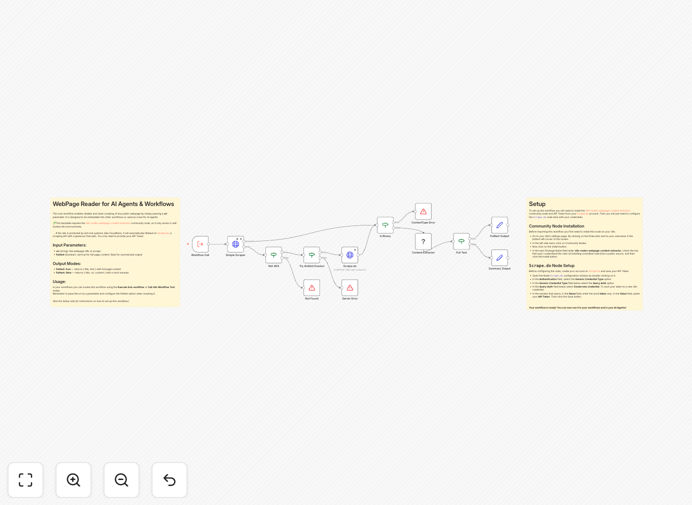
The workflow is designed as a reusable sub-workflow or tool that can be called from other automations.
Step 1: Input & Configuration
You pass a URL and choose your output format. The workflow accepts two parameters: the target URL and a boolean flag for "fulltext" mode. In fulltext mode, you get the complete article body. In summary mode, you get a shorter preview with metadata.
Step 2: Primary Extraction Attempt
The workflow first uses the Webpage Content Extractor community node to attempt clean extraction. This node strips away ads, navigation, and other clutter, returning just the core content. It's fast and efficient for sites without heavy protection.
Step 3: Anti-Bot Fallback Activation
If the primary extraction fails (often indicated by a CAPTCHA page or access denied response), the workflow automatically triggers the fallback path. It calls the Scrape.do API with your configured credentials, which uses residential proxies and headless browsers to bypass protections.
Step 4: Content Processing & Output
The extracted content is cleaned and structured into a consistent JSON format. The workflow handles errors gracefully and returns either the clean text or a helpful error message that your main automation can process.
Pro tip: Use the "fulltext: false" parameter when you only need metadata for link previews in chatbots or notifications. This reduces processing time and API costs while still providing valuable context.
Who This Is For
This template is ideal for:
- AI Developers building agents that need to "read" web pages for research, summarization, or Q&A systems.
- Content Teams monitoring industry news, competitor blogs, or social mentions.
- Marketing Agencies tracking client coverage, backlinks, or PR mentions across the web.
- Researchers & Analysts gathering data from multiple sources for reports or dashboards.
- Product Teams enriching user submissions (like help desk tickets) with context from referenced URLs.
If you've ever struggled with websites blocking your scrapers or spent hours cleaning HTML to get usable text, this workflow eliminates that friction.
What You'll Need
- Self-hosted n8n instance (this workflow uses community nodes not available in Cloud)
- Webpage Content Extractor community node installed via npm
- Scrape.do API account (free tier available) for anti-bot fallback
- Basic understanding of n8n workflows and how to import JSON templates
Quick Setup Guide
Follow these steps to get this workflow running in your n8n environment:
- Install the community node: In your n8n instance, run
npm install n8n-nodes-webpage-content-extractorand restart n8n. - Create a Scrape.do account: Sign up at scrape.do for their free tier (1000 requests/month).
- Import the template: Download the JSON file using the button above, then in n8n, go to Workflows → Import from File.
- Configure credentials: In the "Scrape.do HTTP Request" node, add your API token from your Scrape.do dashboard.
- Test with a URL: Use the Execute Workflow trigger or call it as a sub-workflow with a sample URL parameter.
The workflow is now ready to be integrated into your larger automations or used as a standalone content extraction tool.
Important: Always respect websites' terms of service and robots.txt files. Use this workflow for ethical data collection—consider adding rate limiting if you're scraping the same domain frequently.
Key Benefits
Eliminates scraping headaches: No more worrying about IP bans or CAPTCHAs breaking your automations. The dual-layer approach ensures high success rates.
Saves development time: What would take days to build and test is available instantly. The workflow handles edge cases, error recovery, and content cleaning out of the box.
Cost-effective scaling: The free Scrape.do tier covers moderate usage, and you only pay for the anti-bot service when needed—standard requests remain free.
AI-ready output: Returns clean, structured text perfect for LLM consumption, eliminating noise that can confuse AI models and waste tokens.
Modular design: Use it as a sub-workflow in multiple projects. Once configured, call it from any automation that needs web content.