Google Sheets Apify Lead Generation

Extract Emails & Contact Data from Websites

Automatically collect emails, phone numbers and social links from websites into Google Sheets

Download Template JSON · n8n compatible · Free
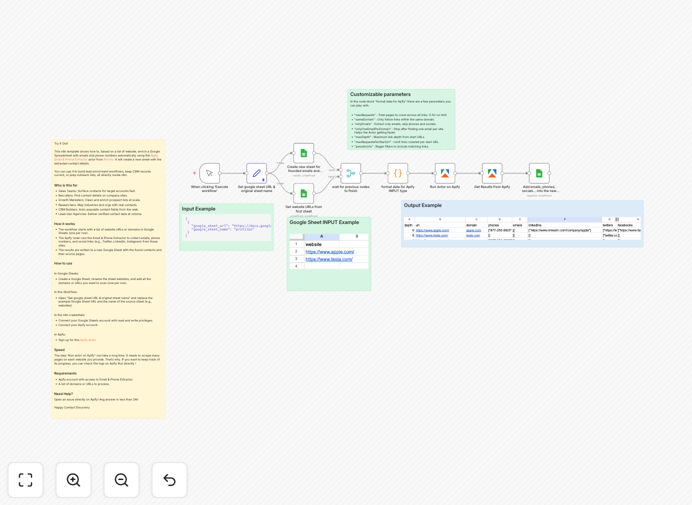
Workflow diagram showing website contact data extraction process

What This Workflow Does

This automation solves the time-consuming process of manually collecting contact information from websites. Sales teams, recruiters, and marketers often waste hours copying emails and phone numbers from different sites. This workflow automates that entire process.

By combining Apify's web scraping capabilities with Google Sheets integration, it extracts professional contact details at scale. The template is particularly valuable for lead generation, talent acquisition, and business development teams who need to build targeted contact lists efficiently.
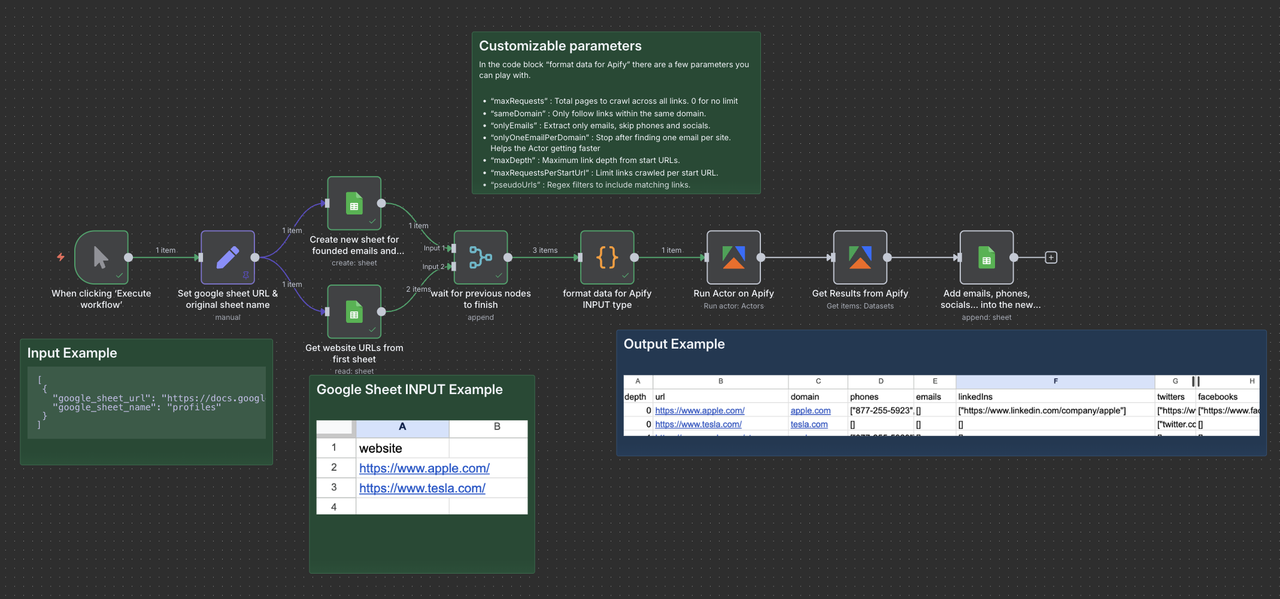
Screenshot showing extracted contact data in Google Sheets
Example output showing extracted emails, phones and social links organized in Google Sheets

How It Works

Step 1: Input Website URLs

The workflow starts with a Google Sheet containing the list of websites you want to extract contacts from. Each URL should be in its own row.

Step 2: Apify Extraction

The Apify node scans each website, identifying email addresses, phone numbers, and social media links using specialized pattern recognition.

Step 3: Data Organization

Extracted contacts are cleaned and formatted consistently, with source URLs preserved for reference.

Step 4: Google Sheets Update

The processed contact information is written to a new sheet in your Google spreadsheet, ready for outreach campaigns.

Who This Is For

This workflow is ideal for:

  • Sales teams building prospect lists
  • Recruiters sourcing candidates
  • Marketing agencies managing lead databases
  • Researchers compiling contact directories
  • Business development professionals

What You'll Need

  1. Apify account with access to Email & Phone Extractor
  2. Google Sheets account
  3. List of target website URLs
  4. n8n instance (cloud or self-hosted)

Quick Setup Guide

  1. Download the template JSON file
  2. Import into your n8n instance
  3. Connect your Google Sheets and Apify credentials
  4. Configure the source sheet with your website URLs
  5. Run the workflow and monitor progress

Pro tip: For large contact lists, schedule this workflow to run overnight so you have fresh data each morning.

Key Benefits

Save 10+ hours per week by automating what would normally be manual copy-paste work.

Improve data accuracy with consistent formatting and automatic deduplication.

Scale your outreach by processing hundreds of websites in a single run.

Maintain compliance with built-in controls for public data collection.

Integrate with your CRM by adding a step to push contacts to Salesforce, HubSpot, or other platforms.

Frequently Asked Questions

Common questions about contact data extraction and automation

The most efficient way is using web scraping tools like Apify combined with automation platforms. This workflow template shows how to extract emails, phone numbers and social links automatically and organize them in Google Sheets.

Manual extraction is time-consuming and error-prone. Automated solutions can process hundreds of sites in the time it takes to manually extract from one.

Accuracy depends on the source website structure but specialized tools can achieve 80-90% accuracy. The Apify actor used in this template is optimized for contact data extraction from business websites.

For best results, focus on professional sites with clear contact sections. The workflow includes validation steps to filter out invalid emails and phone numbers.

Yes, this workflow is designed to process lists of URLs. You can input hundreds of websites and it will extract contacts from each one into an organized spreadsheet.

The system handles queuing and throttling automatically to prevent overloading servers while maintaining efficient processing speeds.

Generally yes for publicly available information, but compliance varies by jurisdiction. Always check terms of service and consider consulting legal counsel for large-scale scraping.

This workflow is configured to respect robots.txt files and crawl delays, focusing only on publicly displayed contact information typically meant for business inquiries.

n8n allows you to customize the extraction process, integrate with other tools, and automate the entire workflow from data collection to CRM updates.

Unlike standalone scraping tools, n8n lets you build complete automation pipelines that can validate, enrich, and distribute your contact data across multiple systems.

For accurate lead generation, refresh your contact data every 3-6 months. This workflow can be scheduled to run automatically at regular intervals.

Consider more frequent updates (monthly) for high-value targets or when you notice bounce rates increasing in your outreach campaigns.

Yes, our team can build tailored solutions for your specific needs, whether you need to extract contacts from niche directories or integrate with your existing CRM system.

Custom solutions might include:

  • Industry-specific contact extraction
  • Integration with your sales stack
  • Advanced data validation rules
  • Automated follow-up sequences

Need a Custom Contact Extraction Automation?

This free template is a starting point. Our team builds fully tailored automation systems for your specific business needs.