What This Workflow Does
Manual lead generation from LinkedIn comments is tedious and inefficient. Sales and marketing teams spend hours scrolling through posts, copying names, and manually checking profiles to see if someone fits their Ideal Customer Profile (ICP). This process is not only slow but also inconsistent and prone to human error.
This Zapier automation solves that by turning LinkedIn engagement into a structured, actionable lead list. It automatically scrapes comments from any LinkedIn post you specify, deduplicates commenters, enriches their profile data, and filters them based on your predefined ICP criteria—such as specific job titles, industries, or locations.
The result is a clean, downloadable CSV file of qualified leads, ready for import into your CRM or outreach platform. It transforms a manual, hours-long task into a fully automated process that runs in minutes, ensuring you never miss a potential prospect hiding in the comments.
How It Works
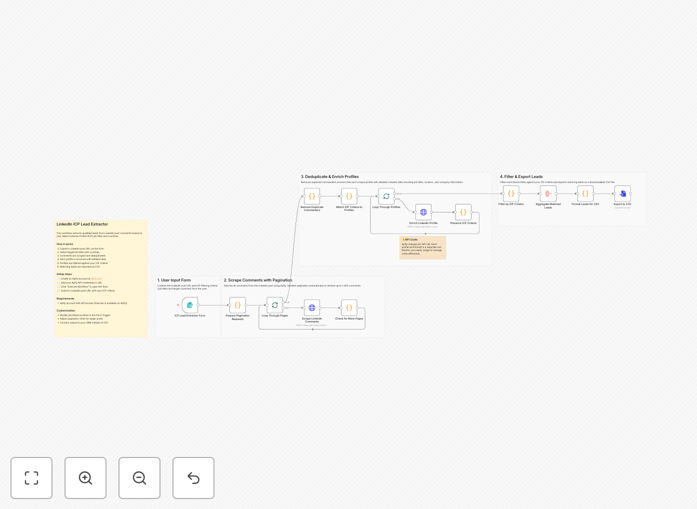
Step 1: Trigger & Input Collection
The workflow starts with a form trigger where you input the LinkedIn post URL and your ICP filtering criteria. You specify target job titles (e.g., "Marketing Director," "VP of Sales") and countries. This sets the stage for the automated search.
Step 2: LinkedIn Comment Scraping
Using the Apify integration, the workflow sends the post URL to a scraping actor. It extracts all comments, including the commenter's name, profile URL, comment text, and timestamp. It handles pagination to capture up to 1,000 comments.
Step 3: Profile Deduplication & Enrichment
The system identifies unique commenters to avoid duplicates. It then fetches public LinkedIn profile data for each person, pulling available details like current job title, company, and location. This enrichment is crucial for the next filtering step.
Step 4: ICP Matching & Filtering
Each enriched profile is checked against your ICP criteria. The workflow compares the extracted job title and location with your target lists. Only profiles that match your specified job titles and are located in your target countries proceed to the final list.
Step 5: Output & Export
Filtered leads are compiled into a structured dataset. The workflow formats this data and generates a CSV file, which is then made available for download. You get a ready-to-use lead list with names, profiles, and relevant details for immediate outreach.
Pro tip: For higher-volume posts, consider adding a delay between profile enrichment requests to stay within LinkedIn's rate limits and ensure data accuracy.
Who This Is For
This automation is ideal for B2B sales teams, business development representatives, recruiters, and marketing agencies who rely on LinkedIn for prospecting. If you regularly engage in industry-specific LinkedIn groups or comment on relevant content to find potential clients, this workflow eliminates the manual grunt work.
It's also perfect for founders and solopreneurs who wear multiple hats and need to maximize their lead generation efficiency without hiring additional staff. Marketing teams running LinkedIn engagement campaigns can use it to identify and nurture warm leads who have already shown interest by commenting.
What You'll Need
- A Zapier account with access to premium apps or a paid plan that supports multi-step workflows.
- An Apify account and API token. Apify offers a free tier with $5 monthly credits, sufficient for testing on smaller posts.
- A clear Ideal Customer Profile (ICP) defined, including target job titles and geographic locations.
- The URL of a public LinkedIn post with engaged commenters relevant to your business.
Quick Setup Guide
Follow these steps to get this automation running in your Zapier account:
- Download the template: Click the "Download Template" button on this page to get the JSON file.
- Import into Zapier: In your Zapier dashboard, create a new Zap and choose "Import from File." Upload the downloaded JSON.
- Configure Apify credentials: In Zapier's "Settings" > "Connected Accounts," add your Apify API key to authenticate the scraping step.
- Customize your ICP filters: Edit the "Filter by Job Title & Country" step to input your specific target roles and locations.
- Test and activate: Run a test with a LinkedIn post URL. Verify the output CSV contains correctly filtered leads, then turn on the Zap.
Pro tip: Start with a small, recent post to test the workflow's accuracy before scaling to posts with thousands of comments. This helps you fine-tune your ICP filters.
Key Benefits
Save 10+ hours per week on manual prospecting. Automating comment scraping and profile checking frees your sales team to focus on high-value conversations instead of data collection.
Improve lead quality with consistent ICP filtering. Automated criteria ensure every lead matches your ideal customer profile, increasing conversion rates and reducing wasted outreach.
Capture intent-based prospects. People who comment on relevant posts are already engaged and interested, making them warmer leads than cold contacts from a purchased list.
Scale your LinkedIn lead generation effortlessly. Process hundreds of comments in minutes, allowing you to monitor multiple posts and campaigns simultaneously without adding headcount.
Maintain a structured, actionable lead database. Export clean CSV files ready for your CRM, email marketing platform, or sales engagement tool, ensuring seamless integration into your existing workflow.