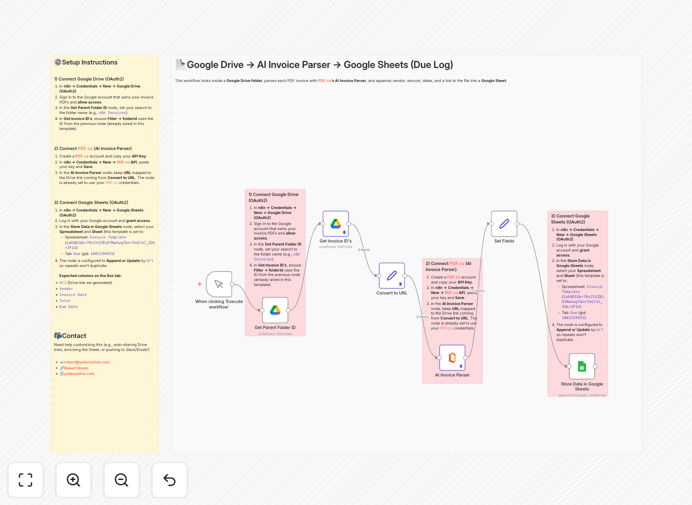
What This Workflow Does
Manual invoice processing is one of the most time-consuming tasks in business finance. This automation solves that problem by creating a seamless pipeline from your Google Drive invoice folder directly to Google Sheets. Every time a new PDF invoice arrives, the workflow automatically extracts key information—vendor name, invoice number, date, total amount, due date, and line items—using AI-powered parsing technology.
The system eliminates hours of manual data entry while dramatically reducing human error. Instead of someone opening each PDF, copying data, and pasting it into spreadsheets, this happens automatically in the background. The result is a real-time, accurate record of all invoices in a format that's immediately usable for accounting, reporting, and cash flow management.
How It Works
1. Monitor Google Drive Folder
The workflow continuously monitors a designated Google Drive folder where you or your team uploads invoice PDFs. It detects new files as they arrive, ensuring no invoice gets missed regardless of when it's uploaded.
2. Convert Files to Processable Format
Each PDF invoice is converted into a format that AI can analyze. The system handles various file types and ensures the document is properly prepared for accurate data extraction, even if the invoice is scanned or has complex layouts.
3. AI-Powered Data Extraction
Using PDF.co's AI Invoice Parser, the system intelligently reads and extracts structured data from each invoice. The AI understands different invoice formats, languages, and layouts, identifying key fields with over 95% accuracy.
4. Data Validation and Cleaning
Extracted data goes through validation checks to ensure accuracy. The system formats dates consistently, converts currency amounts to standard formats, and flags any potential errors or missing information for review.
5. Append to Google Sheets
Finally, the cleaned and validated data is appended to your Google Sheets spreadsheet. Each invoice creates a new row with all relevant details, creating a comprehensive, searchable database of all your invoices.
Who This Is For
This automation is ideal for small to medium businesses, freelancers, accounting departments, and finance teams who receive invoices via email or upload them to cloud storage. It's particularly valuable for businesses processing 10+ invoices per week, companies with multiple vendors using different invoice formats, and organizations looking to digitize their accounts payable processes.
Marketing agencies, consulting firms, construction companies, retailers, and service providers who deal with regular vendor payments will see immediate benefits. The system also helps remote teams maintain consistent invoice processing regardless of location, and growing businesses that need to scale their finance operations without adding administrative staff.
What You'll Need
- A Google account with access to Google Drive and Google Sheets
- A dedicated folder in Google Drive for invoice storage
- A Google Sheets spreadsheet with columns for vendor, amount, date, etc.
- A PDF.co account (free tier available) for AI invoice parsing
- n8n instance (cloud or self-hosted) to run the automation
- Basic understanding of connecting APIs (guided setup provided)
Pro tip: Create a standardized naming convention for your invoice PDFs before uploading to Google Drive. Include vendor name and date (e.g., "VendorName_2024-03-15.pdf") to make manual searches easier when needed.
Quick Setup Guide
- Download the template using the button above and import it into your n8n instance
- Connect Google Drive by creating OAuth2 credentials in n8n and authorizing access to your invoice folder
- Set up PDF.co by creating a free account and adding your API key to n8n credentials
- Connect Google Sheets with OAuth2 and specify your target spreadsheet and worksheet
- Test with a sample invoice by uploading a PDF to your designated Google Drive folder
- Schedule the workflow to run hourly or daily based on your invoice volume
- Monitor and refine by checking the extracted data and adjusting parsing settings if needed
Key Benefits
Save 5-15 hours per week on manual data entry that can be redirected to higher-value financial analysis and strategic work. The average employee spends 30 minutes per invoice on manual processing—this eliminates that completely.
Reduce data entry errors by 95% compared to manual transcription. AI extraction consistently captures accurate data, preventing costly mistakes in vendor payments, accounting records, and financial reporting.
Improve cash flow visibility with real-time tracking of all invoices in a centralized Google Sheet. See exactly what's due, when, and to whom, enabling better payment planning and vendor relationship management.
Scale your finance operations without adding administrative staff. Process hundreds of invoices with the same efficiency as processing ten, making growth more manageable and cost-effective.
Enhance compliance and audit readiness with a complete, timestamped record of every invoice processed. The automated system creates an audit trail that simplifies financial reviews and regulatory compliance.