What This Workflow Does
Manual invoice processing is one of the most time-consuming, error-prone tasks in business finance. Employees waste hours each week typing data from PDFs and scanned invoices into spreadsheets, often making costly mistakes that delay payments and disrupt cash flow.
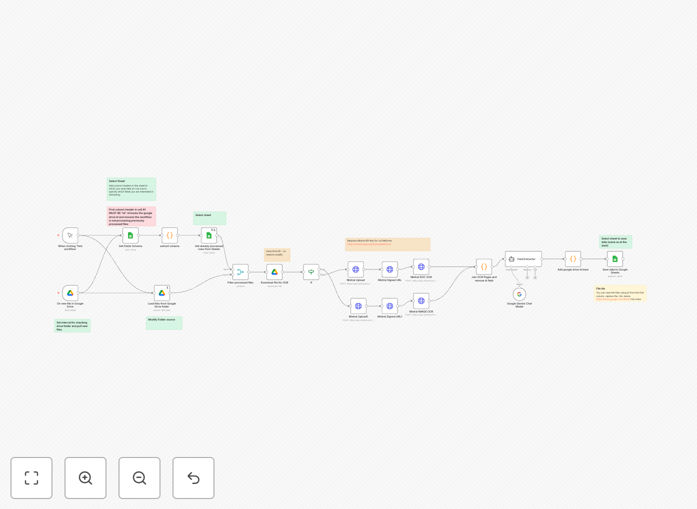
This n8n workflow automates the entire invoice extraction process. When you drop any PDF or image invoice into a designated Google Drive folder, the system automatically uses AI OCR (Mistral and Gemini) to read the document, extract key information like invoice numbers, dates, vendor details, line items, and totals, then structures this data into a clean row in Google Sheets—ready for review, approval, and accounting integration.
The solution works with invoices in multiple languages, handles various formats and layouts, and requires zero manual data entry. It's like having a dedicated accounts payable assistant who works 24/7 without errors.
How It Works
The automation follows a sophisticated multi-step process that mimics how a human would process invoices, but with AI-powered precision and consistency.
1. File Detection & Trigger
The workflow monitors a specific "Invoices Inbox" folder in Google Drive. When any new PDF, JPG, or PNG file is added, the system immediately detects it and prepares it for processing. This trigger works whether files are uploaded manually, emailed as attachments, or synced from other systems.
2. AI OCR Processing
The invoice file is sent to Mistral's OCR API, which converts the document (whether scanned image or digital PDF) into machine-readable text. The AI doesn't just perform basic OCR—it understands document structure, identifies tables, recognizes handwriting (with moderate accuracy), and preserves formatting context.
3. Intelligent Data Extraction
Google Gemini AI then analyzes the extracted text to identify and categorize key invoice fields. Using natural language processing, it distinguishes between invoice numbers and order numbers, identifies tax amounts versus subtotals, recognizes vendor addresses, and extracts line item details even from complex tables.
4. Data Validation & Structuring
The extracted data undergoes validation checks—dates are formatted consistently, currency symbols are standardized, and numerical values are verified for logical consistency. The system matches extracted fields against your Google Sheets column headers, ensuring perfect alignment with your existing accounting structure.
5. Automated Sheet Population
Finally, the validated, structured data is appended as a new row in your designated Google Sheet. Each invoice becomes a searchable, filterable record with all critical information neatly organized in columns, ready for approval workflows or direct integration with accounting software.
Who This Is For
This automation delivers immediate value to several business roles and scenarios:
Freelancers & Small Agencies who receive client invoices via email and need to track expenses without dedicated accounting staff. The system eliminates hours of manual data entry each month.
Finance Teams in SMBs processing 50-500 invoices monthly. The workflow reduces processing time from minutes per invoice to seconds, freeing staff for higher-value analysis and improving month-end close cycles.
Operations Managers overseeing vendor payments and needing better visibility into accounts payable. The automation creates a searchable digital record of all invoices with consistent data structure.
Businesses with Multi-Language Invoices from international suppliers. The AI handles invoices in English, Spanish, French, German, and other major languages without additional configuration.
Companies Transitioning from Paper to Digital who are scanning historical invoices and need to extract data from legacy documents efficiently.
What You'll Need
- n8n Instance – Either self-hosted n8n or n8n.cloud account with workflow execution capabilities
- Google Workspace Account – With Google Drive and Google Sheets access
- Mistral AI API Key – Free tier available for testing, paid plans for production use
- Google Gemini API Key – Available through Google AI Studio with generous free tier
- Designated Google Drive Folder – Create an "Invoices Inbox" folder for automated processing
- Google Sheet Template – With column headers for the data fields you want to extract
Pro tip: Start with a simple Google Sheet structure (Invoice #, Date, Vendor, Amount, Due Date) and expand as needed. The AI can extract dozens of field types, but beginning with 5-7 key fields ensures quick implementation and immediate value.
Quick Setup Guide
Follow these steps to implement this invoice automation in under 30 minutes:
- Download the Template – Click the download button above to get the JSON workflow file
- Import to n8n – In your n8n instance, create new workflow and import the JSON file
- Configure Google Drive Connection – Connect n8n to your Google account and specify your "Invoices Inbox" folder ID
- Set Up API Keys – Add your Mistral and Gemini API keys to the respective nodes (credentials are encrypted)
- Connect Google Sheets – Link to your destination spreadsheet and specify the worksheet name
- Test with Sample Invoice – Upload a PDF invoice to your Drive folder and verify data extraction
- Activate Workflow – Turn on the workflow and begin processing invoices automatically
Key Benefits
90% Time Reduction on Invoice Processing – What previously took 5-10 minutes per invoice now happens in seconds automatically. A business processing 100 invoices monthly saves 8-16 hours of manual work.
Near-Zero Data Entry Errors – AI extraction eliminates typos, transposition errors, and missed fields that plague manual entry. Financial data accuracy improves immediately.
Real-Time AP Visibility – Invoices appear in your tracking sheet within minutes of being received, not days later when someone gets around to manual entry. Cash flow forecasting becomes dramatically more accurate.
Scalable Processing Capacity – The system handles 10 or 1,000 invoices with identical efficiency. Seasonal spikes in invoice volume no longer require temporary staff or overtime.
Searchable Digital Archive – Every extracted invoice creates a structured, searchable record. Find any invoice by vendor, date, amount, or PO number in seconds instead of digging through filing cabinets or disorganized email folders.