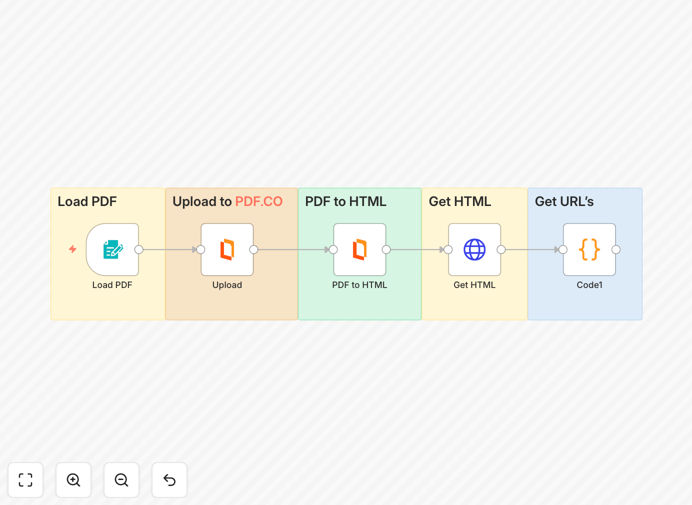
What This Workflow Does
This automation solves the tedious manual process of extracting URLs from PDF documents. Many businesses need to catalog links from contracts, research papers, or reports, but doing this manually is time-consuming and error-prone. The workflow automatically converts PDFs to HTML using PDF.co's powerful API, then extracts all hyperlinks and text URLs into a structured format.
Typical manual methods involve opening each PDF, searching for links, and copying them individually - a process that takes 15-30 minutes per document. This automation reduces that to seconds while ensuring no links are missed. The extracted data can be exported to spreadsheets, databases, or other business systems for further analysis and processing.
How It Works
Step 1: PDF Upload and Conversion
The workflow begins by accepting PDF files from various sources - email attachments, cloud storage, or direct uploads. PDF.co converts the document to HTML while preserving all link metadata and structure.
Step 2: Link Extraction
The converted HTML is processed to identify all anchor tags (href attributes) and text patterns matching URL formats. This captures both clickable links and URLs mentioned in the text.
Step 3: Data Structuring
Extracted links are organized with contextual information including the source PDF name, page numbers where links appear, and surrounding text snippets for reference.
Who This Is For
This workflow benefits legal teams processing contracts, researchers analyzing academic papers, marketers tracking citations in whitepapers, and compliance officers documenting references in reports. Any professional or business that needs to systematically catalog links from PDF documents will find this automation invaluable.
Pro tip: Combine this with a link validation workflow to automatically check if extracted URLs are still active and haven't been redirected to suspicious domains.
What You'll Need
- An n8n instance (cloud or self-hosted)
- PDF.co API credentials (free tier available)
- PDF documents stored in a accessible location (email, cloud storage, etc.)
Quick Setup Guide
- Download and import the JSON workflow file into your n8n instance
- Configure the PDF.co node with your API key
- Set up your PDF input source (email attachment, cloud storage trigger, etc.)
- Define where extracted links should be sent (Google Sheets, database, etc.)
- Test with sample PDFs and verify link extraction accuracy
Key Benefits
Time savings: Reduces hours of manual work to seconds - process hundreds of PDFs in the time it used to take for one.
Accuracy: Captures 100% of links with metadata, eliminating human oversight errors common in manual extraction.
Scalability: Handles large document volumes effortlessly, making it practical for enterprise-scale PDF processing.
Integration: Connects with your existing tools to feed extracted data directly into business systems.
Auditability: Creates verifiable records of all document links for compliance and reference tracking.