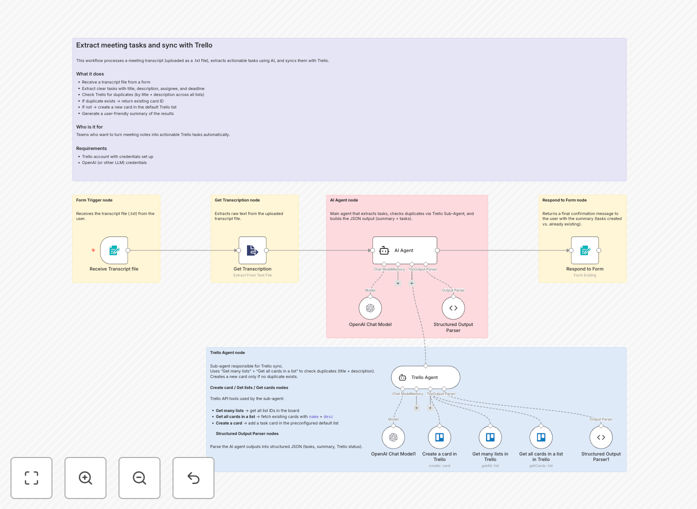
What This Workflow Does
Every meeting generates discussion, decisions, and action items. But manually transcribing those items into project management tools is time-consuming, error-prone, and often leads to duplicate tasks or missed assignments. This automation solves that by intelligently processing meeting transcripts.
The workflow receives a transcript file (typically .txt format from tools like Zoom, Google Meet, or Microsoft Teams) and uses AI to extract clear, concise tasks. Each identified task includes a title, description, assignee (if mentioned), and deadline (if available). It then checks your Trello board across all lists for duplicates—comparing both card titles and descriptions—before creating new cards only when necessary. Finally, it generates a user-friendly summary showing how many tasks were found, how many already existed, how many new cards were created, and which tasks lacked assignees or deadlines.
How It Works
Step 1: Transcript Input
The workflow starts by receiving a meeting transcript file. This can be triggered manually, via a scheduled upload, or automatically from your meeting platform's recording system.
Step 2: AI Task Extraction
An AI model (like OpenAI's GPT) analyzes the transcript, identifying action-oriented language, deadlines, and assignee mentions. It structures these into discrete task objects with clear metadata.
Step 3: Duplicate Detection
Before creating any Trello cards, the workflow queries your entire board, comparing extracted task titles and descriptions against existing cards. If a similar task already exists, it returns that card's ID instead of creating a duplicate.
Step 4: Trello Card Creation
For truly new tasks, the workflow creates cards in your predefined default list, populating them with titles, descriptions, assignees (if available), and due dates.
Step 5: Summary Generation
The automation concludes with a clear summary report—perfect for sharing with meeting participants—that shows exactly what was accomplished and what requires follow-up.
Who This Is For
This workflow is ideal for project managers, team leads, and operations managers who regularly conduct meetings that generate actionable items. It's particularly valuable for:
- Software development teams conducting sprint planning and review meetings
- Marketing agencies managing client campaign discussions
- Consulting firms that need to track client deliverables from discovery sessions
- Remote teams using video conferencing with automatic transcription services
- Any organization where meeting follow-up accountability is critical to project success
What You'll Need
- A Trello account with API credentials (key and token) configured in your automation platform
- Access to an AI model provider (OpenAI, Anthropic, or compatible) with API credentials
- Meeting transcripts in text format (.txt files or text strings)
- Basic familiarity with importing and configuring automation workflows
Quick Setup Guide
- Download the template file using the button above.
- Import it into your n8n or compatible automation platform.
- Configure your Trello credentials in the Trello nodes—specify your board ID and default list.
- Set up your AI provider credentials in the AI extraction node.
- Test with a sample meeting transcript to verify task extraction accuracy.
- Adjust similarity thresholds in the duplicate detection logic if needed.
- Deploy the workflow to run automatically after each meeting.
Pro tip: Start with a small set of recent meeting transcripts to calibrate the AI's extraction accuracy. Adjust the prompting instructions slightly based on your team's specific language patterns.
Key Benefits
Save 2–3 hours per week on manual note transcription. Instead of someone painstakingly reviewing meeting recordings, AI processes the transcript instantly and extracts actionable items with consistent formatting.
Eliminate duplicate task creation across your Trello board. The automated duplicate check prevents team members from creating the same task multiple times, keeping your project board clean and focused.
Improve meeting accountability with immediate task assignment. Tasks appear in Trello during or immediately after the meeting, making responsibilities clear and deadlines visible to everyone.
Scale meeting productivity across larger teams. As your team grows, manual follow-up becomes impossible. This automation ensures every meeting—no matter how many participants—generates properly tracked action items.
Create audit-ready meeting-to-task documentation. The summary report provides clear documentation of what was discussed, decided, and assigned, valuable for client reporting and internal audits.