Gmail Google Sheets AI Automation Gemini AI Procurement

AI-Powered Purchase Order Extraction from Gmail to Google Sheets

Automatically scan emails, extract order details with AI, and log them to spreadsheets—eliminating manual data entry.

Download Template JSON · n8n compatible · Free
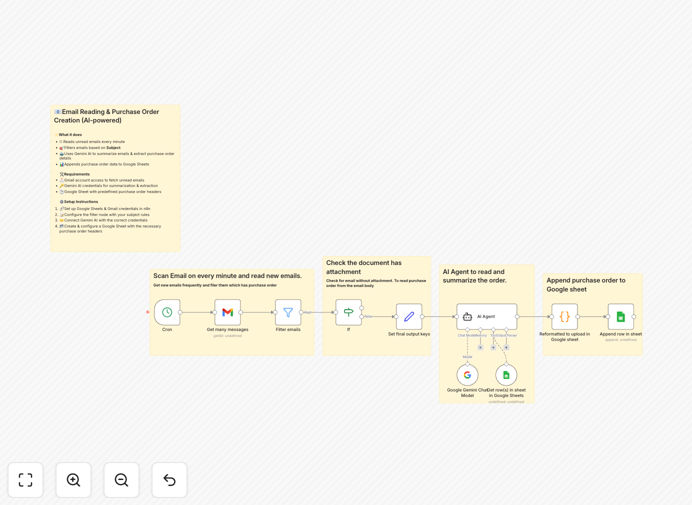
AI-powered purchase order extraction workflow diagram showing Gmail to Google Sheets automation

What This Workflow Does

Manual purchase order processing is a time-consuming, error-prone task that costs businesses hours each week. Employees waste valuable time copying information from emails to spreadsheets, risking data entry mistakes and delaying order fulfillment.

This AI-powered automation solves that problem by connecting your Gmail inbox directly to Google Sheets. It automatically scans for new purchase order requests, uses Gemini AI to intelligently extract key details like vendor names, item quantities, prices, and delivery dates, then logs everything into a structured spreadsheet. The system runs continuously in the background, processing orders in seconds instead of hours.

Beyond basic extraction, the workflow formats dates into ISO calendar weeks for better reporting, enriches order data with product information from existing sheets, and appends records without overwriting previous entries—creating a complete procurement history automatically.

How It Works

1. Email Monitoring & Filtering

The workflow starts by checking your Gmail inbox every minute for unread emails. It filters messages by subject line keywords (like "Purchase Order" or "PO Request") to focus only on relevant communications, ignoring spam and personal emails.

2. AI-Powered Content Extraction

When a matching email is found, the content is sent to Gemini AI for processing. The AI analyzes the email text, identifies purchase order details, and extracts structured data including vendor information, line items, quantities, prices, totals, and delivery requirements.

3. Data Enrichment & Formatting

Extracted data is then enriched with additional product information from your Google Sheets database. Dates are converted to ISO calendar weeks for standardized reporting, and all fields are formatted consistently for easy analysis and integration with other systems.

4. Automated Spreadsheet Logging

The final step appends the complete purchase order record to your designated Google Sheet. The system adds new rows without affecting existing data, creating a growing procurement database that's always up-to-date and searchable.

Who This Is For

This automation is ideal for procurement teams, operations managers, small business owners, and finance departments who regularly process purchase orders via email. It's particularly valuable for businesses dealing with multiple vendors, high order volumes, or complex procurement workflows.

E-commerce companies receiving supplier orders, manufacturing businesses managing raw material purchases, service providers ordering equipment, and any organization with manual purchase order processing will benefit significantly. The solution scales from solo entrepreneurs to enterprise teams, adapting to different volumes and complexity levels.

What You'll Need

  1. Gmail Account: Access to the inbox where purchase order emails arrive (business Gmail recommended).
  2. Google Gemini API Credentials: API key for Gemini AI (Google's PaLM) to power the intelligent extraction.
  3. Google Sheets Setup: A spreadsheet with predefined headers for purchase order data (template included).
  4. n8n Instance: Self-hosted n8n or n8n.cloud account to run the automation workflow.
  5. Basic Configuration: 10-15 minutes to set up connections and customize email filters.

Pro tip: Start with a dedicated "purchase orders" label or folder in Gmail to keep automation emails separate from regular correspondence. This improves filtering accuracy and makes troubleshooting easier.

Quick Setup Guide

  1. Download & Import: Download the template file and import it into your n8n instance using the workflow import feature.
  2. Configure Credentials: Set up Gmail and Google Sheets connections in n8n with your account credentials (OAuth recommended).
  3. Connect Gemini AI: Add your Gemini API key to the AI Agent node in the workflow settings.
  4. Customize Filters: Adjust the subject filter in the Gmail node to match your purchase order email patterns.
  5. Test & Activate: Send a test purchase order email to trigger the workflow, verify the output in Google Sheets, then activate the automation.

Key Benefits

Save 5-10 hours weekly per employee by eliminating manual data entry from emails to spreadsheets. What used to take minutes per order now happens automatically in seconds.

Reduce data entry errors by 90%+ with AI-powered extraction that consistently reads and interprets purchase order details correctly, avoiding costly mistakes in quantities, prices, or vendor information.

Accelerate order processing from days to minutes by automatically capturing and logging purchase orders as soon as they arrive in your inbox, speeding up fulfillment and improving vendor relationships.

Create a searchable procurement database automatically in Google Sheets, with all purchase orders organized, timestamped, and ready for analysis, reporting, or integration with accounting systems.

Scale without adding staff as order volumes increase—the automation handles 10 or 10,000 orders with the same efficiency, freeing your team for higher-value strategic work.

Frequently Asked Questions

Common questions about purchase order automation and AI integration

AI can automatically read and understand purchase order emails, extract key details like vendor names, item quantities, prices, and delivery dates, and format them into structured data. This eliminates manual data entry, reduces errors by up to 95%, and processes orders in seconds instead of hours.

Modern AI models like Gemini are particularly good at understanding natural language in business emails, even when formats vary between vendors. They can identify patterns, learn from corrections, and handle complex purchase orders with multiple line items and special instructions.

Automating purchase order management saves 5-10 hours per week per employee, reduces data entry errors by 90%, accelerates order processing from days to minutes, improves vendor relationships with faster responses, and provides real-time visibility into procurement spending and trends.

Beyond time savings, automation creates consistent data structures that integrate easily with accounting software, ERP systems, and inventory management tools. This eliminates data silos and provides a single source of truth for all procurement activities across your organization.

Gmail integration with Google Sheets creates a seamless data pipeline where emails trigger automated workflows. When a purchase order email arrives, the system extracts the content, processes it with AI, and appends structured data to a Google Sheet. This creates a centralized procurement database without manual copying or spreadsheet updates.

The integration uses secure OAuth authentication and works with both personal and business Google accounts. Once connected, the automation runs continuously in the background, monitoring specified folders or labels for new purchase order emails and processing them according to your business rules.

AI can extract vendor information, purchase order numbers, item descriptions, quantities, unit prices, total amounts, delivery dates, shipping addresses, payment terms, tax details, and special instructions. It can also identify attachments like PDF invoices and process those separately.

Advanced AI extraction can handle complex scenarios like multiple line items with different pricing tiers, bundled products, volume discounts, and conditional terms. The system learns your specific business vocabulary and can be trained to recognize industry-specific terminology and formats.

Modern AI like Gemini achieves 92-98% accuracy for structured purchase order data extraction. Accuracy depends on email formatting consistency, but AI can handle variations and learn from corrections. For best results, combine AI extraction with validation rules and human review for critical transactions.

Accuracy improves over time as the system processes more of your specific purchase orders and learns your vendors' formats. You can also implement confidence scoring to flag low-confidence extractions for manual review, creating a hybrid approach that balances automation with quality control.

Yes, AI-powered automation can handle multiple vendors with different email formats. The system learns patterns from various suppliers and can be configured with specific rules for each vendor. You can set up filters for different subject lines, sender addresses, or attachment types to route orders appropriately.

For businesses with 50+ vendors, we recommend creating vendor-specific processing rules and maintaining a vendor database for enrichment. The automation can reference this database to standardize vendor names, apply correct tax rates, and route orders to appropriate approvers based on vendor categories.

Purchase order automation can trigger inventory updates in ERP systems, create vendor payments in accounting software, send confirmation emails to suppliers, update project budgets, alert team members via Slack, generate procurement reports, and sync with CRM systems for client billing.

Advanced implementations can integrate with approval workflows, budget compliance checks, three-way matching (PO vs invoice vs delivery), and predictive analytics for procurement optimization. Each connection creates additional efficiency gains and reduces manual touchpoints across your business operations.

  • Inventory management synchronization
  • Accounting software integration
  • Vendor communication automation
  • Budget tracking and alerts

Yes, GrowwStacks specializes in building custom purchase order automation systems tailored to your specific business needs, vendor relationships, and existing software stack. We can integrate with your ERP, accounting software, inventory systems, and create custom validation rules and reporting dashboards.

Our team works with you to understand your procurement workflow, identify pain points, and design an automation solution that fits seamlessly into your operations. We handle everything from initial consultation and design to implementation, testing, and ongoing support.

  • Custom integration with your existing software
  • Vendor-specific processing rules
  • Advanced validation and approval workflows
  • Custom reporting and analytics dashboards

Need a Custom Purchase Order Automation?

This free template is a starting point. Our team builds fully tailored automation systems for your specific business needs.