What This Workflow Does
Healthcare organizations drown in paperwork—medical receipts, prescriptions, lab reports, clinical notes, and insurance claims. Manual data entry is slow, error-prone, and expensive. This automation solves that by using Google Gemini AI to automatically classify, extract, and structure data from medical documents with enterprise-grade accuracy.
The workflow accepts document URLs or file uploads, classifies them into six medical document types, extracts relevant information using advanced OCR and AI, and outputs clean, structured JSON data ready for your EMR, billing, or database systems. It handles multiple languages, tracks processing costs, and provides confidence scoring for quality assurance.
By automating this process, healthcare providers can reduce administrative overhead by 90%, accelerate claim processing from days to minutes, ensure data consistency, and free clinical staff to focus on patient care instead of paperwork.
How It Works
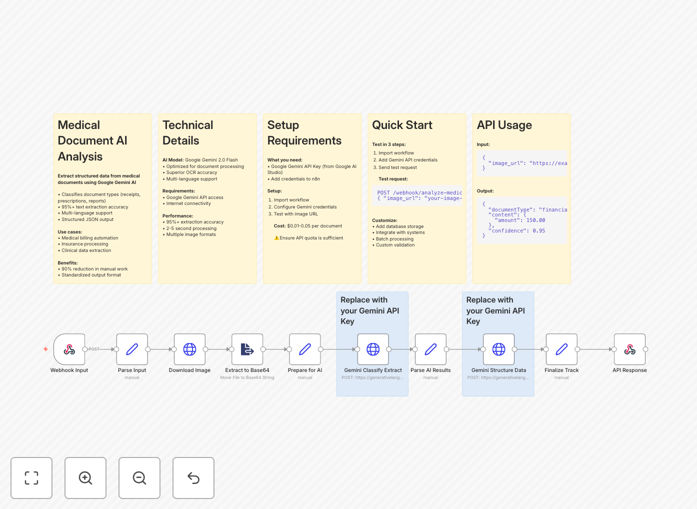
The workflow follows a intelligent pipeline designed for medical document processing:
1. Document Ingestion & Classification
The workflow starts by receiving medical documents via webhook, email attachment, or cloud storage trigger. Google Gemini AI analyzes each document and classifies it into the appropriate category: financial (receipts, bills), clinical (progress notes), prescriptions, administrative (referrals), diagnostic (lab reports), or legal documents.
2. AI-Powered Data Extraction
Once classified, the document undergoes OCR text extraction followed by Gemini AI analysis. The AI is prompted with medical-specific extraction templates to identify key data points: patient information, provider details, dates, amounts, services, medications, dosages, and diagnostic findings.
3. Data Structuring & Validation
Extracted data is structured according to medical taxonomy standards (ICD-10, CPT codes where applicable). The workflow validates data consistency, checks for missing required fields, and applies confidence scoring. Low-confidence extractions can be flagged for human review.
4. Output & Integration
The final structured data is formatted as clean JSON and delivered to your destination systems via webhook, database insert, or API call. The workflow includes logging, cost tracking, and error handling to ensure reliable operation in healthcare environments.
Pro tip: For production use, add a human review step for documents with confidence scores below 85%. This maintains accuracy while still automating the majority of documents.
Who This Is For
This template is ideal for healthcare providers, medical billing companies, insurance processors, and health tech startups. Specifically:
Medical Practices & Clinics: Automate patient intake forms, receipt processing, and clinical note digitization to reduce administrative burden.
Billing & Revenue Cycle Companies: Process insurance claims, invoices, and Explanation of Benefits (EOB) documents at scale with consistent data formatting.
Healthcare IT Integrators: Add AI document processing capabilities to existing EMR/EHR systems or patient portals.
Medical Research Organizations: Extract structured data from clinical trial documents, lab reports, and research notes for analysis.
What You'll Need
- Google Gemini API Key: Get from Google AI Studio (free tier available)
- n8n Instance: Cloud (n8n.cloud) or self-hosted installation
- Document Storage: Cloud storage (Google Drive, S3) or local file system access
- Destination System: EMR/EHR, database, or application to receive structured data
- Webhook Endpoint: For triggering the workflow (optional but recommended)
Quick Setup Guide
Get this medical document automation running in under 15 minutes:
- Import the Template: Download the JSON file above and import it into your n8n instance.
- Configure Google Gemini: Add your API key in the Google AI node credentials.
- Set Up Webhook Trigger: Copy your unique webhook URL for document submission.
- Test with Sample Documents: Send a test medical receipt or prescription image to verify extraction.
- Connect Your Destinations: Configure where extracted data should go (database, API, etc.).
- Deploy & Monitor: Activate the workflow and monitor processing logs and confidence scores.
Implementation Note: For healthcare compliance, ensure your n8n instance and data storage meet HIPAA/GDPR requirements. Consider encryption and access controls for sensitive medical data.
Key Benefits
90% Reduction in Manual Data Entry: Transform hours of clerical work into seconds of automated processing, allowing staff to focus on patient care rather than paperwork.
95%+ Extraction Accuracy: Google Gemini AI combined with medical-specific prompts delivers enterprise-grade accuracy that surpasses manual entry and reduces costly errors.
Multi-Language Support: Process medical documents in English, Spanish, Chinese, and other languages with automatic language detection and translation capabilities.
Scalable Processing: Handle from 10 to 10,000+ documents daily without additional staffing, perfect for growing practices or seasonal volume spikes.
Structured Output Ready for Integration: Clean JSON format integrates directly with EMR systems, billing software, databases, and analytics platforms.