n8n Telegram OCR Text Extraction

Extract text from images with Telegram Bot & OCR Tesseractjs

Automatically convert images to text using Telegram and Tesseract OCR with this ready-to-use n8n workflow

Download Template JSON · n8n compatible · Free
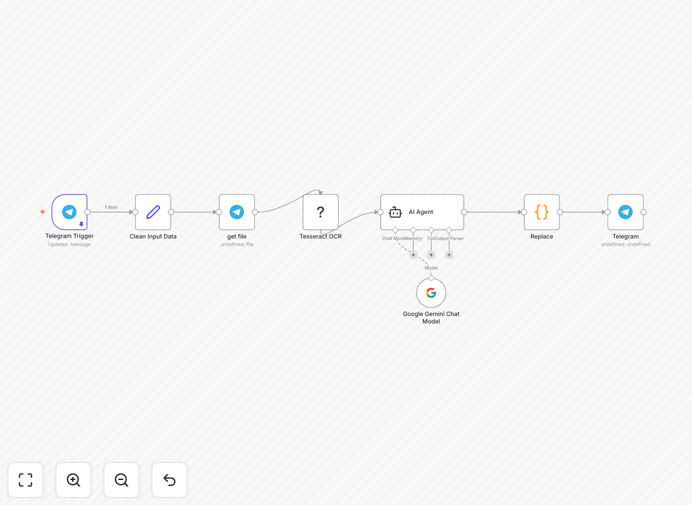
Telegram OCR workflow diagram showing image to text conversion

What This Workflow Does

This n8n workflow automates text extraction from images sent to a Telegram bot using Tesseract OCR technology. It solves the tedious manual process of transcribing text from photos, screenshots, or scanned documents by providing instant automated conversion.

Businesses and individuals can use this to quickly digitize receipts, business cards, invoices, or any printed text captured via mobile photos. The workflow handles the entire process - receiving the image via Telegram, processing it through OCR, and returning the extracted text to the user.

How It Works

1. Image Submission

Users send an image containing text to your Telegram bot. The bot immediately recognizes the image attachment and triggers the workflow.

2. OCR Processing

The workflow passes the image to Tesseract.js, an open-source OCR engine that analyzes the image, detects text regions, and converts them to machine-readable text.

3. Text Extraction

Tesseract processes the image and returns the extracted text in clean, editable format. The workflow can optionally clean up the output by removing artifacts or formatting the text.

4. Response Delivery

The workflow sends the extracted text back to the user via Telegram, completing the automated text extraction process in seconds.

Who This Is For

This workflow is ideal for:

  • Business owners processing receipts or invoices
  • Teams digitizing business cards or documents
  • Researchers extracting text from book pages or screenshots
  • Multilingual teams needing quick text translation
  • Anyone regularly working with printed text that needs digitizing

What You'll Need

  1. An n8n instance (cloud or self-hosted)
  2. A Telegram bot token (create via @BotFather)
  3. Tesseract.js installed in your n8n environment
  4. Basic understanding of n8n workflows

Quick Setup Guide

  1. Download the JSON template file
  2. Import into your n8n instance
  3. Configure your Telegram bot credentials
  4. Test by sending an image to your bot
  5. Deploy the workflow for ongoing use

Pro tip: For best OCR results, ensure images are well-lit, in focus, and contain high-contrast text. Dark mode screenshots may require preprocessing for optimal recognition.

Key Benefits

Save hours on manual data entry by automatically extracting text from images with 90%+ accuracy for standard fonts.

Mobile-friendly workflow lets users capture text anywhere by simply snapping a photo and sending to your Telegram bot.

Scalable solution that can process hundreds of documents daily without additional staffing costs.

Multilingual support through Tesseract's extensive language packs for global business applications.

Frequently Asked Questions

Common questions about OCR technology and Telegram bot integration

OCR (Optical Character Recognition) technology converts images containing text into machine-readable text. When integrated with Telegram bots, users can simply send an image and receive the extracted text instantly. The bot processes the image through OCR algorithms that identify characters and convert them to editable text, eliminating manual transcription.

This combination creates a powerful mobile workflow where field teams can capture documents via phone camera and immediately get digitized text without specialized scanning equipment or desktop software.

This workflow works best with clear images of printed text like receipts, business cards, invoices, or documents. Handwritten text recognition varies by handwriting clarity. For best results, use well-lit images with high contrast between text and background, and avoid blurry or skewed images which reduce OCR accuracy.

Standard documents with common fonts (Arial, Times New Roman) achieve highest accuracy. Complex layouts with multiple columns or unusual fonts may require additional processing steps for optimal results.

Tesseract OCR achieves 90-95% accuracy with clean, standard fonts under ideal conditions. Accuracy depends on image quality, font type, language, and text complexity. For business documents with standard fonts, it provides reliable results. Post-processing can correct common OCR errors like confusing similar characters (O vs 0).

For critical applications, implement a verification step or combine with human review for final quality control. The accuracy improves significantly with proper image preprocessing like contrast adjustment and deskewing.

Key business uses include expense reporting (receipt scanning), contact management (business card digitization), document archiving, multilingual translation prep, and data entry automation. Teams can instantly capture text from field photos without manual typing, saving hours per week on administrative tasks.

Specific industry applications include medical records processing, legal document analysis, and retail inventory management where staff frequently encounters printed product information that needs digital capture.

  • 75% faster than manual data entry
  • Reduces transcription errors
  • Enables mobile workforce productivity

Yes, Tesseract supports over 100 languages with additional language packs. The workflow can be configured to detect language automatically or specify a language for improved accuracy. Multi-language support makes it valuable for global teams processing documents in different languages.

For multilingual documents, you can implement language detection or allow users to specify the language when submitting images. Some languages with complex characters (like Chinese or Arabic) may require specific training data for optimal results.

Telegram provides end-to-end encryption for bot communications. For sensitive documents, implement additional security measures like automatic deletion after processing, restricting bot access to authorized users only, and avoiding storage of extracted text unless necessary for your workflow.

Enterprise implementations can add security layers like document redaction before OCR processing, integration with secure storage systems, and audit logging of all text extraction activities for compliance purposes.

Absolutely! GrowwStacks specializes in tailored OCR automation solutions. We can build custom workflows integrating Telegram with your CRM, databases, or internal systems, add advanced features like form recognition, or create industry-specific solutions for healthcare, legal, or finance document processing.

Our team develops complete automation systems that match your exact business requirements, including custom preprocessing for your document types, integration with existing software, and specialized training for domain-specific terminology recognition.

  • Industry-specific OCR solutions
  • Custom document processing pipelines
  • Enterprise-grade security implementations

Need a Custom OCR Automation?

This free template is a starting point. Our team builds fully tailored automation systems for your specific needs.