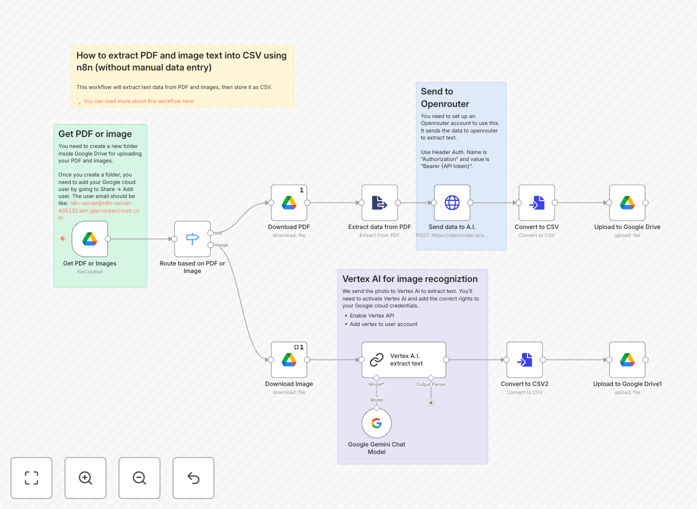
What This Workflow Does
This automation solves the tedious manual work of recording transactions from bank statements and receipts. By leveraging Google's Vertex AI (Gemini), it automatically extracts text data from PDF bank statements and images of receipts, then organizes the information into a clean CSV format ready for import into your accounting software or expense tracking system.
The workflow monitors a designated Google Drive folder for new documents, processes them through Vertex AI's advanced text recognition capabilities, and outputs structured transaction data to another folder. This eliminates hours of manual data entry while ensuring consistent, accurate records.
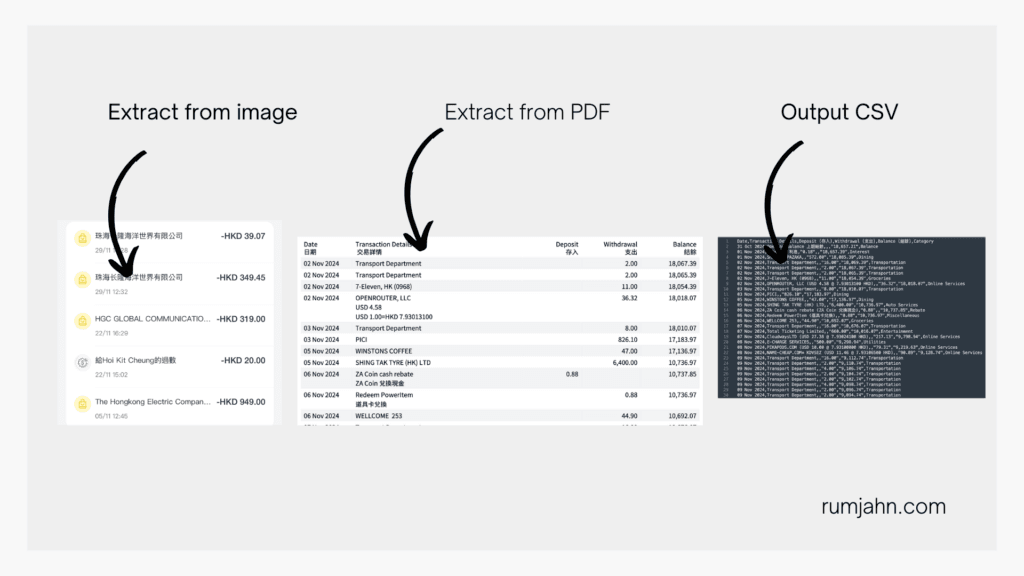
How It Works
Step 1: Document Upload
Users upload PDF bank statements or receipt images to a designated Google Drive folder. The workflow monitors this folder for new files.
Step 2: AI Text Extraction
Each document is processed through Google Vertex AI (Gemini), which extracts all text content including transaction dates, amounts, merchants, and other relevant details.
Step 3: Data Structuring
The extracted text is parsed and organized into standardized fields (date, amount, description, etc.) using natural language processing.
Step 4: CSV Export
The structured transaction data is compiled into a CSV file and saved to an output folder, ready for import into accounting software or expense trackers.
Who This Is For
This workflow is ideal for:
- Small business owners tracking expenses
- Freelancers managing client billing
- Finance teams processing receipts
- Anyone who regularly works with PDF statements or receipt images
What You'll Need
- Google Cloud account with Vertex AI enabled
- Google Drive account
- Basic understanding of n8n workflows
- Designated input/output folders in Google Drive
Quick Setup Guide
- Download and import the JSON template into your n8n instance
- Configure Google Drive credentials for both input and output folders
- Set up your Vertex AI API credentials
- Test with sample documents to verify extraction accuracy
- Deploy the workflow to run automatically
Pro tip: Create separate folders for different expense categories (e.g., travel, office supplies) to automatically categorize transactions in your accounting system.
Key Benefits
Save 5-10 hours per month by eliminating manual data entry from bank statements and receipts. The AI handles the tedious work while you focus on analysis.
99% accuracy for clean documents, compared to 85-90% with traditional OCR tools. Vertex AI understands context to correctly identify transaction details.
Real-time processing means your books are always up-to-date. New documents are processed immediately upon upload to Google Drive.
Customizable extraction lets you adapt the workflow for different document types by modifying the AI prompts and output formatting.