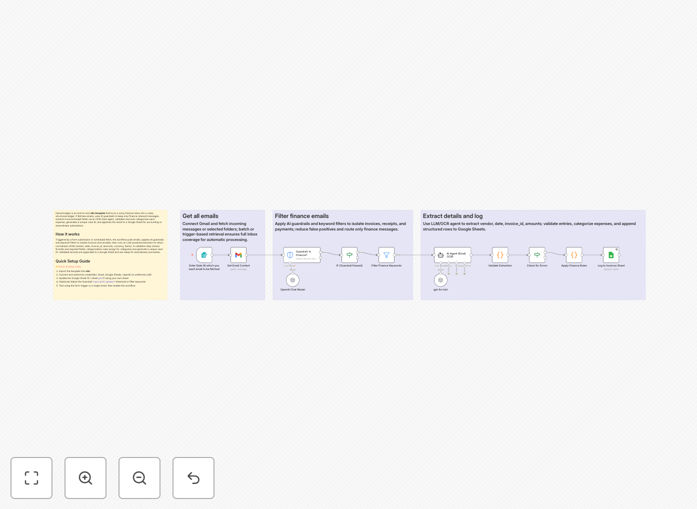
What This Workflow Does
Finance teams waste countless hours manually opening emails, downloading attachments, and copying data into spreadsheets. This n8n automation—dubbed "Inbox2Ledger"—eliminates that drudgery by turning your chaotic finance inbox into a clean, structured accounting ledger automatically.
The workflow monitors your Gmail for incoming invoices and receipts, uses AI guardrails to filter only finance-related messages, extracts key data fields (vendor, date, amount, tax, etc.) via GPT-4, validates the information, categorizes expenses, and appends everything to a Google Sheet with a unique case ID for tracking. What used to take 15 minutes per invoice now happens in seconds with perfect consistency.
Beyond simple data entry, the system creates an audit trail, flags anomalies for review, and prepares your financial data for downstream processing in accounting software or analytics tools. It's like hiring a dedicated accounts payable assistant who works 24/7 without errors.
How It Works
1. Email Capture & Filtering
The workflow triggers either on a schedule (every hour) or via form submission. It connects to your Gmail via OAuth2 and fetches unprocessed emails. An AI guardrail first determines if each message is finance-related—filtering out newsletters, internal chats, and spam while keeping invoices, receipts, and payment reminders.
2. Intelligent Data Extraction
For finance-confirmed emails, GPT-4 acts as an "OCR agent" to read the content—whether in the email body or attached PDFs—and extracts structured JSON data. It identifies vendor names, invoice dates, invoice numbers, total amounts, tax amounts, currency, line items, and even vendor tax IDs with remarkable accuracy.
3. Validation & Error Handling
A code node validates the extracted data: checking required fields, verifying amount formats, ensuring dates are logical, and flagging any extraction errors. Invalid invoices are routed to a separate folder for manual review, while clean data proceeds to categorization.
4. Smart Categorization
The system applies rule-based categorization using vendor names, keywords, and MCC codes to assign each expense to categories like "Software & Hosting," "Subscriptions," "Travel," "Payroll," or "Office Supplies." This eliminates the manual guesswork from bookkeeping.
5. Google Sheets Logging
Finally, the validated, categorized data is appended to your Google Sheet with all relevant columns: invoice ID, vendor, date, amounts, GL category, approval status, timestamp, and a unique case ID for audit purposes. The sheet becomes your single source of truth for all incoming invoices.
Who This Is For
This automation is perfect for small to medium businesses, freelancers, accounting firms, and finance departments drowning in manual invoice processing. If you receive more than 10 invoices per month via email, this template will save you significant time. It's particularly valuable for:
- Small business owners who handle their own bookkeeping
- Accounting teams looking to reduce data entry errors
- Startups needing scalable finance operations without hiring
- Agencies & consultancies tracking client expenses and vendor payments
- Finance managers wanting better visibility into cash flow
What You'll Need
- n8n instance (cloud or self-hosted)
- Gmail account with OAuth2 access (read permissions)
- OpenAI API key or compatible LLM service (GPT-4 recommended)
- Google Sheets with edit permissions (or create a new one)
- Dedicated finance inbox or label for invoice emails (recommended)
Pro tip: Create a dedicated Gmail label like "Invoices/Auto-Process" and set up a filter to automatically label incoming invoices. This makes the automation more reliable and keeps your personal emails separate.
Quick Setup Guide
1. Import the template into your n8n workspace using the download button above.
2. Configure credentials for Gmail, Google Sheets, and OpenAI in n8n's credential management.
3. Update the Google Sheet ID in the "Append to Sheet" node to point to your own spreadsheet (or use the included example).
4. Test with a single invoice email using the manual trigger to verify extraction accuracy.
5. Adjust categorization rules in the "Apply Finance Rules" node to match your chart of accounts.
6. Activate the workflow and set it to run on your preferred schedule (hourly/daily).
Key Benefits
Save 10-15 hours monthly per employee on manual data entry and reconciliation. That's 2-3 full workdays regained every month for strategic financial analysis instead of clerical work.
Eliminate 95% of data entry errors caused by typos, missed decimals, or incorrect dates. The AI extracts with consistent precision, and validation rules catch anomalies before they reach your books.
Accelerate payment cycles by processing invoices immediately upon receipt instead of waiting for manual handling. Vendors get paid faster, improving relationships and potentially earning early payment discounts.
Create a searchable audit trail with unique case IDs for every processed invoice. No more digging through email archives—every transaction is timestamped and logged with source reference.
Scale without adding headcount as your business grows. Process 10 or 1000 invoices monthly with the same efficiency, avoiding the need to hire additional accounting staff prematurely.