What This Workflow Does
This automation solves the time-consuming challenge of manually analyzing and categorizing keyword lists for SEO and content marketing. Marketing teams often collect hundreds or thousands of keywords in spreadsheets, but actually making sense of them requires hours of tedious manual review.
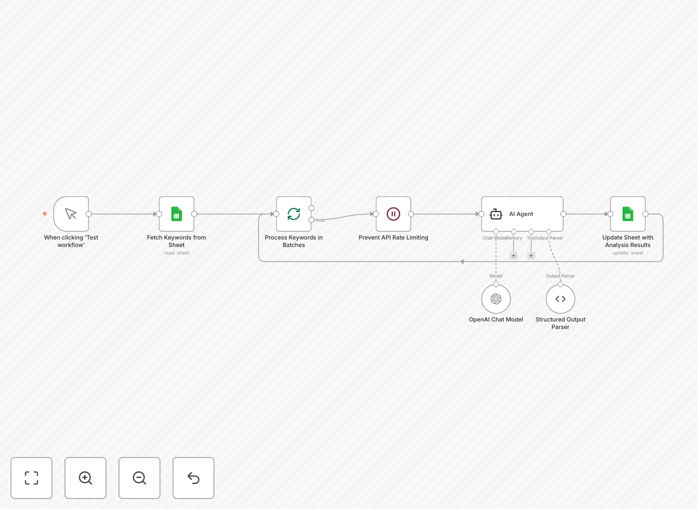
The workflow automatically fetches keywords from your Google Sheet, sends them to an AI classification service, and returns organized results with proper categorization. It can identify search intent (informational vs. commercial), product categories, geographic relevance, or any custom classification system you define.
How It Works
1. Fetch keywords from Google Sheets
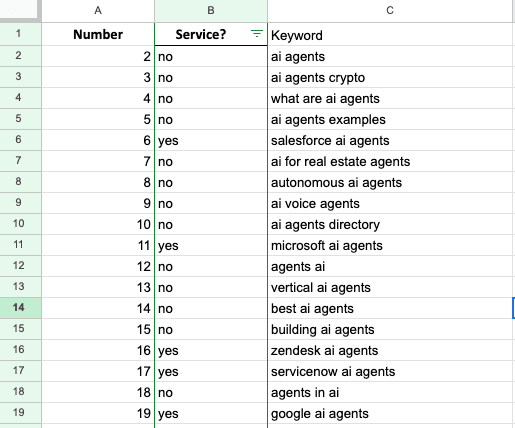
The workflow connects to your specified Google Sheet and extracts the keyword list from your designated columns. It handles authentication and can process multiple sheets or tabs within your document.
2. Send keywords for AI analysis
Each keyword gets sent to an AI classification service (like OpenAI or a custom model) with your predefined categorization rules. The AI examines semantic meaning, word patterns, and context to determine the most appropriate category.
3. Process and validate results
The workflow checks the AI's classification confidence scores and can flag uncertain results for human review. It formats the output into a structured dataset ready for use in your marketing systems.
4. Return classified keywords
The final step delivers the categorized keywords back to your preferred destination - either updating your original Google Sheet, sending to a database, or pushing to other marketing tools.
Pro tip: Start with a small sample of manually classified keywords to train your AI model before processing large lists. This improves accuracy significantly.
Who This Is For
This template is ideal for digital marketing teams, SEO specialists, and content managers who need to:
- Organize large keyword research lists efficiently
- Identify content gaps based on keyword categories
- Align keyword strategy with buyer journey stages
- Scale keyword analysis without adding staff
- Maintain consistent classification standards
What You'll Need
- An n8n instance (cloud or self-hosted)
- Google Sheets with your keyword list
- Access to an AI service (OpenAI, Google AI, or similar)
- Clear classification categories defined
- Google service account credentials for API access
Quick Setup Guide
- Download the JSON template file
- Import into your n8n workspace
- Connect your Google Sheets account
- Configure your AI service credentials
- Define your classification categories
- Test with a small keyword sample
- Schedule or trigger the workflow as needed
Key Benefits
Save 10+ hours weekly by automating what would take days of manual keyword analysis. Process thousands of keywords in minutes instead of weeks.
Improve content strategy with data-driven insights from categorized keywords. See exactly what topics and intents your audience searches for.
Maintain consistency across teams with standardized, automated classification rather than subjective human judgment.
Scale effortlessly as your keyword lists grow. The workflow handles 100 or 100,000 keywords with equal efficiency.
Integrate with your stack by connecting classified keywords directly to your CMS, PPC tools, or analytics platforms.