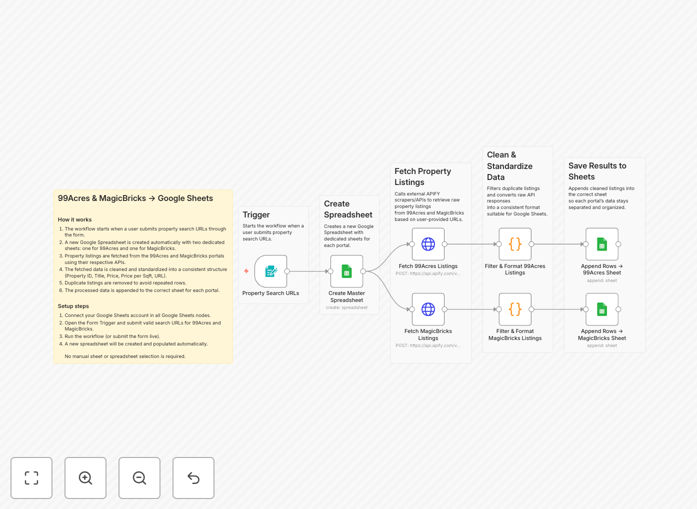
What This Workflow Does
Real estate agents, investors, and property researchers spend countless hours manually checking 99Acres and MagicBricks for new listings. This repetitive task is not only time-consuming but also prone to human error and missed opportunities. This automation solves that problem by systematically collecting property data and organizing it in a centralized Google Sheet.
The workflow connects Apify's web scraping capabilities with Google Sheets to create a living database of property listings. You specify search URLs (like "2BHK apartments in Mumbai under ₹1 crore"), and the system automatically fetches all matching listings, extracts key details, and appends them to your spreadsheet. This creates a searchable, filterable property database that updates automatically.
Beyond simple data collection, the workflow includes data cleaning and standardization steps. It converts prices to numerical values, calculates price per square foot, removes duplicate listings, and structures the data for easy analysis. This transforms raw listing data into actionable business intelligence.
How It Works
Step 1: Trigger with Search URLs
The workflow starts when you submit property search URLs through an n8n form trigger. These are the exact URLs you'd use when manually browsing 99Acres or MagicBricks with your search criteria already applied.
Step 2: Scrape Listings with Apify
Apify actors (pre-built scrapers) extract property data from both platforms simultaneously. They navigate through pagination, handle JavaScript-rendered content, and capture all relevant listing details including price, location, size, amenities, and contact information.
Step 3: Clean and Standardize Data
Raw scraped data often contains inconsistencies. The workflow processes this data to ensure uniform formatting—converting "₹1.2 Cr" to "12000000," extracting square footage from descriptions, and creating unique identifiers for each property to prevent duplicates.
Step 4: Append to Google Sheets
Cleaned data flows into Google Sheets, with separate tabs for 99Acres and MagicBricks listings. Each new property gets added as a row with consistent columns: Property ID, Title, Price, Price/SqFt, Location, URL, and Scrape Date. The spreadsheet becomes your single source of truth.
Step 5: Schedule Regular Updates
Once configured, the workflow can run automatically on a schedule (daily, weekly, etc.) to refresh your database with new listings and price changes. This ensures your property intelligence stays current without manual intervention.
Who This Is For
This automation delivers the most value to real estate professionals who need comprehensive market visibility:
Real Estate Agents: Track competing listings, monitor price trends in your area, and identify properties matching client criteria faster than manual searching.
Property Investors: Build a historical database of listing prices to identify undervalued opportunities and track market movements across neighborhoods.
Market Researchers: Analyze supply trends, price distributions, and property characteristics across different locations and property types.
Property Aggregators: Create your own curated property feed without expensive API subscriptions or manual data entry teams.
Home Buyers: Systematically compare hundreds of properties against your criteria without visiting each listing individually.
What You'll Need
- Google Sheets Account: Free Google account with Sheets access to store and organize the collected data.
- Apify Account: Free tier Apify account with API access for the 99Acres and MagicBricks scrapers.
- Valid Search URLs: At least one search URL from each platform with your desired filters applied.
- n8n Instance: Self-hosted n8n, n8n.cloud, or n8n.io account to run the workflow.
- Basic Technical Comfort: Ability to copy API keys, configure simple nodes, and follow setup instructions.
Quick Setup Guide
Follow these steps to get your automated property listing system running in under 15 minutes:
- Download the Template: Click the download button above to get the JSON workflow file.
- Import to n8n: In your n8n instance, create new workflow and import the downloaded JSON file.
- Connect Google Sheets: Authenticate all Google Sheets nodes with your Google account credentials.
- Configure Apify: Add your Apify API key to the HTTP Request nodes and test the connection.
- Set Your Search URLs: Replace the example URLs in the Form Trigger node with your actual 99Acres and MagicBricks search URLs.
- Test the Workflow: Execute once manually to verify data flows correctly into your spreadsheet.
- Schedule Automation: Set up a schedule trigger to run daily or weekly for automatic updates.
Pro tip: Start with broad search URLs to capture maximum data, then use Google Sheets' filter and query functions to narrow down to your specific criteria. This gives you flexibility to analyze different segments later.
Key Benefits
Save 10+ Hours Weekly: Eliminate manual browsing and data entry. What takes hours daily becomes fully automated.
Never Miss a Listing: Automated checks run consistently, ensuring you see every new property that matches your criteria.
Historical Price Tracking: Build a database of price changes over time to identify market trends and negotiation opportunities.
Comparative Analysis: Side-by-side comparison of similar properties across platforms reveals pricing discrepancies and better deals.
Scalable Research: Expand from tracking 10 properties to 10,000 without additional manual work—perfect for portfolio investors.