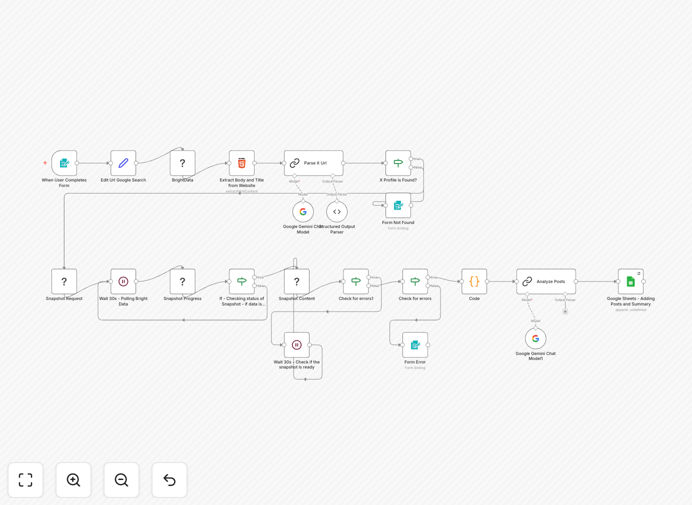
What This Workflow Does
Manual Twitter analysis is time-consuming and inconsistent. Researching a single profile can take hours—searching for the right account, scrolling through posts, counting engagements, and trying to summarize themes. This process doesn't scale and is prone to human error and bias.
This n8n workflow automates the entire Twitter profile analysis pipeline. It accepts a person's name and date range, automatically finds their Twitter (X) profile via Google search, uses Bright Data to scrape post data, extracts key metrics (views, likes, reposts, hashtags), and then employs Google Gemini AI to generate a clean, insightful summary of their tone, interests, and activity trends. All results are neatly stored in a Google Sheet for team review or further analysis.
The automation transforms what was a manual, multi-hour research task into a consistent, minute‑level process that delivers structured, actionable intelligence.
How It Works
Step 1: Profile Discovery
The workflow starts with a public form where users input a full name and desired date range. It constructs a precise Google search query, scrapes the results using Bright Data's Web Unlocker, and parses the HTML to identify potential Twitter profile links.
Step 2: AI‑Powered Profile Verification
Candidate profile URLs are passed to Google Gemini AI, which evaluates them against the provided name to select the correct, matching Twitter account. This intelligent filtering ensures accuracy before data collection begins.
Step 3: Data Collection & Transformation
Using Bright Data's dataset snapshot API, the workflow retrieves all posts from the verified profile within the specified date range. A Code node then structures the raw data into clean fields: post date, description, hashtags, likes, views, replies, reposts, quotes, and tagged users.
Step 4: AI Analysis & Summary Generation
Google Gemini analyzes the entire post dataset. It identifies the account's predominant tone (professional, casual, advocacy), recurring themes, popularity patterns, and overall sentiment, producing a concise, human‑like written summary.
Step 5: Results Storage & Delivery
The structured post data and AI summary are appended to a designated Google Sheet, creating a permanent record. The workflow concludes by displaying a success message or a helpful fallback if no profile was found.
Who This Is For
This automation is ideal for recruiters and hiring managers conducting due diligence on candidates, sales and business development teams researching prospects or partners, marketing and PR professionals analyzing influencers or competitors, investors monitoring founder or company sentiment, and market researchers studying industry conversations and trends.
Any professional or team that needs to systematically understand public personas, gauge influence, or track thematic discussions on Twitter will find immense value in this automated pipeline.
What You'll Need
- A Bright Data account with access to the Web Unlocker zone and dataset snapshot API for reliable search and post scraping.
- Google Gemini (PaLM) API access via OpenAI/Google Vertex for profile verification and summary generation.
- A Google Sheets account with OAuth2 credentials to store the final results.
- n8n installed (cloud or self‑hosted) and the n8n‑nodes‑brightdata community node installed via Settings → Community Nodes.
Quick Setup Guide
- Import the template: Download the JSON file and import it into your n8n instance.
- Configure credentials: Set up connections for Bright Data, Google Gemini, and Google Sheets in n8n's credentials management.
- Install the community node: In n8n Settings, go to "Community Nodes" and install "n8n‑nodes‑brightdata".
- Adjust the Google Sheet ID: Update the Google Sheets node with your specific spreadsheet ID and tab name.
- Test with a known profile: Trigger the workflow manually with a public figure's name to verify the full pipeline works.
- Deploy the form: Activate the n8n Form Trigger node to create a public URL for submissions.
Pro tip: Start by analyzing a few well‑known profiles to calibrate the AI summary output. You can fine‑tune the Gemini prompts in the workflow to emphasize specific aspects like professional tone or technical expertise, tailoring the summaries to your use case.
Key Benefits
Save 10–15 hours per month on manual research. Automating profile analysis eliminates the tedious, repetitive work of scrolling, counting, and note‑taking, freeing up valuable human time for strategic interpretation.
Ensure consistent, unbiased insights across all analyses. The AI applies the same criteria to every profile, removing human variability and bias from the evaluation process, leading to more reliable comparisons.
Scale your research capacity instantly. Process dozens or hundreds of profiles in parallel, a task that would be impossible manually, enabling comprehensive market mapping or large‑scale candidate screening.
Gain deeper, data‑driven intelligence. Move beyond gut feelings to quantified metrics and AI‑identified themes, providing a stronger evidence base for hiring, partnership, or investment decisions.
Create a searchable, shareable knowledge base. All results land in a centralized Google Sheet, building an organized, easily shared repository of profile intelligence for your entire team.