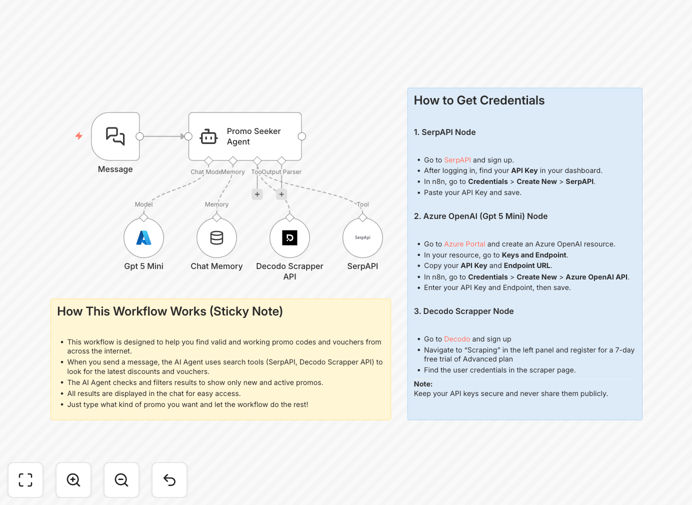
What This Workflow Does
Manually scouring the web for valid promo codes is a tedious, time-consuming task that yields inconsistent results. This automation solves that problem by creating a systematic, AI-powered pipeline for discount discovery.
The "Promo Seeker" workflow automatically searches the web using SerpAPI, extracts potential codes and voucher pages with Decodo Scraper, and then uses a GPT-5 Mini AI agent to intelligently filter, validate, and summarize the findings. It maintains context via chat memory to avoid duplicates and improve future searches. The result is a clean, actionable list of fresh, working promo codes delivered directly to your team or systems.
This transforms a reactive, manual process into a proactive, scalable asset. Marketing teams can fuel campaigns with verified offers, support agents can instantly provide discounts to retain customers, and affiliate marketers can maintain a competitive edge with the latest deals.
How It Works
The workflow intelligently orchestrates search, data extraction, and AI analysis to deliver validated results.
1. Trigger & Query Initiation
The process starts with a manual trigger or a scheduled webhook. A user or system provides a search query (e.g., "latest Amazon promo codes"). This query is formatted and passed to the search and scraping engines.
2. Web Search & Data Scraping
SerpAPI performs a real-time Google search for the query, returning a list of relevant URLs from deal sites, forums, and blogs. The Decodo Scraper node then visits these URLs to extract raw text, specifically hunting for patterns that look like promo codes, discount percentages, and terms & conditions.
3. AI-Powered Analysis & Validation
All extracted text and potential codes are sent to the GPT-5 Mini AI agent. The agent is instructed with a system prompt to act as a "Promo Code Validator." It evaluates each finding, checking for expiration dates, verifying the code format, assessing relevance to the original query, and filtering out known spam or fake patterns.
4. Context Management & Output
A Chat Memory node stores the context of the search and its results. This prevents the workflow from returning the same code in subsequent runs and allows the AI to reference past successful finds. Finally, the validated, formatted list of codes—complete with source links, discount values, and expiry notes—is output. This can be sent to a Slack channel, saved to a database, appended to a Google Sheet, or returned via the original webhook.
Pro tip: Schedule this workflow to run daily or hourly. Combine it with a "Code Usage Tracker" to monitor which distributed codes are actually redeemed, providing valuable data for your marketing ROI.
Who This Is For
This automation delivers immediate value for teams that rely on discounts to drive engagement and sales.
Marketing & Growth Teams: Populate email newsletters, social media posts, and landing pages with fresh, compelling offers to boost conversion rates and click-throughs.
Customer Support & Success Teams: Empower agents to instantly offer a valid discount during retention conversations or to resolve complaints, turning negative experiences into positive ones.
Affiliate Marketers & Deal Aggregators: Automatically discover and publish the latest vouchers across multiple niches, staying ahead of competitors who manually update their sites.
E-commerce & SaaS Companies: Run internal searches for competitor discounts for price-matching strategies or to inform your own promotional calendar.
What You'll Need
- An n8n Instance: A self-hosted n8n setup or a n8n.cloud account.
- SerpAPI Account & Key: For performing automated Google searches. A free tier is available to start.
- Decodo Account & API Key: For advanced web scraping capabilities to extract text from target URLs.
- Azure OpenAI Service (GPT-5 Mini): An Azure OpenAI resource with the GPT-5 Mini model deployed. You'll need the endpoint and API key.
- Optional - Destination: A place to send the results, like a Slack webhook, Google Sheets document, or a database table.
Quick Setup Guide
Get this automation running in your environment in under 15 minutes.
- Import the Template: Download the JSON file using the button above. In your n8n instance, go to "Workflows", click "Import from file", and select the downloaded template.
- Configure Credentials: In the workflow canvas, click the credential icons on the SerpAPI, Decodo, and Azure OpenAI Chat Model nodes. Add your respective API keys and endpoint details.
- Customize the Search: Open the SerpAPI node. Adjust the search query parameters (like `num` for results or `gl` for country) to target your desired retailers or regions.
- Tailor the AI Agent: Review the system prompt in the AI Agent node. You can modify its instructions to prioritize certain brands, exclude specific sites, or change the output format.
- Set Your Output: Configure the final node (like a Slack node or Google Sheets node) with your destination details. Test the workflow with a simple query like "Uber Eats promo code".
Key Benefits
Save 10+ Hours Per Week: Eliminate the daily grind of checking dozens of websites, forums, and email newsletters for new codes. The automation does the legwork continuously.
Increase Offer Accuracy & Trust: By using AI to validate context and expiry, you dramatically reduce the chance of sharing dead codes, protecting your brand's credibility and improving customer experience.
Gain a Competitive Edge: Be the first to discover and leverage new promotions. This speed can be the difference between capturing a customer's sale or losing it to a competitor.
Scale Personalization: Use the workflow's output to fuel hyper-personalized marketing. Send specific discount codes for a user's favorite brands based on their purchase history or expressed interests.
Build a Valuable Asset: Over time, the workflow builds a historical database of promo code performance. This data is invaluable for understanding seasonal trends, brand popularity, and discount effectiveness.