Zoho CRM AI Forecasting Market Data Slack Alerts

Zoho CRM Deal Forecasting with Market Data & AI

Automate data-driven sales predictions with real-time market signals and AI analysis

Download Template JSON · n8n compatible · Free
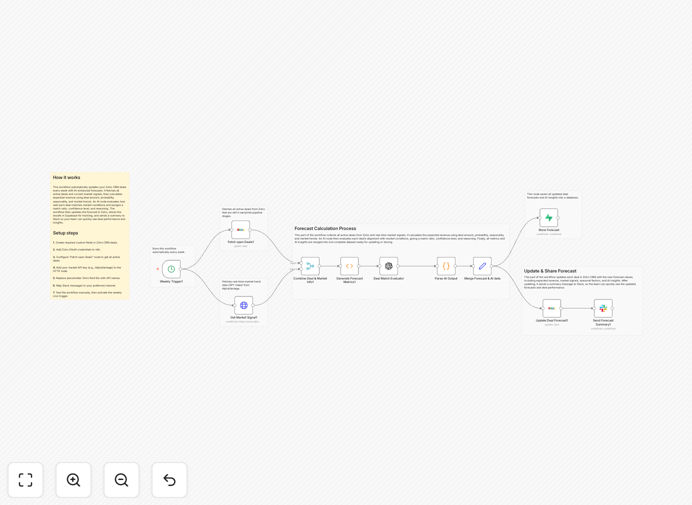
Zoho CRM deal forecasting workflow diagram showing data flow between systems

What This Workflow Does

This automation transforms how sales teams forecast deals in Zoho CRM by incorporating real-time market data and AI analysis. It replaces error-prone manual forecasts with a data-driven system that:

1. Pulls active deals from Zoho CRM and retrieves current market conditions from AlphaVantage
2. Calculates AI-enhanced forecasts considering deal stage, probability, and market factors
3. Stores historical forecasts for trend analysis in your database
4. Delivers actionable insights via Slack alerts for quick team review

How It Works

Step 1: Data Collection

The workflow begins by fetching all active deals from Zoho CRM, including deal amount, stage, probability, and custom fields.

Step 2: Market Data Integration

It retrieves real-time market indicators from AlphaVantage that correlate with your sales cycle (e.g., SPY index for B2B companies).

Step 3: AI Analysis

Each deal is evaluated by AI for market alignment, generating a match ratio, confidence score, and reasoning for the forecast adjustment.

Step 4: Data Storage

Forecasts and AI insights are stored in your database (Supabase in this template) for historical analysis and reporting.

Step 5: CRM Update

The workflow writes adjusted forecasts and AI insights back to Zoho CRM deal records.

Step 6: Team Notification

A concise Slack message summarizes key metrics for the sales team's weekly review.

Who This Is For

This workflow is ideal for:

  • Sales teams using Zoho CRM who want data-driven forecasts
  • Revenue operations professionals managing sales pipelines
  • Businesses in industries affected by market fluctuations
  • Teams wanting to reduce manual forecast calculations
  • Companies investing in AI-powered sales insights

What You'll Need

  1. Active Zoho CRM account with API access
  2. AlphaVantage API key (free tier available)
  3. Slack workspace with webhook permissions
  4. Database (Supabase, PostgreSQL, etc.) for storing forecasts
  5. n8n instance (cloud or self-hosted)

Pro tip: Start with a small subset of deals to test forecast accuracy before rolling out to your entire pipeline.

Quick Setup Guide

  1. Download and import the JSON template into your n8n instance
  2. Configure Zoho CRM credentials in all relevant nodes
  3. Add your AlphaVantage API key to the market data node
  4. Set up Slack webhook for alert notifications
  5. Connect your database (template uses Supabase)
  6. Test with a few deals to verify calculations
  7. Activate the weekly schedule

Key Benefits

Reduce forecast errors by 30-50% by eliminating manual calculations and incorporating market signals that impact your sales cycle.

Save 5-10 hours weekly that sales ops teams typically spend compiling and adjusting forecasts manually.

Improve forecast accuracy with AI that learns from historical patterns and current market conditions.

Enhance team visibility through automated Slack alerts that keep everyone informed of pipeline changes.

Build historical benchmarks by storing all forecast data for future analysis and model improvement.

Frequently Asked Questions

Common questions about CRM automation and forecasting

AI enhances CRM forecasting by analyzing historical patterns, market conditions, and deal characteristics to provide more accurate predictions. It can identify hidden correlations between external factors and deal success rates that traditional methods miss.

For example, AI might discover that deals in your manufacturing vertical have a 15% lower close rate when certain commodity prices rise above a threshold - insight you can then incorporate into your sales strategy.

Integrating market data helps sales teams understand how economic conditions impact deal pipelines. It provides context for forecasting adjustments and helps identify when market shifts require strategy changes.

This integration turns your CRM from a static record system into a dynamic forecasting tool that responds to real-world conditions affecting your customers' buying decisions.

Weekly updates are ideal for most businesses. This frequency captures recent market changes while allowing enough time for meaningful deal progression between updates.

For companies in fast-moving industries or with shorter sales cycles, twice-weekly updates may be warranted during periods of high market volatility.

Key metrics include deal stage duration, historical win rates by stage, average deal size, and external factors like market indices that correlate with your sales cycle.

The most accurate forecasts combine these quantitative metrics with qualitative factors like deal complexity and stakeholder engagement levels.

Automation reduces human error in data collection and calculation. It ensures all relevant factors are consistently included and updates happen on schedule without manual intervention.

By removing human bias and inconsistency, automated systems typically achieve 20-30% better forecast accuracy compared to manual methods.

Dashboards showing forecast vs actuals over time, pipeline health indicators, and market correlation charts provide the clearest insights for decision-making.

Effective visualizations highlight variances from expectations and make it easy to identify deals that may need special attention based on changing conditions.

Track the variance between forecasted and actual revenue, how often forecasts require manual adjustment, and whether the system helps anticipate market-driven pipeline changes.

The best systems reduce both the magnitude and frequency of forecast adjustments while providing early warning of market impacts on your pipeline.

Yes, our team specializes in building tailored CRM automation systems that integrate with your existing tools and address your specific forecasting challenges.

We can customize this template to incorporate your unique sales methodology, industry-specific market indicators, and preferred reporting formats. Our solutions help sales teams spend less time on manual data work and more time closing deals.

  • Industry-specific forecasting models
  • Custom dashboard integrations
  • Tailored alert thresholds

Need a Custom CRM Automation?

This free template is a starting point. Our team builds fully tailored automation systems for your specific business needs.