What This Workflow Does
This automation solves a common problem for content managers, marketers, and educators: manually downloading Instagram videos is time-consuming and disorganized. When you need to archive content, repurpose videos for other platforms, or collect user-generated material, the manual process involves copying links, visiting third-party sites, downloading files, renaming them, and organizing them in folders.
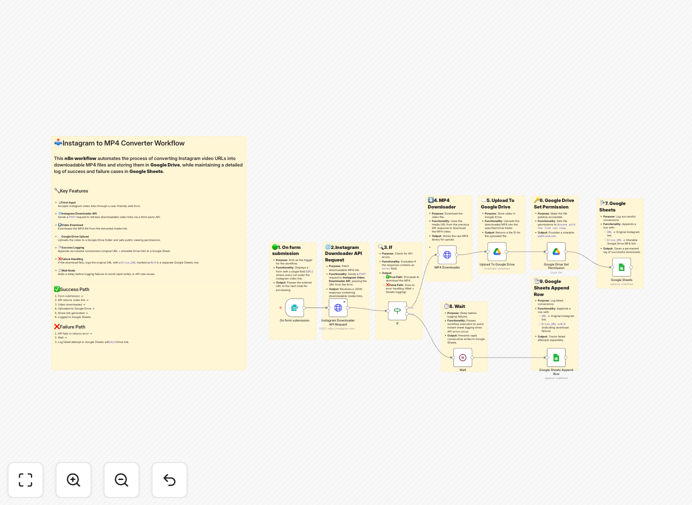
This n8n workflow automates the entire process. Users simply submit an Instagram video URL through a form, and the system automatically converts it to an MP4 file, uploads it to your designated Google Drive folder, sets appropriate sharing permissions, and logs the entire transaction in Google Sheets—including success/failure status and direct links to the downloaded content.
The automation handles both successful conversions and failures gracefully, ensuring you have a complete audit trail of all download attempts. This transforms what was previously a 5-10 minute manual task into a 30-second form submission with guaranteed consistency and organization.
How It Works
1. Form Submission Trigger
The workflow activates when a user submits an Instagram video URL through an integrated form. This could be a simple web form, Google Form, or internal submission system. The URL is captured and passed to the next stage for processing.
2. Instagram Downloader API Processing
The system sends the Instagram URL to a reliable video downloader API (like RapidAPI's Instagram Downloader) which extracts the actual video file from Instagram's platform. The API returns a direct download link for the MP4 video file.
3. Conditional Logic Check
An "If" node evaluates whether the API response indicates success. If successful, the workflow proceeds to download and store the video. If failed, it routes to an error handling path that logs the failure in Google Sheets after a brief wait period to prevent rapid-fire error logging.
4. Video Download & Google Drive Upload
For successful responses, the system downloads the MP4 file from the provided media URL, then immediately uploads it to your specified Google Drive folder. The file is automatically named with timestamp and source information for easy identification.
5. Permission Setting & Logging
Once uploaded, the workflow sets appropriate sharing permissions on the Google Drive file (typically view-only access) and generates a shareable link. All details—original URL, download status, Drive link, and timestamp—are appended to a Google Sheet for complete tracking and reporting.
Who This Is For
This automation is ideal for content marketing agencies that need to archive client work, social media managers collecting competitor or inspiration content, educators saving educational Reels for course materials, brands collecting user-generated content campaigns, and creators backing up their own content for portfolios or repurposing.
Businesses that regularly need to preserve Instagram content for compliance, archival, or repurposing will find this workflow particularly valuable. It's also perfect for teams that collaborate on content and need a centralized, organized repository of video assets with clear attribution and source tracking.
What You'll Need
- n8n instance (cloud or self-hosted) with workflow execution capabilities
- Instagram Downloader API key from RapidAPI or similar service
- Google Cloud Platform account with Drive and Sheets APIs enabled
- Google Service Account credentials (JSON file) for authentication
- Google Drive folder designated for downloaded videos
- Google Sheet with columns for URL, status, Drive link, and timestamp
Pro tip: Before going live, test the workflow with various Instagram content types (Reels, IGTV, regular posts) to ensure the API handles all formats correctly. Set up a monitoring system to alert you if failure rates exceed your threshold.
Quick Setup Guide
- Import the template into your n8n instance using the downloaded JSON file
- Configure API credentials by adding your Instagram Downloader API key to the HTTP Request node
- Set up Google authentication by uploading your service account JSON file in n8n's credential manager
- Update folder and sheet IDs in the Google Drive and Google Sheets nodes to point to your specific resources
- Test with sample URLs to verify the entire flow works correctly end-to-end
- Connect your form trigger by replacing the manual trigger with your actual form submission mechanism
- Monitor initial executions and adjust any rate limiting or error handling as needed
Key Benefits
Save 5-10 minutes per video download by eliminating manual copying, downloading, renaming, and organizing. For teams downloading 20+ videos weekly, this represents 15+ hours monthly recovered for higher-value work.
Eliminate organizational chaos with automatic filing in Google Drive using consistent naming conventions and folder structures. No more "untitled" files or duplicate downloads cluttering your storage.
Create audit trails automatically through comprehensive Google Sheets logging that tracks every submission attempt, success/failure status, timestamps, and direct links to downloaded content.
Scale content operations effortlessly as your needs grow. The automation handles increased volume without additional staff time, making it cost-effective for growing teams and agencies.
Improve team collaboration with centralized, permission-controlled access to downloaded content. Team members can instantly access archived videos without requesting files from colleagues.