AI Video Fashion E‑commerce Content Creation n8n Kling API

Generate 360° Virtual Try‑On Videos for Clothing with AI

Automate realistic fashion try‑on videos using Kling AI. Upload model & clothing images to create immersive 360° videos that boost conversions and reduce returns.

Download Template JSON · n8n compatible · Free
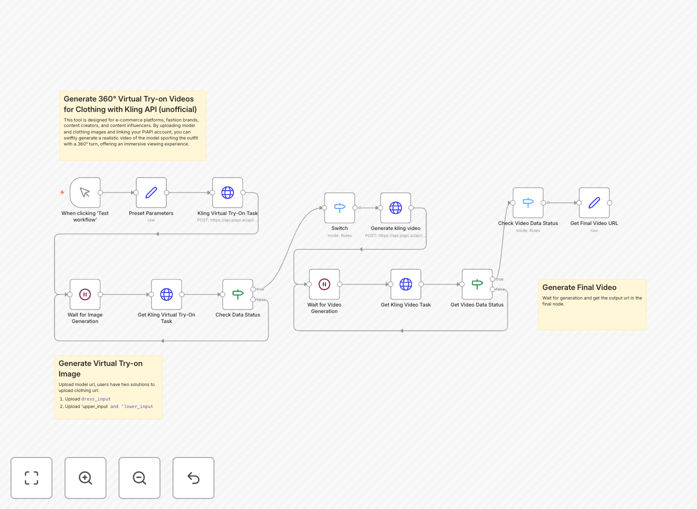
AI virtual try-on video generation workflow interface showing model and clothing inputs with video output

What This Workflow Does

This automation solves a critical problem for fashion e‑commerce: showing customers how clothing actually looks and moves on a body, without expensive photoshoots or physical samples. It uses the Kling AI API (via PiAPI) to generate professional 360° virtual try‑on videos from just two images: a model photo and a clothing item photo.

The workflow automatically processes these inputs, calls the AI video generation service, and delivers a downloadable video file showing the garment realistically fitted onto the model with a smooth rotating view. This transforms static product listings into dynamic, engaging content that reduces purchase hesitation and cuts return rates significantly.

Beyond basic try‑ons, you can configure it for separates (upper + lower clothing), batch process entire catalogs, or trigger generation whenever new products are added to your store. It turns weeks of manual content creation into minutes of automated processing.

How It Works

Step 1: Input Configuration

You provide your PiAPI authentication key and specify the input image URLs. The workflow supports both dress‑type garments (single clothing image) and separates (upper + lower images). These URLs can come from your CMS, e‑commerce platform, or cloud storage.

Step 2: AI Processing

The workflow sends the images to the Kling API, which uses advanced diffusion models to understand garment geometry, texture, and how it should drape on the human form. The AI generates a coherent video sequence showing the clothing from all angles.

Step 3: Output Delivery

Once processing completes, the workflow captures the generated video URL and makes it available for download. You can extend the automation to automatically upload this video to your product pages, social media scheduler, or digital asset management system.

Pro tip: Use consistent lighting and neutral backgrounds in your model photos for best results. The AI handles various poses, but front‑facing, full‑body shots yield the most accurate garment fitting.

Who This Is For

Fashion E‑commerce Brands: Reduce return rates and increase conversion by showing products in motion. Perfect for dresses, jackets, and complete outfits.

Dropshipping Businesses: Create professional marketing content without holding inventory or organizing photoshoots. Generate videos directly from supplier product images.

Content Creators & Influencers: Produce styled‑outfit videos at scale for social media platforms like Instagram Reels and TikTok.

Marketing Agencies: Offer virtual try‑on video production as a service to fashion clients, scaling delivery without proportional cost increases.

What You'll Need

  1. An active PiAPI account with Kling API access (provides the AI video generation credits)
  2. An n8n instance (cloud or self‑hosted) to run the workflow
  3. Publicly accessible image URLs for your model and clothing items
  4. Basic familiarity with n8n's interface for credential setup

Quick Setup Guide

1. Download the template using the button above and import it into your n8n workspace.

2. Configure the PiAPI node with your X‑API‑Key from your PiAPI dashboard.

3. Replace the sample image URLs in the workflow with your actual model and product image URLs.

4. Test the workflow with one product to verify the output quality matches your expectations.

5. Automate the trigger by connecting it to your e‑commerce platform's webhook or schedule it for batch processing.

Implementation note: Start with a small batch of 5‑10 products to fine‑tune your input image quality and workflow settings before scaling to your entire catalog.

Key Benefits

Cut content production costs by 80‑90%. No need for models, photographers, studios, or video editors. A video that would normally cost $500+ and take days is generated in minutes for pennies.

Reduce product returns by up to 40%. Virtual try‑ons give customers confidence in fit and appearance, dramatically decreasing "not as described" returns common in online fashion.

Increase conversion rates significantly. Products with video demonstrations convert 2‑3× better than static images alone. The rotating view answers critical customer questions about drape and movement.

Scale content creation infinitely. Once configured, the workflow can process hundreds of products automatically, enabling rapid catalog expansion and seasonal collection launches.

Future‑proof your marketing. AI‑generated video content is becoming the standard for fashion e‑commerce. Adopting this automation now positions you ahead of competitors still relying on traditional photography.

Frequently Asked Questions

Common questions about virtual try‑on automation and AI video generation

A virtual try-on video uses AI to superimpose clothing onto a model and generate a 360-degree rotating video, showing how the garment looks and moves. For e-commerce, this dramatically increases customer confidence, reduces return rates by up to 40%, and boosts conversion rates by providing a realistic preview that static images cannot match.

Unlike flat product photos, these videos demonstrate fabric drape, movement, and fit from all angles. Customers can virtually "see themselves" in the clothing, which is particularly valuable for online shopping where physical try-ons aren't possible.

Modern AI models like Kling API produce highly realistic results, accurately mapping clothing textures, folds, and movement to the model's body. The quality depends on input image resolution and lighting, but for most e-commerce applications, the output is convincing enough to significantly influence purchase decisions and reduce uncertainty.

The technology has advanced rapidly—today's models handle complex garments, patterns, and accessories with surprising fidelity. While not perfect photorealistic, they provide substantially more information than static product shots.

Fashion retailers use virtual try-ons for new product launches, marketing campaigns, and social media content. Dropshipping businesses can showcase products without physical samples. Influencers and content creators generate styled content at scale. The automation saves thousands in photoshoot costs and accelerates time-to-market for new collections.

Specific applications include: creating video assets for product pages, generating social media content for Instagram Reels/TikTok, producing email marketing materials, and building lookbooks without model bookings.

You need an n8n instance (cloud or self-hosted), a PiAPI account for Kling API access, and image URLs for your models and clothing items. The workflow handles the API calls and video generation automatically—no coding required. Basic familiarity with n8n's interface is helpful for configuration.

The setup takes about 30 minutes: create your PiAPI account, get an API key, import the workflow template, add your credentials, and test with sample images. No AI expertise or video editing skills are necessary.

Manually producing a single professional 360° try-on video with a model, studio, and editor can take days and cost $500+. This automation generates a comparable video in minutes for just API costs. For a brand launching 50 products monthly, that's over 200 hours and $25,000 saved per month.

The time savings compound when you consider revisions, reshoots, and seasonal collections. What traditionally required a production team now runs unattended after initial setup.

Absolutely. The generated video URLs can be automatically pushed to Shopify product pages, WooCommerce, or any CMS via webhooks. You can trigger the workflow when new products are added to your store, creating try-on videos automatically as part of your inventory onboarding process.

Common integrations include: adding videos to product media galleries, updating variant-specific content, sending video links to email marketing platforms, and posting to social media scheduling tools.

Traditional photography requires physical samples, models, studios, and extensive editing. Virtual try-on uses AI to generate videos from existing clothing images, eliminating sample production, reducing costs by 80-90%, and allowing infinite variations (different models, backgrounds, lighting) from the same base image.

While traditional photography offers ultimate quality control, AI generation provides scalability, speed, and cost-effectiveness that makes professional video content accessible to businesses of all sizes.

Yes! GrowwStacks specializes in building tailored automation solutions for fashion e-commerce. We can integrate virtual try-ons with your specific inventory system, add multi-model variations, batch processing for entire catalogs, and connect outputs directly to your marketing channels.

Our team handles the complete implementation—from API configuration to workflow optimization—ensuring you get production‑ready automation that scales with your business. Book a free consultation to discuss your requirements.

  • Custom integrations with your e‑commerce platform
  • Bulk processing for thousands of products
  • Advanced features like background replacement and branding
  • Ongoing support and optimization

Need a Custom Virtual Try‑On Automation?

This free template is a starting point. Our team builds fully tailored automation systems for your specific business needs.