What This Workflow Does
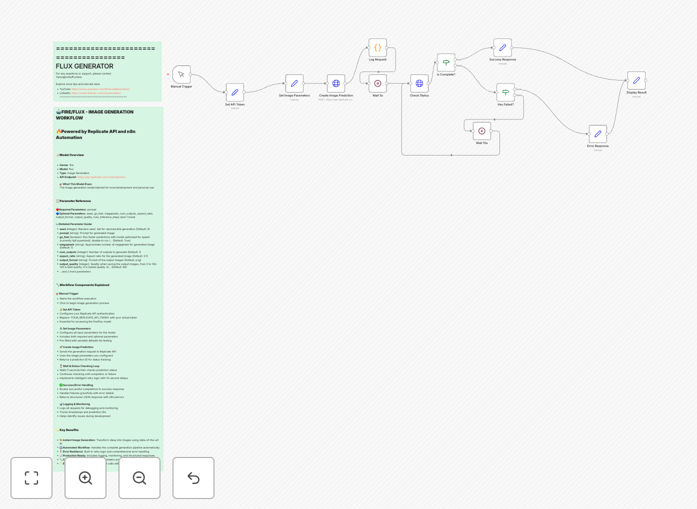
This automation solution bridges the gap between your text content and AI-generated visual assets by connecting directly to the Fire Flux AI model through Replicate's API. It eliminates the manual process of crafting API requests, waiting for responses, and downloading generated images one by one.
The workflow handles the entire image generation process automatically. You provide text prompts (either manually or from another system), and the workflow manages the API communication, processes the response, and delivers the final images ready for use in your projects.
How It Works
1. Prompt Input
The workflow accepts text prompts either from manual input or from connected systems like CMS platforms or spreadsheets. These prompts can include detailed descriptions of desired images.
2. API Communication
The automation formats your prompt according to Fire Flux model requirements and sends it to Replicate API endpoint. It handles all necessary parameters like image dimensions, quality settings, and generation options.
3. Response Handling
The workflow monitors the API response, handles potential errors, and waits for image generation to complete. It can automatically retry failed requests with adjusted parameters if needed.
4. Output Delivery
Once generation is complete, the workflow processes the output image URLs, downloads the images, and makes them available in your preferred format location. Images can be saved to cloud storage, sent via email, or passed to other systems.
Who This Is For
This workflow benefits creative professionals, marketing teams, content creators, and businesses that regularly need custom visual assets. Ideal users include:
- Marketing agencies creating social media content
- E-commerce businesses needing product visuals
- Bloggers and content creators enhancing articles
- Design teams prototyping concepts
- Educators developing visual materials
What You'll Need
- An n8n instance (cloud or self-hosted)
- Replicate API account with credits
- Access to Fire Flux model on Replicate
- Storage destination for generated images (like Google Drive or S3)
Quick Setup Guide
- 1. Download and import the JSON template into your n8n instance
- 2. Configure your Replicate API credentials in the workflow settings
- 3. Set your preferred image storage destination
- 4. Test with sample prompts to verify connection
- 5. Deploy the workflow for production use
Key Benefits
Save hours per week by automating repetitive image generation tasks that would otherwise require manual API interaction.
Ensure consistency in your visual branding by applying standardized parameters across all generated images.
Scale content production without increasing design team workload or hiring additional staff.
Reduce costs by minimizing the time spent on manual image creation and revisions.
Accelerate ideation by rapidly prototyping multiple visual concepts from text prompts.
Pro tip: For best results, craft detailed prompts that include specific details about composition, lighting, style, and mood. The more descriptive your prompt, the better the AI can match your vision.