JotForm OpenAI Google Docs Gmail Sales Automation

Generate AI-powered sales proposals from JotForm leads

Automatically create personalized proposals using AI when a lead submits a JotForm. Saves hours per week and boosts conversion rates.

Download Template JSON · n8n compatible · Free
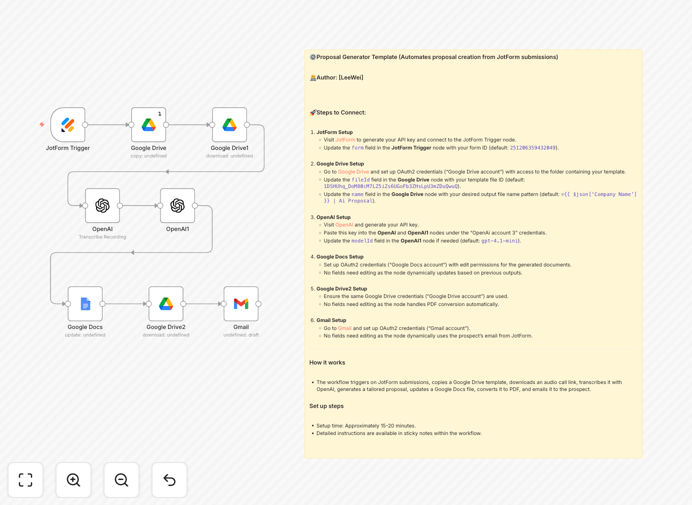
AI proposal automation workflow diagram showing JotForm, OpenAI, Google Docs integration

What This Workflow Does

Manual proposal writing is a time-consuming bottleneck for sales teams. Every new lead requires researching their needs, crafting a tailored document, and sending it promptly—often taking hours per proposal. This workflow solves that by automating the entire process.

When a potential client submits information via a JotForm (like a contact form, consultation request, or quote inquiry), this automation instantly triggers. It uses OpenAI to analyze the lead's data and generate a professionally written, personalized sales proposal. The proposal is then formatted in Google Docs, converted to PDF, and emailed directly to the lead via Gmail—all within minutes.

The result: sales teams can respond to leads instantly with high-quality proposals, dramatically increasing conversion rates while freeing up hours each week for more strategic activities.

How It Works

Step 1: Capture Lead Data

The workflow starts when a new submission arrives in your JotForm. It captures all form fields—company name, contact details, project requirements, budget range, and any custom questions you've set up.

Step 2: AI Proposal Generation

The lead data is sent to OpenAI (GPT-4 or similar model) with a tailored prompt that instructs the AI to create a sales proposal. The AI incorporates your company's tone, service offerings, and pricing templates to produce a draft that feels personal and professional.

Step 3: Document Creation & Formatting

The AI-generated text is inserted into a Google Docs template. This template includes your branding, logo, standard sections, and formatting. The workflow populates the document with the proposal content and dynamically names it (e.g., "Company Name | Proposal").

Step 4: PDF Conversion & Delivery

The Google Doc is automatically converted to a PDF for easy sharing and printing. Then, using Gmail, the PDF is attached and sent to the lead's email address from the form. The email includes a personalized message and follow-up instructions.

Who This Is For

This automation is ideal for service-based businesses, consulting firms, agencies, freelancers, and B2B sales teams who regularly send customized proposals. If you receive lead inquiries through forms and spend significant time crafting responses, this workflow will transform your sales process.

Marketing agencies, software vendors, consultants, and professional service providers can particularly benefit. The system works best for businesses that have a structured proposal format but need to personalize details for each client.

What You'll Need

  1. A JotForm account with an active form collecting lead information.
  2. An OpenAI API key (access to GPT-4 or similar models).
  3. Google Drive and Google Docs access with OAuth2 credentials.
  4. A Gmail account for sending proposals (or Google Workspace).
  5. An n8n instance (cloud or self-hosted) to run the workflow.
  6. A basic proposal template in Google Docs to serve as the formatting foundation.

Quick Setup Guide

  1. Download the template JSON file and import it into your n8n workspace.
  2. Configure the JotForm trigger node with your form ID and API key.
  3. Set up the OpenAI node with your API key and adjust the prompt if needed.
  4. Connect the Google Drive and Google Docs nodes using OAuth2.
  5. Link the Gmail node with your sending account credentials.
  6. Test the workflow with a sample form submission to verify the output.
  7. Activate the workflow and start automating proposals instantly.

Key Benefits

Save 5–10 hours per week on proposal writing. Eliminate manual drafting, formatting, and emailing. The automation handles everything from data intake to delivery.

Increase lead conversion rates by responding instantly. Prospects receive a professional proposal within minutes of submitting their interest, dramatically improving engagement.

Ensure consistency and brand alignment across all proposals. Every document follows your template, tone, and structure, maintaining professional standards.

Reduce errors and omissions in proposals. Automated data mapping ensures all lead information is accurately included, avoiding manual copy-paste mistakes.

Scale personalization without increasing workload. Each proposal is uniquely tailored using AI, allowing you to offer customized responses to every lead at scale.

Pro tip: Start with a simple proposal template and gradually refine the AI prompts based on real outputs. Collect feedback from your sales team on which proposals convert best and adjust the automation accordingly.

Frequently Asked Questions

Common questions about AI proposal automation and integration

AI can analyze lead data from forms like JotForm to create highly personalized proposals. It understands context, industry specifics, and client needs, producing drafts that are more relevant and persuasive than generic templates. This reduces manual writing time and increases conversion rates.

For example, an AI can incorporate specific industry terminology, adjust tone based on client size, and highlight relevant case studies—all automatically. This level of personalization is difficult to achieve manually at scale.

Automating proposal creation saves hours per week, ensures consistency, reduces errors, and allows sales teams to respond instantly to leads. It also enables personalization at scale, making each proposal feel tailored while maintaining brand standards.

Beyond time savings, automation improves data accuracy—information from the form flows directly into the proposal without manual transcription errors. This leads to more reliable quotes and fewer client misunderstandings.

Integrating JotForm with Google Docs automatically transforms raw lead data into structured documents. It eliminates manual copying, ensures data accuracy, and creates a seamless pipeline from lead capture to proposal delivery, improving speed and professionalism.

The integration also allows for version control, collaborative editing, and easy updates. Sales teams can refine templates centrally, and all future proposals automatically use the latest version.

Yes, when properly configured. AI models like GPT-4 can be guided with templates, company data, and validation rules. The workflow can include human review steps or automated checks to ensure pricing, terms, and details are correct before sending.

Best practice is to start with a validation layer—for example, having the AI flag any unusual requests or pricing discrepancies for human review. Over time, as the system learns, it becomes increasingly reliable.

Service-based businesses (consulting, agencies, freelancers), B2B sales teams, and companies with high-volume lead intake benefit most. Any organization that sends customized proposals regularly can save significant time and improve response quality.

Businesses with complex pricing models, multiple service tiers, or international clients gain additional advantages—the automation can handle currency conversion, localized language, and tier-specific terms automatically.

Modern automation platforms use encrypted connections, OAuth2 authentication, and secure API keys. Data flows directly between trusted services without intermediate storage. Businesses should follow best practices like using private API keys and limiting access scopes.

For sensitive data, consider adding encryption steps or using masked fields. Always review the data retention policies of each service and ensure compliance with your industry regulations.

Common pitfalls include incomplete data mapping, overly generic AI prompts, missing approval steps, and not testing the full workflow. Start with a simple template, validate outputs, and gradually add complexity to ensure reliability.

Another common issue is not accounting for edge cases—like international phone formats, unusual budget entries, or missing fields. Build validation nodes to catch these before they affect the proposal quality.

Yes, GrowwStacks specializes in building custom automation systems tailored to your specific sales process, data sources, and branding. We can integrate your CRM, pricing models, and approval workflows to create a fully bespoke solution that matches your business needs.

Custom automation can include multi-level approvals, integration with your existing quote software, dynamic pricing calculators, and compliance checks. We design workflows that fit exactly how your team operates.

  • Tailored to your existing tools and processes
  • Includes testing, deployment, and ongoing support
  • Scalable as your business grows and evolves

Need a Custom AI Proposal Automation?

This free template is a starting point. Our team builds fully tailored automation systems for your specific business needs.