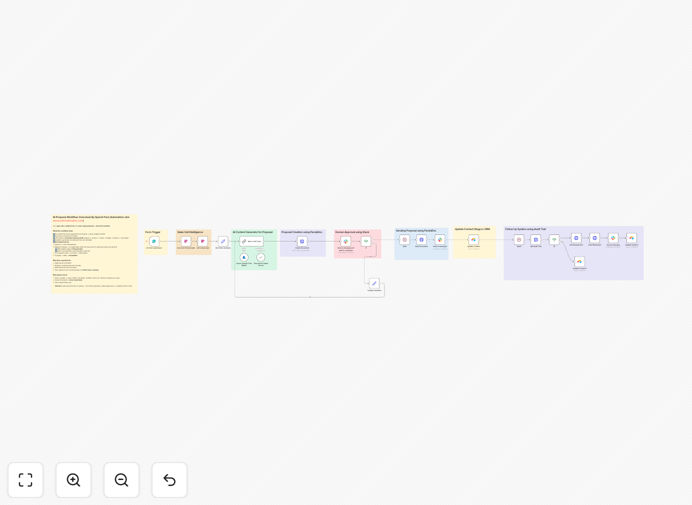
What This Workflow Does
This automation solves the time-consuming, error-prone process of manually creating sales proposals after discovery calls. Sales teams often lose momentum waiting for proposals to be drafted, formatted, approved, and sent—delaying deals and creating inconsistent client experiences.
The workflow automatically transforms sales call transcripts and client intake data into professionally formatted proposals using AI. It routes drafts for quick Slack approval, sends the final document via PandaDoc (or similar), updates your CRM, and even handles follow-up reminders—all without manual intervention.
By connecting your conversation intelligence platform (like Fireflies or Gong) with AI, document generation, and approval systems, you ensure proposals are accurate, personalized, and delivered within hours instead of days.
How It Works
1. Trigger & Data Collection
When a client completes your proposal intake form, the workflow is triggered. It immediately fetches the latest sales call transcript associated with that client's email from your conversation intelligence platform.
2. AI Analysis & Drafting
The transcript and form data are sent to Azure OpenAI (or your chosen LLM). The AI analyzes the conversation, identifies key pain points and discussed solutions, and generates a structured proposal draft with introduction, problem statement, proposed solution, scope, deliverables, timeline, and investment.
3. Document Creation
The AI-generated content populates a pre-designed template in PandaDoc, DocuSign, or similar document platform. Pricing tables are automatically inserted based on the budget discussed, creating a client-ready document.
4. Approval Workflow
A Slack message is sent to the designated approver (sales manager, legal, etc.) with the draft proposal and interactive Approve/Request Changes buttons. If changes are requested, feedback is incorporated via AI and the approval loop repeats until approved.
5. Sending & CRM Sync
Once approved, the proposal is automatically sent to the client via the document platform. The deal stage in your CRM (Airtable, HubSpot, Salesforce) is immediately updated to "Proposal Sent" with a link to the document.
6. Automated Follow-up
After 48 hours, the workflow checks the document's audit trail. If not signed, it sends a polite reminder to the client and updates the CRM to "Reminder Sent." If signed, it updates to "Document Signed" and can trigger next steps.
Pro tip: Customize the AI prompt to match your company's voice and proposal structure. Include examples of your best past proposals to train the AI on what works for your specific services and clients.
Who This Is For
This automation is ideal for B2B service businesses, agencies, consultants, and SaaS companies that send multiple proposals weekly. Sales teams spending 3+ hours per proposal will see immediate ROI. It's particularly valuable for:
Agency owners who need to respond quickly to RFPs with polished, customized proposals. Consulting firms where proposal quality directly impacts win rates. Tech sales teams that want to leverage call intelligence for better proposals. Solo entrepreneurs who need to appear larger and more systematic. RevOps leaders aiming to standardize and accelerate the sales process.
What You'll Need
- n8n instance (cloud or self-hosted)
- Transcript source (Fireflies.ai, Gong, Fathom, Avoma, or similar)
- AI API access (Azure OpenAI, OpenAI, Anthropic Claude, etc.)
- Document platform (PandaDoc, DocuSign, Qwilr, or Google Docs API)
- Slack workspace with app permissions for approval flows
- CRM system (Airtable, HubSpot, Salesforce, Pipedrive, etc.)
- Client intake form (Typeform, Tally, Jotform, or native form)
Quick Setup Guide
- Download and import the JSON template into your n8n instance.
- Configure credentials for each service (AI, documents, Slack, CRM) in n8n.
- Customize the AI prompt in the LLM node to match your proposal style and services.
- Upload your proposal template to your document platform and map the field tokens.
- Set up your Slack approval channel and configure the webhook or bot.
- Test the workflow with a sample transcript and form submission.
- Activate the workflow and connect it to your live intake form.
Pro tip: Start with a simplified version using just AI generation and document creation. Once that works smoothly, add the Slack approval and CRM update steps. This phased approach reduces complexity during initial setup.
Key Benefits
Cut proposal creation time by 80%: What used to take 3-5 hours now happens automatically in minutes, freeing your sales team to focus on selling rather than administrative work.
Increase proposal quality and consistency: AI ensures every proposal addresses the client's specific pain points with professional language, while maintaining brand voice and compliance standards across all documents.
Accelerate sales cycles: Proposals go out within hours instead of days, maintaining momentum from the sales call and significantly improving close rates through timely, relevant follow-up.
Eliminate approval bottlenecks: Slack-based approval flows with clear audit trails prevent proposals from getting stuck in email inboxes, ensuring faster internal review and client delivery.
Automate follow-up and tracking: Never let a proposal go cold again. Automated reminders based on document activity ensure timely follow-up while keeping your CRM perfectly synchronized with reality.