AI Video Content Creation Social Media HeyGen Gemini

Generate AI Video Avatars from URLs with HeyGen & Gemini

Turn any article, blog post, or webpage into a vertical short video with your AI avatar—ready for TikTok, Instagram Reels, and YouTube Shorts.

Download Template JSON · n8n compatible · Free
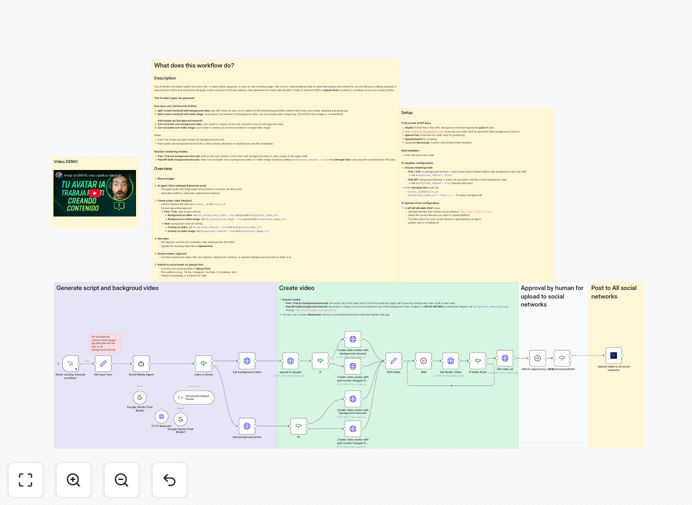
AI video avatar workflow diagram showing URL input, AI script generation, video creation with HeyGen, and social media publishing

What This Workflow Does

This automation solves the time-consuming challenge of creating consistent, engaging video content for social media. Instead of manually filming and editing, this workflow automatically transforms any URL—whether a news article, blog post, or product page—into a professional vertical short video featuring your AI avatar explaining the content.

The system fetches the webpage content, uses Google Gemini to generate a concise 30–45 second script with platform-optimized descriptions, captures dynamic background visuals from the page itself, composes and renders the video using HeyGen's AI avatar technology, and publishes the finished video to your social media channels through Upload-Post. It includes an optional human review step for quality control before publishing.

Pro tip: You can run this entire workflow using free trials of all the integrated services—no credit card required for HeyGen, ScreenshotOne, Gemini, or Upload-Post APIs.

How It Works

Step 1: URL Input & Content Extraction

The workflow begins when you provide any webpage URL. It fetches the content, extracts the main text, and identifies key information and featured images that will form the basis of your video.

Step 2: AI Script Generation with Gemini

Google Gemini analyzes the extracted content and creates a tight, engaging script optimized for short-form video. It generates not just the avatar's dialogue but also platform-specific descriptions for TikTok, Instagram Reels, and YouTube Shorts.

Step 3: Visual Background Creation

ScreenshotOne captures dynamic visuals from the webpage—either as an animated scroll-through video or a static featured image—creating the 9:16 vertical background that will appear behind your AI avatar.

Step 4: HeyGen Video Composition & Rendering

The workflow sends the script and background to HeyGen, which composites your chosen AI avatar speaking the script with the background visuals. You can choose between free split-screen layouts or paid clean cut-out avatars.

Step 5: Review & Publishing

Once rendered, the video can be sent for human approval (optional) before being automatically uploaded to your connected social media accounts via Upload-Post, complete with the AI-generated titles and descriptions.

Who This Is For

Content Creators & Marketers: Explain articles, product launches, and industry news without filming or editing. Maintain a consistent posting schedule across multiple platforms.

Media Companies & Newsletters: Turn breaking stories and long-form articles into shareable short videos that drive engagement and platform growth.

Marketing Agencies: Scale video content production for multiple clients with consistent quality and brand alignment, including review gates for client approval.

Founders & Product Teams: Maintain an active social presence by turning product updates, blog posts, and customer stories into engaging video content.

What You'll Need

  1. n8n instance (cloud or self-hosted)
  2. HeyGen API key with access to an avatar and voice
  3. ScreenshotOne API key for capturing webpage visuals
  4. Google Gemini API access (chat model)
  5. Upload-Post account connected to your social media platforms
  6. Basic understanding of API key management and n8n credential setup

Quick Setup Guide

  1. Download and import the template JSON file into your n8n instance.
  2. Configure credentials for HeyGen, ScreenshotOne, Gemini, and Upload-Post in n8n's credential management.
  3. Set your variables in the "Set Input Vars" node: your target URL, background type (video or photo), and whether to use background removal (paid feature).
  4. Test with a simple URL like a blog post or news article to verify all connections work properly.
  5. Configure publishing platforms in Upload-Post and enable the review step if you want manual approval before videos go live.
  6. Schedule or trigger the workflow manually whenever you have new content to convert to video.

Pro tip: Start with the free split-screen layout in HeyGen to test the workflow before investing in background removal features. The free option still produces professional-looking videos perfect for social media.

Key Benefits

Scale content production 10x faster: What used to take hours of filming and editing now happens automatically in minutes. Convert multiple articles to videos simultaneously.

Maintain consistent brand presence: Your AI avatar becomes a recognizable brand ambassador, delivering content with consistent tone, style, and quality across all platforms.

Repurpose existing content effectively: Breathe new life into old blog posts, news articles, and website content by converting them into engaging video format.

Optimize for each platform automatically: The workflow generates platform-specific descriptions and formats, ensuring your content performs well whether it's on TikTok, Instagram, or YouTube.

Include human quality control: The optional review step lets you maintain editorial standards while still benefiting from automation efficiency.

Frequently Asked Questions

Common questions about AI video automation and content creation

AI video avatars allow you to create consistent, on-brand video content at scale without the time and expense of traditional video production. They can explain complex articles, product updates, or news stories in a personal, engaging format that increases reach and engagement on platforms like TikTok, Instagram Reels, and YouTube Shorts.

This technology is particularly effective for businesses that need to maintain regular content schedules but lack the resources for continuous filming and editing. The avatar becomes a recognizable brand representative, delivering information with consistent tone and presentation style.

Automating video creation saves significant time and resources while ensuring consistent output quality. It allows you to repurpose existing written content like blog posts or news articles into video format quickly, extending the reach and lifespan of your content investments.

This approach also enables rapid testing of different content topics and styles across social platforms. You can produce multiple variations of a video with different scripts or presentations to see what resonates best with your audience, all without additional production costs.

AI-generated video is dramatically faster, more cost-effective, and infinitely scalable compared to traditional production. While it may lack the personal touch and custom cinematography of professionally filmed content, it excels at turning written information into digestible video explanations quickly.

This makes AI video ideal for regular content schedules, news-based content, educational material, and situations where the information value outweighs production polish. Many businesses use a hybrid approach: AI for regular updates and explanations, traditional filming for key brand stories and campaigns.

News articles, blog posts, product updates, how-to guides, and industry reports work exceptionally well with AI avatar videos. Content that explains concepts, summarizes information, or provides insights benefits from the visual and auditory reinforcement that video provides, increasing comprehension and retention.

Technical explanations, data summaries, and educational content are particularly effective because the avatar can guide viewers through complex information while relevant visuals appear in the background. Avoid content that requires emotional authenticity or personal storytelling, as AI avatars currently excel at informational delivery rather than emotional connection.

Use consistent avatar appearance, voice selection, background styles, and script tone across all videos. Many AI video platforms allow you to create custom avatars that match your brand ambassador or spokesperson, or you can design a unique avatar that represents your brand personality.

Establish clear guidelines for script structure, video length, visual elements, and posting formats. The automation workflow can enforce these standards consistently, ensuring every video aligns with your brand identity regardless of who manages the content production process.

Focus on short-form video platforms like TikTok, Instagram Reels, YouTube Shorts, and LinkedIn video. These platforms are optimized for the vertical format and brief engagement windows that work well with AI-generated explanatory content.

Each platform has different audience expectations and technical requirements, so optimize your content format, length, and description style accordingly. The automation workflow in this template generates platform-specific descriptions to help maximize engagement on each channel while maintaining consistent messaging across platforms.

Yes, GrowwStacks specializes in building custom automation solutions for businesses of all sizes. We can create tailored workflows that integrate with your specific content sources, brand guidelines, and publishing platforms.

Our team will work with you to understand your content strategy, technical requirements, and quality standards, then build a solution that aligns perfectly with your marketing objectives. We can incorporate custom approval processes, multi-language support, advanced analytics tracking, and integration with your existing content management systems.

  • Custom avatar creation and voice matching
  • Integration with your CMS or internal tools
  • Advanced analytics and performance tracking
  • Multi-team collaboration and approval workflows

Need a Custom AI Video Automation?

This free template is a starting point. Our team builds fully tailored automation systems for your specific business needs.