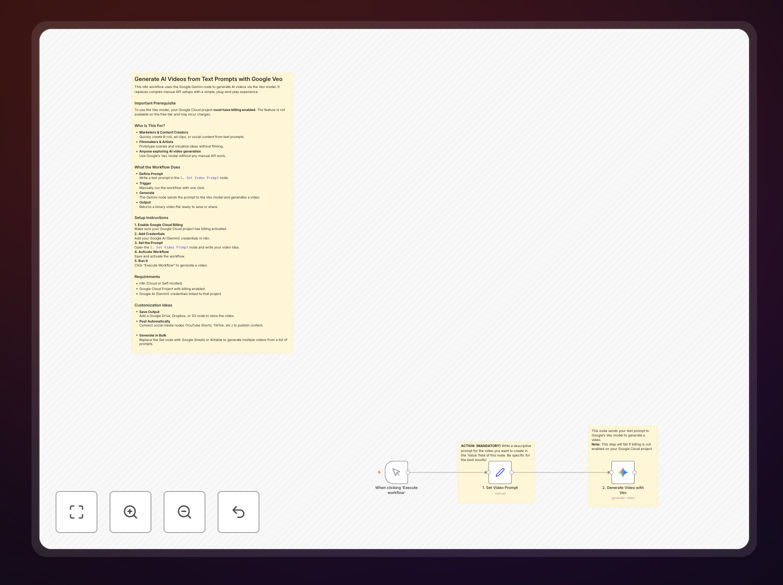
What This Workflow Does
This automation solves the time-consuming challenge of creating visual content from scratch. Instead of hiring videographers, scheduling shoots, and editing footage, you can generate professional-quality videos directly from text descriptions. The workflow connects Google's powerful Veo AI model through n8n, turning creative prompts into ready-to-use video assets in minutes.
Whether you need social media clips, product demonstrations, training materials, or creative prototypes, this system eliminates the technical complexity of API integration. It provides a simple interface where you input text and receive video files, making advanced AI video generation accessible to marketing teams, content creators, and businesses without technical expertise.
How It Works
1. Input Your Video Concept
The workflow starts with a simple text prompt describing your desired video. You can specify scenes, actions, styles, and duration. The system accepts natural language descriptions, making it accessible to anyone regardless of technical background.
2. Process Through Google Veo
Your prompt is sent securely to Google's Veo model via the Gemini API. The AI analyzes the text, understands the visual requirements, and generates corresponding video frames with appropriate motion, lighting, and composition.
3. Generate and Return Video
The model creates a complete video file based on your specifications. The workflow receives this file and prepares it for download or further processing, handling all the technical API communication automatically.
4. Deliver and Store Results
The final video is output as a downloadable file. You can immediately use it for your projects or connect additional steps to automatically upload to cloud storage, social media platforms, or content management systems.
Pro tip: Start with detailed prompts including scene descriptions, camera angles, and mood. The more specific your input, the better the AI can match your vision. Experiment with different styles before settling on final production parameters.
Who This Is For
This automation is ideal for marketing teams needing quick social media content, content creators producing regular video material, e-commerce businesses showcasing products, educators developing training materials, and agencies prototyping concepts for clients. It's particularly valuable for businesses that produce video content regularly but lack the budget for continuous professional production.
Small businesses and startups benefit from the cost savings, while larger organizations appreciate the scalability and consistency. Even individual creators and influencers can use this to maintain consistent content output without technical video editing skills.
What You'll Need
- n8n instance (cloud or self-hosted) with active subscription
- Google Cloud Project with billing enabled (Veo requires paid access)
- Google AI Studio credentials with Gemini API access
- Basic understanding of your video requirements and target audience
- Storage solution for generated videos (optional but recommended)
Quick Setup Guide
Follow these steps to implement this automation in your workflow:
- Import the template into your n8n instance using the downloaded JSON file
- Configure Google credentials in the Gemini node with your API key from AI Studio
- Set your video prompt in the designated node with your desired description
- Test the workflow with a simple prompt to verify connectivity and output
- Activate and schedule the workflow for regular use or trigger manually as needed
- Add integration nodes to automatically save videos to your preferred storage
Important: Google Veo currently requires billing-enabled Google Cloud projects. Ensure your project has sufficient quota and budget allocated before production use to avoid service interruptions.
Key Benefits
Reduce video production time from days to minutes. What traditionally required planning, filming, and editing now happens automatically with text input. This accelerates content cycles and enables rapid iteration.
Cut production costs by 80-90% compared to traditional methods. Eliminate expenses for equipment, locations, crew, and post-production while maintaining professional output quality for many use cases.
Scale content creation without proportional cost increases. Generate hundreds of variations for A/B testing or personalized videos for different audience segments with minimal additional effort.
Maintain consistent quality and brand alignment. Once optimized, the AI produces reliably consistent results that match your established style guidelines and quality standards.
Enable non-technical team members to create professional video. Remove the technical barrier to video production, allowing marketers, content strategists, and subject matter experts to directly create visual content.