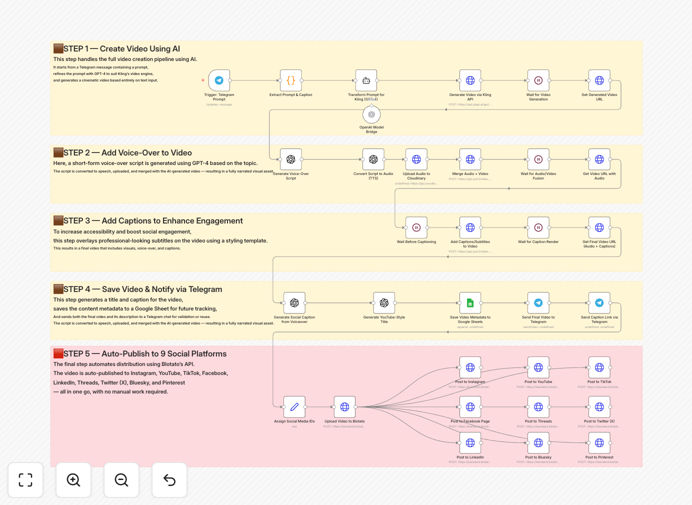
What This Workflow Does
This automation solves the massive time drain of creating and distributing video content across multiple social platforms. Instead of spending hours scripting, filming, editing, and manually posting to each platform, this workflow transforms a simple text message into a fully produced, published social video in minutes.
The system leverages cutting-edge AI tools: GPT-4 transforms your idea into a detailed video script and scene description, Kling AI generates the actual cinematic video, and voice synthesis adds professional narration. Finally, it automatically publishes the finished video to Instagram, TikTok, YouTube, Facebook, LinkedIn, Threads, Pinterest, Twitter (X), and Bluesky—all triggered by a single Telegram message.
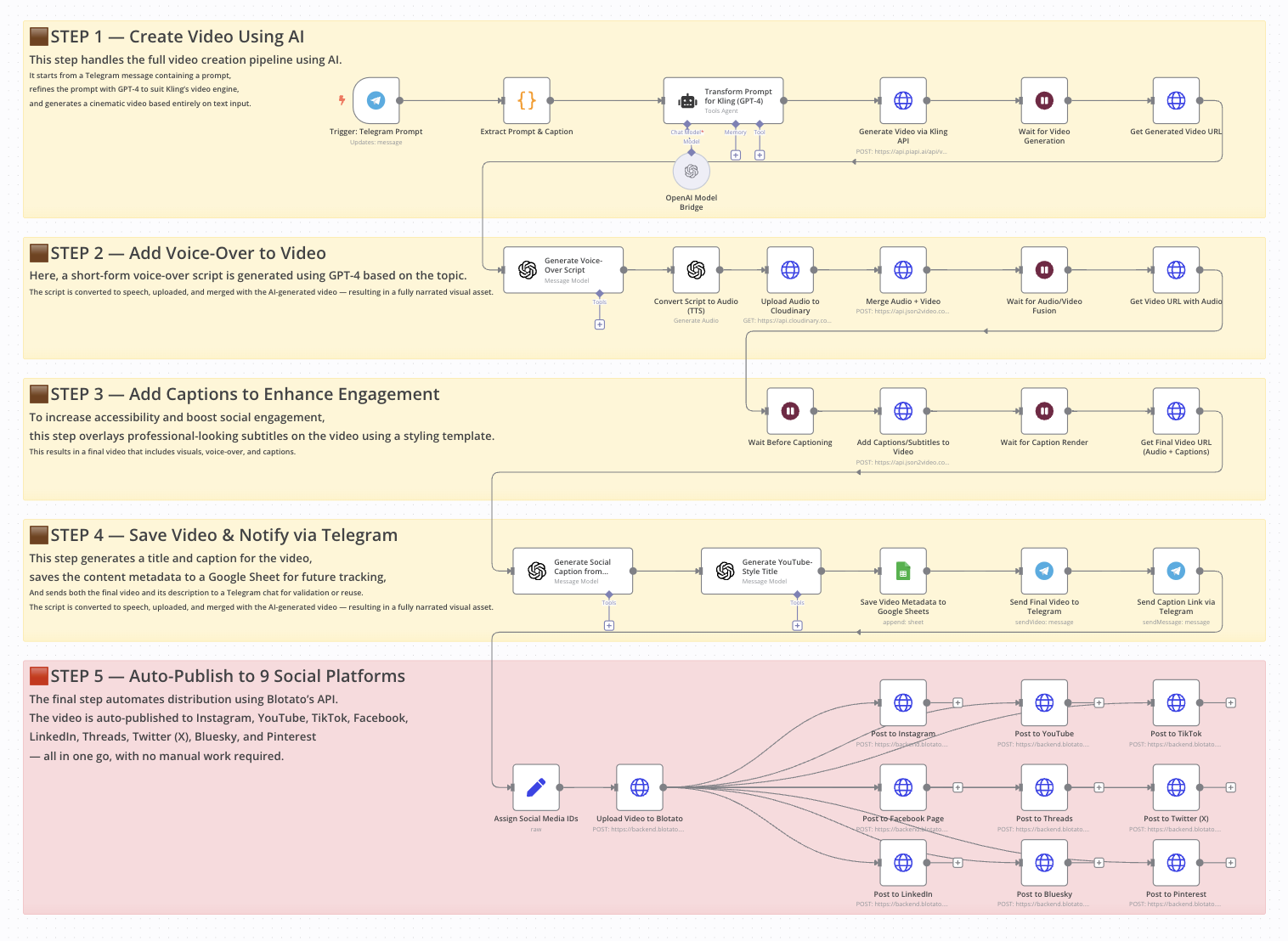
How It Works
1. Trigger & Idea Processing
You send a text message via Telegram (like "generate video A robot exploring Mars, Why AI will reshape humanity"). The workflow captures this prompt and uses GPT-4 to expand it into a detailed video scene description, script, and voiceover narrative.
2. Video Generation & Enhancement
The detailed scene description is sent to Kling AI, which generates a high-quality cinematic video. Simultaneously, the script is converted to audio using text-to-speech technology. The system then merges the video and audio, adding styled captions optimized for social media viewing.
3. Content Optimization & Distribution
GPT-4 creates engaging social captions and SEO-optimized titles. All metadata is saved to Google Sheets for tracking. Finally, the completed video package is distributed to all connected social platforms via Blotato, with a preview sent back to you via Telegram.
Pro tip: Start with one or two platforms to test your content performance before enabling all nine. This helps you refine your AI prompts and video style based on actual engagement data.
Who This Is For
This workflow is ideal for content creators, social media managers, marketing agencies, and business owners who need to maintain an active video presence across multiple platforms. If you're creating educational content, product demos, thought leadership pieces, or brand storytelling videos, this automation can save you dozens of hours weekly.
It's particularly valuable for solopreneurs and small teams who lack dedicated video production resources but want to compete with larger organizations' content output. The system also benefits automation enthusiasts who want to explore the intersection of AI content creation and multi-platform distribution.
What You'll Need
- n8n instance (self-hosted or cloud)
- OpenAI API key for GPT-4 access
- Kling AI API access for video generation
- Telegram bot token for triggering the workflow
- Cloudinary account for audio file hosting
- JSON2Video account for video merging and captioning
- Google Sheets for metadata tracking
- Blotato API key with configured platform connections
Quick Setup Guide
1. Import the downloaded JSON file into your n8n instance.
2. Configure the Telegram Trigger node with your bot token.
3. Add your OpenAI API key to all GPT-related nodes in the workflow.
4. Set up Kling API credentials in the "Generate Video" node.
5. Connect your Cloudinary, JSON2Video, and Google Sheets accounts.
6. Configure Blotato with your social platform API keys and IDs.
7. Test the system by sending a Telegram message with your video idea.
Important: This workflow uses Community Nodes (specifically for Kling AI and Blotato), which are only available on self-hosted n8n instances. Ensure you have the necessary nodes installed before attempting to run this automation.
Key Benefits
Save 10-20 hours per week on video content creation and distribution. What typically takes hours of manual work happens automatically in minutes.
Maintain consistent posting across all your social channels without the mental overhead of remembering to post to each platform individually.
Scale your content production without scaling your team. One person can manage what would normally require a small production team.
Test content variations rapidly by generating multiple versions of a video concept and seeing which performs best across platforms.
Centralized tracking and analytics through Google Sheets integration, giving you a single source of truth for all your video content performance.