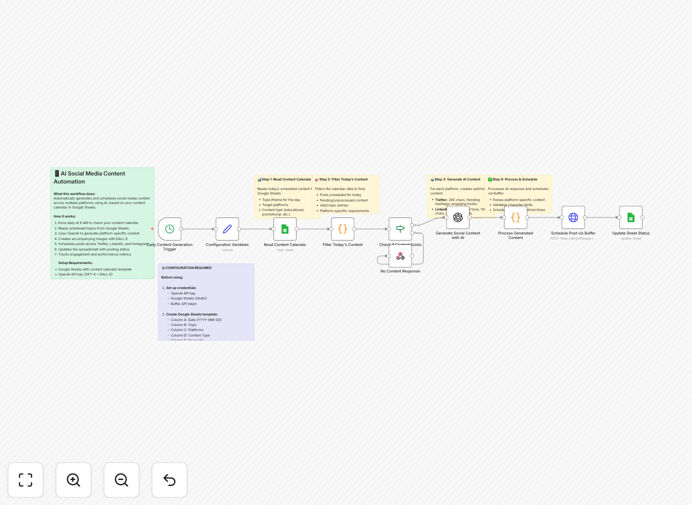
What This Workflow Does
Maintaining a consistent, engaging social media presence is a major time sink for marketing teams. This workflow solves that by automating the entire process from content planning to publication.
It reads your content calendar from a Google Sheet, uses OpenAI's GPT-4 to generate platform-specific posts (tailored for Twitter, LinkedIn, Instagram), creates matching images with DALL-E, and then schedules everything through Buffer at optimal times. The system runs daily, ensuring your social channels are always active with fresh, on-brand content.
This eliminates manual copy-pasting, reduces creative burnout, and turns social media management from a daily chore into a set-and-forget system that works while you focus on strategy.
How It Works
Step 1: Read the Content Calendar
The workflow triggers daily (e.g., at 9 AM) and fetches the day's content topics from your designated Google Sheet. It identifies what needs to be posted, for which platforms, and any specific keywords or instructions.
Step 2: Generate AI Content
For each topic, it calls GPT-4 with tailored prompts to create engaging posts. It crafts concise threads for Twitter, professional insights for LinkedIn, and visual storytelling captions for Instagram. Simultaneously, DALL-E generates accompanying images based on your brand style.
Step 3: Format & Schedule
The generated content is formatted with appropriate hashtags, character limits, and calls-to-action. The workflow then uses the Buffer API to schedule each post to the correct social profile at the times you've predefined.
Step 4: Update & Notify
Finally, it updates the Google Sheet with status (scheduled), includes previews of the generated content and image URLs for your records, and can send a Slack notification to your team for visibility.
Who This Is For
This automation is ideal for marketing teams, social media managers, content creators, solopreneurs, and small to medium businesses that want to maintain a professional social presence without the daily manual effort.
It's particularly valuable for agencies managing multiple client accounts, startups with lean teams, and any business that uses content marketing as a growth channel. If you're spending more than 5 hours a week on social media posting, this workflow will give you that time back.
What You'll Need
- A Google account with access to Google Sheets (to host your content calendar).
- An OpenAI API key with access to GPT-4 and DALL-E (for content and image generation).
- A Buffer account with your social media profiles (Twitter, LinkedIn, Instagram) connected.
- An n8n instance (either self-hosted or a cloud subscription) to run the automation.
- Optional: A Slack workspace for success notifications.
Quick Setup Guide
- Download the template using the button above and import it into your n8n workspace.
- Create your content calendar in Google Sheets using the provided template structure (Date, Topic, Platforms, Keywords, Status).
- Configure credentials in n8n: Add your OpenAI API key, set up Google Sheets OAuth2, and add your Buffer API token.
- Update configuration variables in the workflow: Insert your Google Sheet ID, define your brand voice, and set target audience details.
- Connect Buffer profiles and ensure the workflow nodes point to the correct profile IDs for each social platform.
- Test with a dummy entry by adding a test topic for tomorrow in your sheet and running the workflow manually to verify everything works.
- Activate the schedule to run daily and enjoy automated social media content.
Pro tip: Start by automating just one platform (like LinkedIn) to validate the system. Once you're confident, expand to other networks. This reduces complexity during initial setup.
Key Benefits
Save 5–10 hours per week. Eliminate the daily grind of brainstorming, writing, formatting, and manually scheduling posts across multiple platforms.
Ensure brand consistency. AI follows your predefined voice and style guidelines, producing on-brand content every time, reducing the risk of off-message posts.
Scale content production effortlessly. What used to take a full day can now be handled by the automation in minutes, allowing you to increase posting frequency without adding staff.
Improve engagement with optimized timing. By scheduling posts through Buffer for platform-specific optimal times, you increase the likelihood of visibility and interaction.
Create a reliable, auditable process. Everything is tracked in your Google Sheet—what was generated, when it was scheduled, and what image was used—providing full transparency.