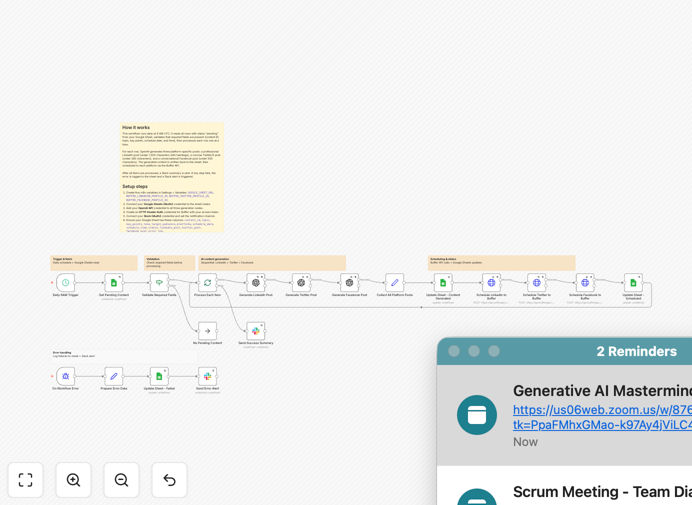
What This Workflow Does
Manual social media management consumes valuable time that could be spent on strategy and engagement. This automation solves that by creating a complete content pipeline that turns raw ideas into published posts without manual intervention.
The workflow reads content ideas from a Google Sheet, uses OpenAI's GPT to generate platform-optimized posts for LinkedIn, X (Twitter), and Facebook, then schedules them via Buffer. It includes error handling, Slack notifications, and batch processing for multiple content pieces at once.
Businesses using this system report saving 5-10 hours per week on social media management while maintaining a consistent, professional presence across all platforms.
How It Works
1. Content Ingestion
The workflow starts by reading content ideas from your Google Sheet. Each row contains topic ideas, target platforms, tone preferences, and any specific hashtags or calls-to-action you want included.
2. AI Content Generation
OpenAI processes each idea, creating unique posts tailored to each platform's requirements—shorter, punchier content for X, professional tone for LinkedIn, and engaging visuals suggestions for Facebook.
3. Platform Optimization
The system automatically adjusts character counts, adds relevant hashtags, and formats posts according to each platform's best practices before sending them to Buffer for scheduling.
4. Scheduling & Publication
Buffer receives the optimized posts and schedules them according to your predetermined calendar. The workflow can handle multiple posts across different dates and times in a single run.
5. Error Handling & Notifications
If any step fails, the workflow logs the error in your Google Sheet and sends a Slack notification to your team, ensuring you never miss a scheduled post due to technical issues.
Pro tip: Create a "content ideas" channel in Slack where team members can submit post ideas. Use another automation to add these directly to your Google Sheet, creating a complete idea-to-publication pipeline.
Who This Is For
This automation is ideal for marketing teams, content creators, small business owners, and agencies managing multiple social media accounts. It's particularly valuable for:
Marketing Managers who need to maintain consistent brand presence across platforms while managing limited resources. Content Teams that want to batch-create content during planning sessions and schedule it throughout the month. Agencies managing social media for multiple clients who need efficient, scalable processes. Solo Entrepreneurs who wear multiple hats and need to automate repetitive tasks to focus on business growth.
What You'll Need
- n8n instance (cloud or self-hosted) with workflow execution capabilities
- Google Sheets with edit permissions for your content ideas spreadsheet
- OpenAI API key with GPT-4 or GPT-3.5 access for content generation
- Buffer account with connected social media profiles
- Slack workspace (optional, for error notifications)
- Basic understanding of your brand voice and content guidelines
Quick Setup Guide
Follow these steps to get your automated social media pipeline running in under 30 minutes:
- Download and import the template into your n8n instance using the JSON file
- Connect your accounts by adding credentials for Google Sheets, OpenAI, and Buffer in n8n's credentials management
- Configure your Google Sheet with the required columns: Topic, Target Platforms, Tone, Hashtags, and Call-to-Action
- Set up your Slack webhook (optional) for error notifications by creating an incoming webhook in your Slack workspace
- Test with one row of content to ensure everything works before processing multiple items
- Schedule the workflow to run daily or weekly based on your content calendar needs
Pro tip: Start by automating just one platform (like LinkedIn) to get comfortable with the workflow. Once that's running smoothly, add additional platforms one at a time.
Key Benefits
Save 5-10 hours weekly on manual content creation and scheduling. What would you do with an extra half-day each week? Many businesses reinvest this time into content strategy, audience engagement, or creating higher-quality visual assets.
Maintain consistent posting across all platforms without daily effort. Consistency is key to social media algorithm favorability and audience retention. Automated scheduling ensures you never miss a post, even during busy periods or vacations.
Scale content production without adding team members. The AI can generate multiple variations of the same core idea, allowing you to A/B test messaging or repurpose content across platforms efficiently.
Reduce human error in scheduling and platform-specific formatting. The workflow automatically checks character counts, adds appropriate hashtags, and formats posts correctly for each platform's requirements.
Gain valuable insights through structured content planning and performance tracking. Since all content originates from your Google Sheet, you can easily track which ideas perform best and refine your content strategy based on data.