What This Workflow Does
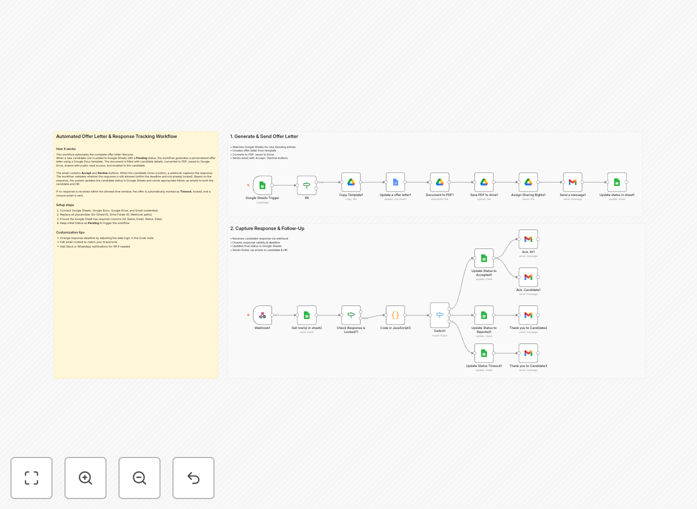
This automation transforms your hiring process by eliminating the manual work involved in creating, sending, and tracking offer letters. When a candidate reaches the offer stage, the system automatically generates a personalized offer letter using data from your Google Sheets, sends it via Gmail, and tracks the candidate's response—all without HR lifting a finger.
The workflow solves three major pain points: time-consuming document creation, error-prone manual data entry, and lack of visibility into offer status. It ensures every offer letter maintains perfect consistency with your templates while automatically updating your records when candidates respond.
How It Works
1. New candidate triggers the workflow
When you mark a candidate as "Ready for Offer" in your Google Sheets hiring tracker, the automation begins. The system pulls all relevant details like name, position, salary, and start date from your spreadsheet.
2. Document generation
Using a Google Docs template you've prepared, the workflow creates a personalized offer letter. It replaces all placeholder fields with the candidate's specific information, ensuring perfect accuracy every time.
3. Secure storage and sharing
The completed offer letter saves to a designated Google Drive folder with proper permissions. The system then emails the document to the candidate through Gmail with your standard messaging template.
4. Response tracking
When the candidate replies, the workflow analyzes their email and updates your master spreadsheet automatically. It flags accepted offers for onboarding, rejected offers for records, and negotiable terms for HR review.
Pro tip: Create multiple Google Docs templates for different job levels or departments. The workflow can select the appropriate template based on criteria in your spreadsheet.
Who This Is For
This automation is ideal for HR teams, recruiters, and hiring managers at growing companies that make 5-50 hires per year. It's particularly valuable for:
- Startups scaling their teams rapidly
- Remote companies hiring across time zones
- Businesses with complex compensation structures
- Organizations needing audit trails for compliance
What You'll Need
- A Google Workspace account with Sheets, Docs, Drive, and Gmail access
- Your candidate tracking spreadsheet in Google Sheets
- Offer letter templates in Google Docs format
- A designated Google Drive folder for finalized offers
- Zapier account to run the workflow (free plan available)
Quick Setup Guide
- Download the template file and import it to your Zapier account
- Connect your Google Workspace apps to Zapier
- Map your spreadsheet columns to the workflow fields
- Upload your offer letter templates to Google Drive
- Test with a dummy candidate record
- Go live with real candidates when you're satisfied
Key Benefits
Reduce offer processing time by 80%: What used to take 30-45 minutes per candidate now happens automatically in seconds.
Eliminate manual errors: No more copy-paste mistakes in salary figures, names, or job titles—the system pulls data directly from your source.
Real-time tracking: Know immediately when offers are viewed, accepted, or declined without checking multiple inboxes.
Scalable hiring operations: Handle 10x more offers without adding HR staff as your company grows.
Audit-ready documentation: Every offer and response is automatically filed with timestamps in your Google Drive.