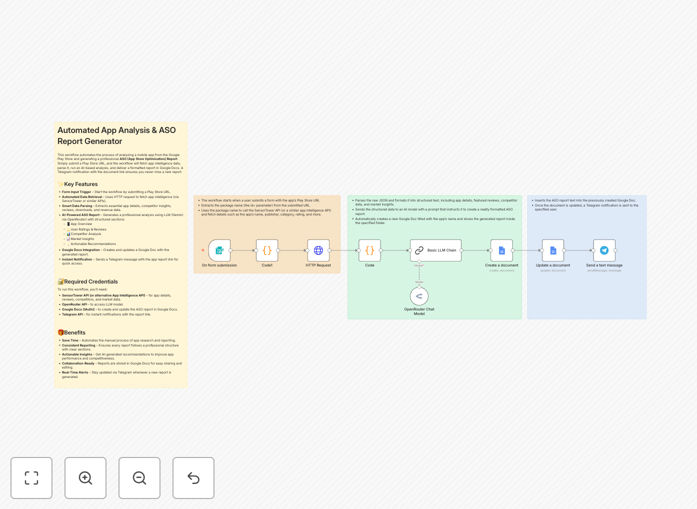
What This Workflow Does
This automation solves the time-consuming process of manually analyzing Google Play Store apps and creating App Store Optimization (ASO) reports. Mobile app developers and marketers often spend hours compiling data from various sources, analyzing competitor strategies, and formatting reports - tasks that can be fully automated.
The workflow connects to Google Play Store data, processes it through Gemini AI for intelligent analysis, and generates comprehensive ASO reports in Google Docs format. It transforms raw app data into actionable insights with minimal manual intervention, saving teams countless hours each month.
How It Works
1. Google Play Data Extraction
The workflow begins by pulling relevant data from specified Google Play Store app listings. This includes metadata, descriptions, screenshots, ratings, reviews, and competitor information.
2. AI-Powered Analysis
Gemini AI processes the extracted data to identify optimization opportunities, analyze review sentiment, compare against competitors, and highlight key trends. The AI evaluates factors like keyword usage, conversion potential, and visual asset effectiveness.
3. Report Generation
The analyzed data is structured into a professional ASO report format in Google Docs. The template includes sections for executive summary, keyword analysis, competitor benchmarks, visual asset recommendations, and action items.
4. Automated Distribution
Completed reports can be automatically shared with stakeholders via email or saved to designated Google Drive folders. The workflow can be scheduled to run at regular intervals or triggered by specific events.
Who This Is For
This workflow is ideal for mobile app developers, ASO specialists, and digital marketing teams managing multiple apps. It's particularly valuable for:
- App publishers with frequent updates needing regular ASO tracking
- Agencies managing ASO for multiple client apps
- Product managers overseeing app growth strategies
- Startups needing to compete effectively with limited resources
What You'll Need
- n8n account with API access
- Google Cloud Platform credentials for Play Store API
- Gemini AI API access
- Google Workspace account for Docs integration
- Target app's Google Play Store URL
Quick Setup Guide
- Download and import the JSON template into your n8n instance
- Configure Google Play Store API credentials
- Set up Gemini AI API connection
- Connect your Google Docs account
- Specify target apps and report recipients
- Test with one app before scheduling regular runs
Key Benefits
Save 10+ hours per month by automating manual ASO analysis and report generation tasks.
Improve decision speed with AI-powered insights delivered consistently without human bias.
Enhance collaboration through automatically generated Google Docs that teams can comment on and edit.
Scale ASO efforts across multiple apps without proportional increase in workload.
Stay competitive with regular, data-driven optimizations based on latest market trends.