What This Workflow Does
Email overload is a universal productivity killer. Professionals spend an average of 3.1 hours daily managing their inbox, often missing critical information buried in lengthy threads. This n8n automation solves that problem by creating an intelligent daily digest that transforms chaos into clarity.
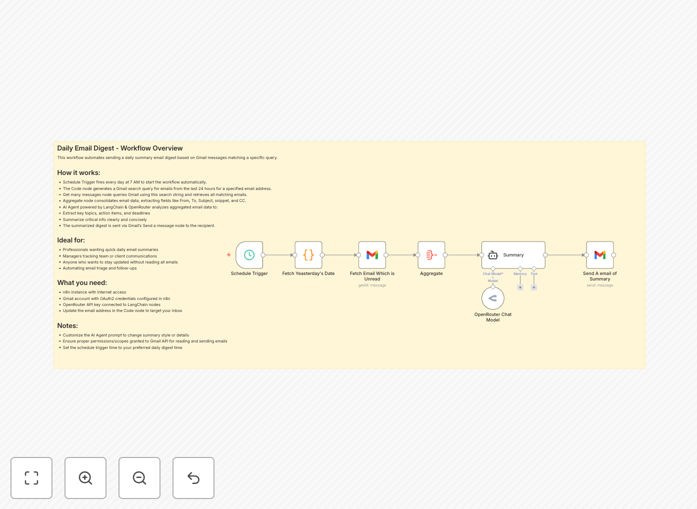
The workflow automatically fetches your Gmail messages from the past 24 hours, processes them through AI-powered analysis, and delivers a structured summary to your inbox every morning. It extracts key information like action items, deadlines, important topics, and urgent matters—presenting everything in an easy-to-scan format that saves you from manually reading through dozens of emails.
How It Works
The automation follows a logical sequence that mimics how an efficient assistant would process your emails, but with AI-powered consistency and speed.
Step 1: Scheduled Email Collection
Every morning at 7 AM (configurable to any time), the workflow triggers and connects to your Gmail account. It retrieves all emails from the previous 24 hours, applying any filters you've configured to focus on priority messages or exclude certain senders.
Step 2: Data Preparation
The system extracts key metadata from each email: sender information, subject lines, timestamps, and message snippets. This structured data is prepared for AI processing, ensuring the model receives clean, organized input for accurate analysis.
Step 3: AI-Powered Analysis
Using OpenRouter's GPT models via LangChain integration, the AI analyzes the collected emails. It identifies patterns, extracts action items, recognizes deadlines, categorizes topics, and determines urgency levels—transforming raw email data into meaningful insights.
Step 4: Digest Generation
The AI generates a professionally formatted summary organized by priority. The digest includes sections for urgent matters, action items with deadlines, key discussion topics, and reference information—all presented in a clear, scannable format that takes minutes to absorb instead of hours.
Step 5: Delivery
The final digest is sent back to your Gmail inbox (or any specified email address) with a clear subject line indicating it's your daily summary. You receive it before your workday begins, giving you immediate visibility into what matters most.
Who This Is For
This automation delivers exceptional value for busy professionals across various roles. Executives and managers who oversee multiple projects can quickly grasp team status without reading every thread. Sales professionals managing client communications can identify opportunities and urgent requests instantly. Customer support leads can track emerging issues and sentiment trends. Remote team members coordinating across time zones can catch up on overnight developments efficiently.
Anyone receiving 30+ daily emails will experience immediate productivity gains. The system is particularly valuable for roles where missing a single email can have significant consequences—ensuring nothing important slips through the cracks while dramatically reducing time spent on email management.
What You'll Need
- n8n instance (cloud or self-hosted) with workflow execution capabilities
- Gmail account with API access enabled (standard Gmail or Google Workspace)
- OpenRouter API key for AI processing (affordable pay-per-use model)
- Basic understanding of n8n interface for credential setup
- 10-15 minutes for initial configuration and testing
Pro tip: Start with a test email folder before processing your main inbox. Create a label like "AI Digest Test" and configure the workflow to only process emails with that label initially. This lets you verify the summary quality before going live with all your emails.
Quick Setup Guide
Getting this automation running takes just a few simple steps. The template is designed for quick implementation with minimal technical knowledge required.
- Download and import the JSON template into your n8n instance using the import workflow feature
- Configure Gmail credentials in n8n's credential manager, ensuring proper API permissions are granted
- Add your OpenRouter API key to the AI agent node (sign up at openrouter.ai if needed)
- Update email addresses in the code node and send summary node to match your accounts
- Test with a single email by temporarily adjusting the schedule trigger to manual execution
- Activate the workflow once you're satisfied with the test results
- Refine over time by adjusting the AI prompt or adding email filters based on your preferences
Key Benefits
Recover 2.5+ hours weekly previously spent scanning emails. The average professional saves 30+ minutes daily, which compounds to 130 hours annually—time better spent on strategic work or personal activities.
Never miss critical information buried in lengthy threads. AI analysis identifies important content humans might overlook during quick scanning, ensuring action items and deadlines receive proper attention regardless of email length or complexity.
Reduce morning cognitive load by starting your day with clarity instead of chaos. The digest provides immediate focus, eliminating the stressful "where do I begin" feeling that comes with an overflowing inbox.
Improve response times to urgent matters by surfacing them immediately. Time-sensitive requests get highlighted at the top of your summary, allowing you to address them before they become problems.
Create searchable records of daily communications. The summaries serve as excellent reference material for tracking decisions, commitments, and discussions over time—much more efficient than searching through hundreds of individual emails.
Pro tip: Customize the AI prompt in the LangChain agent to match your industry terminology. Adding specific keywords, project names, or priority indicators helps the AI better understand what's important in your context, significantly improving summary relevance.