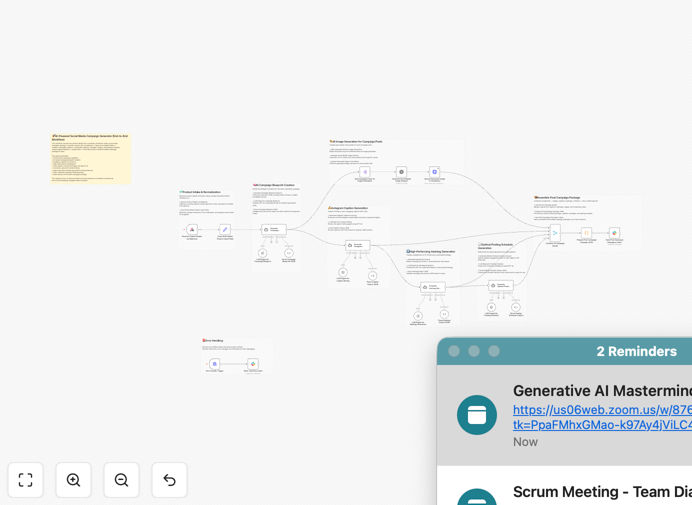
What This Workflow Does
Marketing teams spend countless hours crafting social media campaigns—writing captions, designing images, researching hashtags, and planning posting schedules. This workflow eliminates that manual labor by automating the entire creative production pipeline.
It accepts raw product inputs via a webhook, cleans and structures the data, then uses a sequence of AI agents to generate a strategic campaign blueprint, Instagram‑ready captions, discovery‑optimized hashtags, photorealistic commercial images via DALL·E 3, and a time‑zone‑aware posting schedule. All outputs are validated against strict JSON schemas, merged into a unified campaign package, and delivered directly to a Slack channel for human review and approval.
This turns a days‑long creative process into a minutes‑long automated one, giving brands the ability to launch campaigns faster, test more ideas, and scale content production without hiring additional designers or copywriters.
How It Works
1. Receive & Sanitize Product Inputs
A webhook trigger captures incoming product details (name, description, benefits, audience, brand voice). A cleanup node sanitizes escaped characters, trims whitespace, and prepares stable fields for AI consumption.
2. Generate Campaign Blueprint
GPT‑4o analyzes the sanitized inputs and produces a structured JSON blueprint containing article summary, key insights, tone mapping, target audience breakdown, and platform‑specific post objects.
3. Create Instagram Captions & Hashtags
Separate AI agents generate five short, conversion‑ready captions with CTAs, plus 12–18 hashtags categorized by discovery strategy (broad, mid, niche). Each output is parsed and validated.
4. Produce Commercial Images
The workflow splits the campaign posts, sends tailored image prompts to DALL·E 3, and requests ultra‑realistic, 8K‑style commercial visuals. Generated images are uploaded to Cloudinary for hosting.
5. Compute Optimal Posting Schedule
Another AI agent recommends the best posting time per platform, considering audience behavior and timezone (Asia/Kolkata). The schedule includes reasoning and is structured for downstream use.
6. Merge & Deliver to Slack
A post‑processing module merges Cloudinary image URLs, captions, hashtags, and schedules into a final JSON payload. This unified campaign package is formatted and sent to a designated Slack channel for immediate creative review.
7. Error Handling
A dedicated error‑handler trigger captures any workflow failures and sends structured debugging information to Slack, ensuring issues are flagged and resolved quickly.
Pro tip: To ensure brand consistency, include a “style guide” JSON object in your initial webhook payload. This can define color palettes, mood keywords, and visual references that the DALL·E prompts will incorporate.
Who This Is For
This automation is ideal for:
- Consumer brands launching fast‑cycle product promotions.
- Marketing agencies needing to produce high‑volume campaign content for multiple clients.
- Startups & D2C founders without in‑house design or copywriting teams.
- Social media managers looking to scale content output while maintaining quality.
- E‑commerce teams that run frequent flash sales or seasonal campaigns.
What You'll Need
- OpenAI API access for GPT‑4o and DALL·E 3.
- Cloudinary account for hosting generated images.
- Slack workspace with a bot token and a channel for campaign approvals.
- A webhook endpoint to receive product input data (can be internal or public).
- Clean, structured product input JSON containing name, description, benefits, audience, and brand voice.
Quick Setup Guide
Import and configure this workflow in under 15 minutes:
- Download the template using the button above and import it into your n8n instance.
- Configure credentials for OpenAI, Cloudinary, and Slack in the n8n credentials manager.
- Set your webhook trigger to receive product data from your CMS, e‑commerce platform, or internal form.
- Adjust AI prompts if needed—the workflow includes editable prompt templates for captions, hashtags, images, and schedules.
- Test with a sample product payload and verify the campaign package arrives correctly in your Slack channel.
- Activate the workflow and connect it to your live product launch pipeline.
Pro tip: Use the error‑handler node to monitor failures. If any AI step fails, you’ll receive a detailed Slack alert with the error context, allowing quick troubleshooting without breaking the entire campaign.
Key Benefits
Save 10–20 hours per campaign. Eliminate manual copywriting, design, hashtag research, and scheduling. The AI agents handle all creative production in minutes.
Launch campaigns faster. Turn product announcements into live social content within hours instead of days, accelerating your marketing cycle.
Ensure structured, reliable outputs. Every AI response is parsed and validated against JSON schemas, guaranteeing clean data for downstream use.
Create polished commercial visuals instantly. DALL·E 3 generates photorealistic, brand‑aligned images that would normally require a designer and hours of work.
Optimize posting strategy. The AI‑generated schedule considers audience behavior and timezone, increasing engagement potential without manual research.
Unified delivery for easy review. The entire campaign package—images, captions, hashtags, schedule—is delivered as a single Slack message, streamlining team approval.