Google Gemini Google Sheets Google Drive AI Image Generation Content Creation

Generate Consistent Styled Images from References with Google Gemini and Sheets

Automate AI-powered image creation while maintaining visual consistency across all your branded assets.

Download Template JSON · n8n compatible · Free
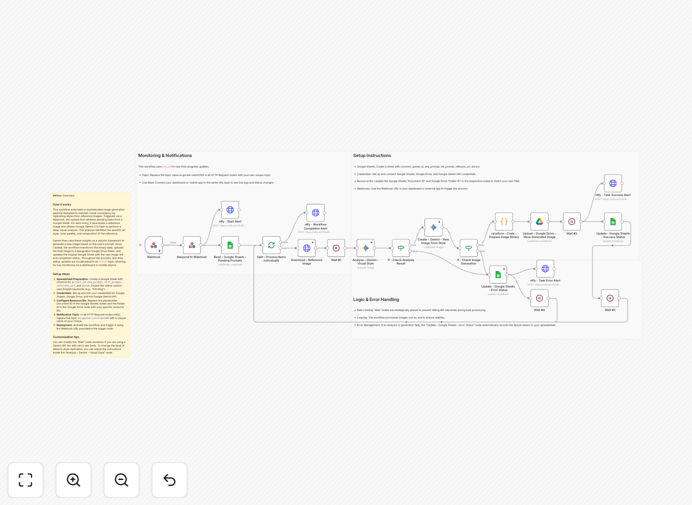
AI image generation workflow connecting Google Sheets, Gemini AI, and Google Drive

What This Workflow Does

This automation solves a critical challenge for modern content teams: producing visually consistent images at scale while maintaining brand identity. Manual image creation is time-consuming, expensive, and often results in inconsistent visuals across campaigns.

The workflow connects Google Sheets (where you manage prompts and references) with Google Gemini AI (which analyzes visual styles and generates new images) and Google Drive (where final assets are stored). It creates a complete pipeline from creative brief to finished asset without manual intervention.

When triggered, the system reads pending tasks from your spreadsheet, analyzes reference images to extract style characteristics, generates new images that match those styles, uploads them to Drive, and updates the spreadsheet with results—all while sending real-time notifications about progress.

How It Works

1. Task Management in Google Sheets

Your team maintains a Google Sheet with columns for image IDs, primary prompts, style prompts, reference image URLs, and status. This becomes your centralized content production dashboard where anyone can submit image requests.

2. Reference Image Analysis

For each pending task, the workflow downloads the reference image and sends it to Google Gemini for visual analysis. Gemini examines color palettes, composition, lighting, artistic style, and other visual characteristics that define your brand's look.

3. AI Image Generation

Using the style analysis from the reference image combined with your text prompts, Gemini generates new images that maintain visual consistency while applying your specific creative direction. The AI understands how to replicate styles rather than just copying images.

4. Asset Management & Notification

Generated images are automatically uploaded to designated Google Drive folders with proper naming conventions. The original spreadsheet is updated with download links and status, while team members receive notifications via ntfy.sh about completed tasks or any errors.

Who This Is For

This template is ideal for marketing teams producing social media graphics, e-commerce brands creating product visuals, content agencies managing multiple client campaigns, and any business needing consistent branded assets at scale.

If you're currently spending hours with designers or struggling with inconsistent visuals across platforms, this automation can transform your content production. It's particularly valuable for teams that already use Google Workspace and need to integrate AI image generation into their existing workflows.

What You'll Need

  1. Google Workspace account with access to Sheets and Drive
  2. Google Gemini API credentials (available through Google AI Studio)
  3. Self-hosted n8n instance (community nodes are used)
  4. Reference images that represent your desired visual style
  5. Organized Google Sheet with proper column structure for task management

Pro tip: Start with 3-5 high-quality reference images that perfectly represent your brand style. The AI learns better from clear, consistent examples than from dozens of mixed-quality references.

Quick Setup Guide

  1. Import the template into your n8n instance using the downloaded JSON file.
  2. Configure credentials for Google Sheets, Google Drive, and Google Gemini in n8n's credentials management.
  3. Update spreadsheet IDs in the Google Sheets nodes with your actual document and folder IDs.
  4. Customize notification settings by replacing the ntfy.sh topic with your unique channel.
  5. Test with sample data by adding a few rows to your Google Sheet with prompts and reference URLs.
  6. Activate the workflow and trigger it via webhook or schedule it to run automatically.

Key Benefits

Reduce image production time from hours to minutes. What previously required designer back-and-forth now happens automatically, freeing your team for higher-value creative strategy.

Maintain perfect brand consistency across all assets. The AI analyzes and replicates your visual style precisely, ensuring every generated image aligns with your brand guidelines.

Scale content production without scaling costs. Generate hundreds of variations for A/B testing, localized campaigns, or seasonal promotions without additional design resources.

Centralize creative workflow management. Keep all prompts, references, and assets organized in familiar Google tools that your team already knows how to use.

Real-time visibility into production status. Track what's in progress, what's completed, and what needs attention through automated spreadsheet updates and notifications.

Frequently Asked Questions

Common questions about AI image generation automation and integration

AI-powered image generation uses artificial intelligence to create visuals based on text prompts. For businesses, this means producing marketing graphics, social media content, product mockups, and branded assets without hiring designers or photographers.

It dramatically reduces content creation costs and speeds up production from days to minutes while maintaining brand consistency. Teams can experiment with multiple visual concepts quickly and personalize images for different audience segments at scale.

  • Eliminates dependency on designer availability
  • Enables rapid iteration and A/B testing
  • Scales personalized content creation

Google Gemini offers strong multimodal capabilities that understand both text and visual references. Unlike standalone image generators, Gemini can analyze existing images to extract style elements like color palettes, composition, and artistic techniques.

This makes it particularly valuable for maintaining brand consistency across multiple assets when you have reference images to guide the AI. For business use, Gemini's integration with Google's ecosystem (Sheets, Drive) creates smoother workflow automation compared to standalone AI tools.

  • Better at understanding and replicating specific visual styles
  • Seamless integration with Google Workspace tools
  • Strong multimodal understanding of text+image relationships

Google Sheets provides a structured, collaborative environment to manage image generation tasks at scale. Teams can maintain prompt libraries, track generation status, manage approvals, and organize assets—all within a familiar spreadsheet interface.

This workflow automation connects Sheets data directly to AI generation, creating a complete pipeline from brief to final asset without manual intervention. Non-technical team members can submit requests through simple spreadsheet entries while the automation handles the complex AI interactions.

  • Familiar interface reduces training requirements
  • Enables collaboration across departments
  • Provides audit trail of all generation requests

Automating image generation delivers three key benefits: massive time savings (minutes instead of hours per image), consistent brand application (AI follows style guidelines precisely), and scalability (generate hundreds of variations for A/B testing or localized campaigns).

Businesses can respond faster to market trends, personalize content at scale, and maintain visual coherence across all customer touchpoints. The automation also creates predictable production timelines and reduces the creative bottleneck that often slows down marketing campaigns.

  • 80-90% reduction in image production time
  • Perfect brand consistency across all assets
  • Unlimited scalability for campaigns and testing

Start by providing high-quality reference images that represent your brand's style. Use detailed prompts specifying colors, composition, mood, and key visual elements. Implement approval workflows where generated images are reviewed against brand guidelines.

Over time, build a library of approved prompts and references that consistently produce on-brand results, creating a repeatable system for all future content. The more specific your guidance and the better your reference images, the more consistent the AI output will be.

  • Curate a library of 5-10 perfect reference images
  • Develop detailed prompt templates for different asset types
  • Implement human review for critical brand assets

E-commerce brands need product visuals and marketing graphics. Content creators require social media posts and blog illustrations. Marketing agencies produce client assets across multiple campaigns. SaaS companies need UI mockups and documentation visuals.

Educational platforms create course materials and presentations. Any business producing regular visual content at scale can benefit from automating this process. The ROI is particularly strong for companies with frequent content needs, multiple brands to support, or limited design resources.

  • E-commerce: product images, ads, social media
  • Agencies: client campaign assets
  • Content teams: blog graphics, social posts

Yes, GrowwStacks specializes in building custom AI automation solutions tailored to your specific business needs. We can design workflows that integrate with your existing tools, implement brand-specific style guidelines, create approval processes, and scale the system to handle your content volume.

Our team handles everything from initial consultation to deployment and ongoing optimization. We'll work with your marketing and design teams to understand your brand requirements and build a system that fits seamlessly into your existing workflows while delivering maximum efficiency gains.

  • Custom integration with your current tech stack
  • Brand-specific style training and optimization
  • Ongoing support and workflow enhancements

Need a Custom AI Image Generation Automation?

This free template is a starting point. Our team builds fully tailored automation systems for your specific business needs.