What This Workflow Does
Construction estimators and BIM managers spend countless hours manually measuring wall volumes, counting elements, and compiling quantity takeoff reports from Revit and IFC models. This tedious process is prone to human error, difficult to update with design changes, and creates bottlenecks during bidding and procurement phases.
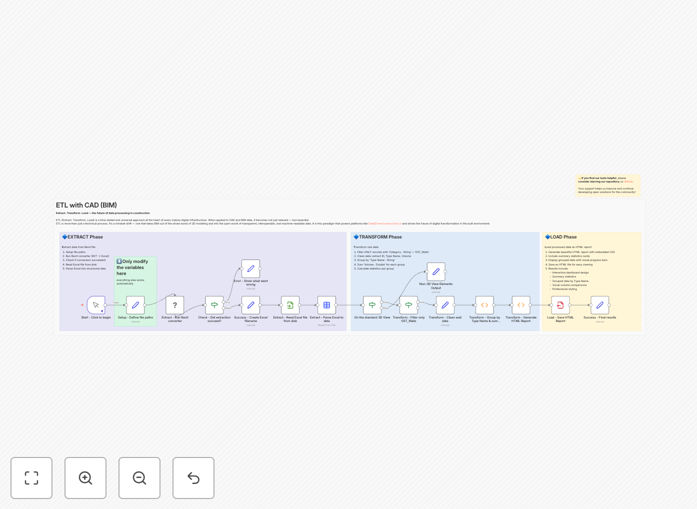
This n8n workflow automates the entire quantity extraction process. It reads Revit or IFC files, analyzes wall elements by type, calculates volumes and areas, and generates a professional, interactive HTML report ready for stakeholders. What used to take days of manual work now happens in minutes with consistent, auditable results.
The automation transforms static BIM data into actionable business intelligence. Project teams get immediate access to material quantities without needing Revit licenses, while estimators gain more time for value engineering and cost analysis rather than basic measurement tasks.
How It Works
Step 1: File Input & Data Extraction
The workflow accepts Revit (.rvt) or IFC files as input. It parses the BIM model structure, identifies wall elements, and extracts key parameters including type names, dimensions, materials, and geometric properties. This happens through specialized nodes that understand construction data formats.
Step 2: Quantity Calculation & Aggregation
Element volumes are calculated based on extracted geometry. The workflow groups walls by type (e.g., "Exterior Wall - Brick", "Interior Partition - Drywall") and aggregates totals for each category. It also computes summary statistics including total elements, overall volume, and average wall dimensions.
Step 3: HTML Report Generation
A dynamic HTML dashboard is created with interactive charts, sortable tables, and filterable data visualizations. The report includes a breakdown by wall type, volume distribution charts, and detailed element listings. The output is a standalone HTML file that opens in any browser.
Step 4: Output & Distribution
The completed HTML report is saved to a specified location and can be automatically distributed via email, uploaded to project management systems, or archived with project documentation. The workflow creates a complete audit trail of the extraction process.
Who This Is For
Construction Estimators: Professionals who need accurate, fast quantity takeoffs for bidding and cost planning. Automation gives them competitive advantage during tight bid deadlines.
BIM Managers & Coordinators: Teams responsible for model data extraction and reporting across projects. This workflow standardizes quantity reporting across their organization.
General Contractors: Firms that need to verify subcontractor quantities, track material procurement, and maintain as-built documentation throughout project lifecycle.
Engineering Consultants: Structural, MEP, and facade engineers who require precise material quantities from architectural models for their design calculations and specifications.
Owners & Developers: Organizations that want transparent, accessible quantity data for project oversight, value engineering, and facility management purposes.
What You'll Need
- n8n Instance: A running n8n installation (cloud or self-hosted) with appropriate resources to process BIM files.
- BIM Files: Revit (.rvt) or IFC files with properly modeled wall elements and type parameters.
- Storage Access: Read access to source files and write access for generated HTML reports.
- Basic n8n Knowledge: Familiarity with workflow import, node configuration, and credential setup.
- Optional Integrations: Connections to project management software (Procore, PlanGrid), cloud storage (Google Drive, SharePoint), or email systems for automated distribution.
Pro tip: Before running automation on production models, test with a sample file to verify parameter mapping. Ensure wall types are consistently named in your Revit templates for accurate grouping in reports.
Quick Setup Guide
- Download & Import: Download the template JSON file and import it into your n8n instance via the workflow import function.
- Configure File Input: Set the source node to point to your Revit/IFC file location (local path, cloud storage, or FTP).
- Adjust Parameters: Review the extraction settings to match your model's wall categorization and unit preferences (cubic meters vs cubic feet).
- Set Output Destination: Specify where the HTML report should be saved and configure any distribution steps (email, upload to CMS).
- Test & Run: Execute the workflow with a sample model, verify the HTML output, then schedule it for regular runs or trigger via webhook when new models arrive.
Key Benefits
90% Time Reduction on Quantity Takeoffs: What traditionally takes 8-16 hours of manual measurement becomes a 15-minute automated process, freeing estimators for higher-value analysis.
Eliminate Costly Estimation Errors: Automated extraction from the BIM model source eliminates transcription mistakes, missed elements, and measurement inaccuracies that can impact project budgets by 3-5%.
Real-Time Reporting for Stakeholders: Generate interactive HTML reports that project owners, architects, and subcontractors can explore without BIM software licenses, improving collaboration and transparency.
Consistent Methodology Across Projects: Standardize your quantity takeoff process regardless of which modeler created the BIM files, ensuring apples-to-apples comparisons across bids and projects.
Scalable for Large & Complex Projects: Handle stadiums, hospitals, or high-rise buildings with thousands of wall elements that would be impractical to measure manually, with consistent processing time.