n8n Google Maps Lead Generation Google Sheets

Generate leads with Google Maps

Automate business lead generation from Google Maps API queries. This n8n workflow extracts contact details, locations, and business data, then organizes everything in Google Sheets for your sales team.

Download Template JSON · n8n compatible · Free
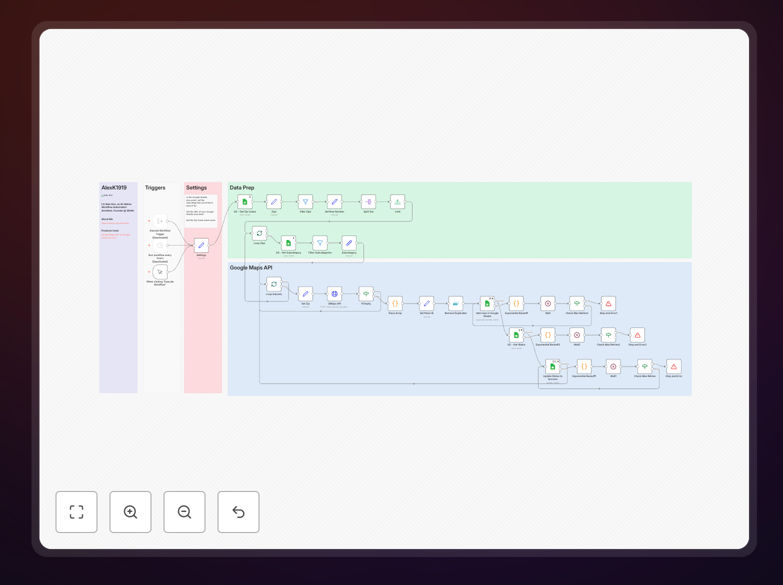
Google Maps lead generation workflow interface in n8n

What This Workflow Does

This automation solves the time-consuming process of manually searching Google Maps for potential business leads. Instead of spending hours copying and pasting contact information, the workflow programmatically queries the Google Maps API based on your search criteria (location, business category, keywords, etc.), extracts the relevant business details, and organizes everything in a Google Sheet.

The system can be configured to collect specific data points like business names, addresses, phone numbers, websites, hours of operation, and customer reviews. This creates a structured lead database that's immediately usable for sales outreach, market analysis, or partnership development.

How It Works

1. Configure search parameters

The workflow starts by accepting your target criteria - geographic coordinates or area names, business categories, keywords, and other filters. These parameters determine which businesses appear in your lead list.

2. Execute Google Maps API queries

Using n8n's HTTP Request node, the workflow makes authenticated calls to the Google Maps Places API. It handles API rate limits and pagination automatically to collect comprehensive results.

3. Extract and transform business data

The raw API responses are processed to extract only the relevant fields for your lead database. The workflow can clean and standardize data formats (phone numbers, addresses) for consistency.

4. Populate Google Sheets

Processed lead data is appended to a designated Google Sheet with proper column headers. The workflow can create new sheets or tabs for different search batches while maintaining your preferred data structure.

Who This Is For

This automation is ideal for B2B sales teams, local service providers, market researchers, and business development professionals. Specific use cases include:

  • Commercial service providers targeting local businesses (IT, cleaning, maintenance)
  • Franchise developers analyzing competitor locations
  • Marketing agencies building prospect lists for local campaigns
  • Researchers studying business distribution patterns

What You'll Need

  1. An n8n instance (cloud or self-hosted)
  2. Google Cloud Platform account with Maps API enabled
  3. Google Sheets document for lead storage
  4. Google service account credentials for API access
  5. Basic understanding of API concepts

Quick Setup Guide

  1. Download the JSON workflow file
  2. Import into your n8n instance
  3. Configure your Google Cloud API credentials
  4. Set your target search parameters (location, radius, business types)
  5. Connect to your Google Sheet and map data fields
  6. Test with a small geographic area before scaling up

Key Benefits

Save 10+ hours weekly by automating what would otherwise require manual searches and data entry for each potential lead.

Build targeted lead lists with precise geographic and categorical filters that match your ideal customer profile.

Maintain data consistency with standardized formatting across all extracted business information.

Scale your prospecting across multiple locations without proportional increases in research time.

Integrate with your CRM by using the Google Sheets output as a staging area for further automation.

Pro tip: Combine this with email finding tools to build complete contact records automatically. Schedule the workflow to run weekly for fresh leads in your target areas.

Frequently Asked Questions

Common questions about Google Maps integration and automation

Google Maps contains valuable business data including contact information, reviews, and locations. By automating data extraction from Google Maps, businesses can build targeted lead lists for sales outreach, market research, or partnership opportunities without manual searching.

For example, a commercial cleaning company could extract all office buildings in a downtown area, complete with property management contact details. The automation handles the tedious data collection while sales teams focus on converting leads.

  • Extract businesses by category, location, or keywords
  • Gather complete contact information in one step
  • Create structured data ready for CRM import

B2B service providers, local marketers, sales teams, and market researchers benefit most. Examples include commercial cleaning companies targeting offices, IT services prospecting local businesses, or franchise developers analyzing competitor locations.

Service area businesses with geographic territories find particular value. A pest control company could automatically identify all restaurants in their service area, complete with health inspection dates from reviews, to prioritize high-need prospects.

  • Best for location-dependent services
  • Ideal for businesses targeting specific verticals
  • Valuable for competitive analysis

The Google Maps API provides business names, addresses, phone numbers, websites, hours, reviews, and categories. Advanced queries can filter by location radius, business type, ratings, or keywords in reviews to create highly targeted lead lists.

Beyond basic contact info, review analysis can reveal pain points to address in sales pitches. A roofing company might prioritize businesses with reviews mentioning leaks, while a POS vendor could target restaurants complaining about slow systems.

  • Basic contact information
  • Operational details like hours
  • Customer sentiment from reviews

Automation saves hours of manual searching by programmatically querying the API, extracting relevant data points, and organizing leads in spreadsheets. It enables scaling lead generation across multiple locations while maintaining consistent data formatting for CRM imports.

A real estate agent could automate weekly searches for new business openings in their territory, receiving formatted spreadsheets with all relevant details. This transforms what was a 10-hour manual process into a 10-minute automated task with better results.

  • Eliminates repetitive manual work
  • Ensures data consistency
  • Enables large-scale prospecting

Google limits API queries to prevent abuse, requiring strategic pacing of requests. Some businesses may have incomplete profiles, and data accuracy depends on business owners updating their Google My Business listings regularly.

Certain industries like medical practices often omit direct phone numbers for privacy reasons. The automation works best when supplemented with other data sources, especially for email addresses which Google Maps typically doesn't provide.

  • API usage quotas apply
  • Data completeness varies
  • Email addresses usually unavailable

Combine Maps data with LinkedIn for decision-maker names, append email addresses using enrichment tools, and analyze review sentiment to personalize outreach. Automated workflows can trigger research steps after initial data collection.

For instance, after extracting restaurant leads, the workflow could automatically search for health inspection scores or menu prices to identify high-value targets. This creates a 360-degree view of prospects before the first contact.

  • Add contact names from LinkedIn
  • Append emails via enrichment services
  • Analyze reviews for pain points

Yes, GrowwStacks specializes in custom Google Maps automation solutions. We can build workflows tailored to your target criteria, data formatting needs, and integration with your CRM or marketing tools for seamless lead management.

Our team creates solutions that match your specific sales process - whether you need daily lead sheets for your team, automatic CRM entries, or enriched data pipelines combining multiple sources with Google Maps data.

  • Fully customized search parameters
  • Integration with your existing tools
  • Ongoing maintenance and support

Need a Custom Google Maps Integration?

This free template is a starting point. Our team builds fully tailored automation systems for your specific needs.