n8n Abyssale Blotato Social Media Marketing Automation

Automate Multi-Format Social Visuals with Abyssale & Blotato

Generate platform-specific graphics and publish them automatically across Facebook, Instagram, LinkedIn, Twitter, and more—all from a single n8n workflow.

Download Template JSON · n8n compatible · Free
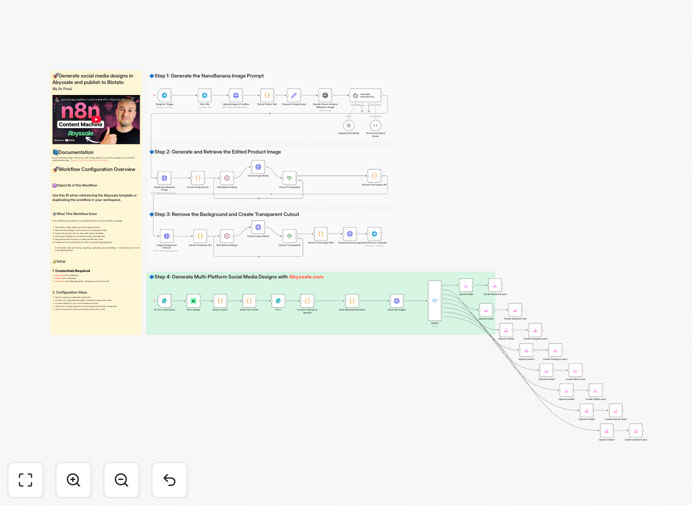
Automated social media design workflow connecting Abyssale and Blotato in n8n

What This Workflow Does

Managing social media across multiple platforms is a constant battle against time and consistency. Each network demands different image dimensions—Facebook posts, Instagram stories, LinkedIn banners, Twitter headers—forcing marketers to manually resize, reformat, and re-upload the same content. This workflow eliminates that grind.

It automates the entire social media visual pipeline: from AI-powered product image generation to template-based design creation in Abyssale, to automatic publishing across eight different social platforms via Blotato. What used to take hours of manual work now happens with a single trigger, ensuring brand consistency and freeing your team for strategic tasks.

The system handles background removal, dynamic text insertion, format-specific resizing, and channel-aware publishing—turning a product idea into a live multi-platform campaign in minutes instead of days.

How It Works

This end-to-end automation connects AI image generation, design automation, and social media publishing into one seamless process.

1. AI Product Image Generation

The workflow starts by creating a product visual using AI. You provide a text description, and the system generates a high-quality image with a transparent background, ready for placement in your designs.

2. Template-Based Design in Abyssale

The generated image is automatically injected into your pre-configured Abyssale template. The system dynamically updates text elements (like headlines, captions, CTAs) and generates all required format variations—square posts, landscape banners, story dimensions—maintaining perfect brand alignment.

3. Smart Format Routing

A switch node intelligently routes each formatted visual to its corresponding social platform. Facebook posts go to Facebook, Instagram stories to Instagram, LinkedIn graphics to LinkedIn, ensuring each platform receives the optimally sized asset.

4. Multi-Channel Publishing via Blotato

Blotato nodes handle the authenticated publishing to each connected social media account. The workflow can include captions, hashtags, scheduling, and even platform-specific optimizations, all automated.

Who This Is For

This template is ideal for marketing teams, e-commerce brands, digital agencies, and content creators who manage multiple social media accounts. If you're spending more time resizing graphics than creating strategy, this automation is for you. It's particularly valuable for:

  • E-commerce stores launching new products weekly
  • Marketing agencies managing client social accounts
  • SaaS companies with regular feature announcements
  • Content teams producing daily social content
  • Solopreneurs who want professional social presence without the design overhead

What You'll Need

  1. n8n instance (cloud or self-hosted)
  2. Abyssale account with API credentials and at least one template configured
  3. Blotato account connected to your social media platforms
  4. AI image generation API access (like AtlasCloud/NanoBanana or similar)
  5. Background removal service (often included with image generation APIs)
  6. Social media accounts you want to automate (Facebook, Instagram, LinkedIn, Twitter/X, Pinterest, TikTok)

Pro tip: Start with just 2-3 key social platforms to test the workflow before expanding to all eight channels. This lets you refine your templates and posting strategy without being overwhelmed.

Quick Setup Guide

Get this automation running in your n8n instance in under 30 minutes:

  1. Download and import the JSON template file into your n8n workspace.
  2. Configure credentials for Abyssale, Blotato, and your AI image service in n8n's credentials management.
  3. Set your Abyssale template ID in the appropriate node to use your branded design.
  4. Connect Blotato nodes to each social media account you want to publish to.
  5. Test with a simple trigger (like manual execution) to generate and publish one visual.
  6. Add your production trigger—this could be a webhook from your CMS, a scheduled timer, or a form submission.

Key Benefits

Save 10+ hours per week on manual design resizing and cross-platform posting. What used to be a multi-step, error-prone process becomes a single automated workflow.

Ensure brand consistency across all social channels. Your Abyssale templates guarantee that colors, fonts, logos, and layouts remain perfectly aligned, eliminating accidental branding deviations.

Scale content production without adding headcount. One team member can now manage social visuals for multiple brands or products simultaneously by simply adjusting input parameters.

Reduce human error in posting schedules, format specifications, and platform requirements. The automation follows your rules exactly every time.

Gain strategic flexibility by reallocating design hours to content strategy, audience engagement, and campaign analysis rather than repetitive production tasks.

Frequently Asked Questions

Common questions about social media design automation and integration

The biggest challenge is creating and resizing visuals for each platform's specific dimensions (Instagram post vs. story vs. LinkedIn, etc.) and then manually publishing them. This process is repetitive, time-consuming, and prone to human error, leading to inconsistent branding and wasted creative effort.

Marketing teams often spend more time on production than strategy. A single campaign might require 5-7 different image sizes, each needing manual adjustment in design tools before uploading to separate platforms.

Automation eliminates manual design resizing, format conversion, and cross-platform uploading. A workflow like this can turn a 2-3 hour manual task into a 5-minute automated process, freeing your team to focus on strategy and content creation instead of repetitive production work.

Beyond time savings, it ensures consistency. When you update brand colors or logos, the change propagates automatically across all future social graphics without manual redesign of each template variation.

Yes, AI image generation tools can create product visuals based on text prompts. When combined with background removal and design automation platforms like Abyssale, you can generate clean, branded product shots without a photoshoot, which is perfect for e-commerce and product launches.

The key is consistency. By using the same AI model and prompt structure, you maintain visual coherence across your product line. This approach works exceptionally well for digital products, concept visualizations, or when physical photography isn't feasible.

Abyssale allows you to maintain brand consistency across all formats by using templates. You define your brand elements once, and it automatically generates correctly sized visuals for every platform, ensuring your logo, colors, and fonts remain perfectly aligned without manual adjustment.

It also enables non-designers to produce professional graphics. Marketing teams can update text and swap images within approved templates, reducing dependency on graphic designers for every social post while maintaining quality control.

Yes, when done correctly. Using a tool like Blotato that's designed for social media API integration ensures posts go to the right accounts and platforms. You can build in approval steps or scheduling within the automation to maintain control over what gets published and when.

Best practices include starting with a private test account, implementing content validation rules, and maintaining the ability to pause automation instantly. Most social platforms have robust API systems specifically designed for this type of automated publishing.

You can extend this workflow to automatically pull content from your blog or product feed, generate performance reports, notify your team when posts go live, sync engagement metrics to a spreadsheet, or trigger follow-up actions based on post performance—creating a complete content marketing pipeline.

Consider connecting it to your CRM to share top-performing content with sales teams, or to your analytics dashboard to track ROI. The real power comes from creating interconnected systems rather than isolated automations.

  • Automatically repurpose top-performing content across channels
  • Generate UTM-tagged links for each post for precise tracking
  • Create weekly performance digests emailed to stakeholders

Absolutely. GrowwStacks specializes in building tailored automation systems for marketing teams. We can create custom workflows that integrate with your specific tech stack, incorporate your brand guidelines, add approval workflows, and connect to your analytics dashboards.

Every business has unique requirements—maybe you need integration with your product inventory, approval chains for compliance, or special reporting. We build solutions that fit your exact processes rather than forcing you to adapt to generic templates.

  • Custom integrations with your existing marketing tools
  • Multi-level approval workflows for regulated industries
  • Performance tracking and ROI measurement dashboards
  • Ongoing support and optimization as your needs evolve

Need a Custom Social Media Automation?

This free template is a starting point. Our team builds fully tailored automation systems for your specific business needs.