What This Workflow Does
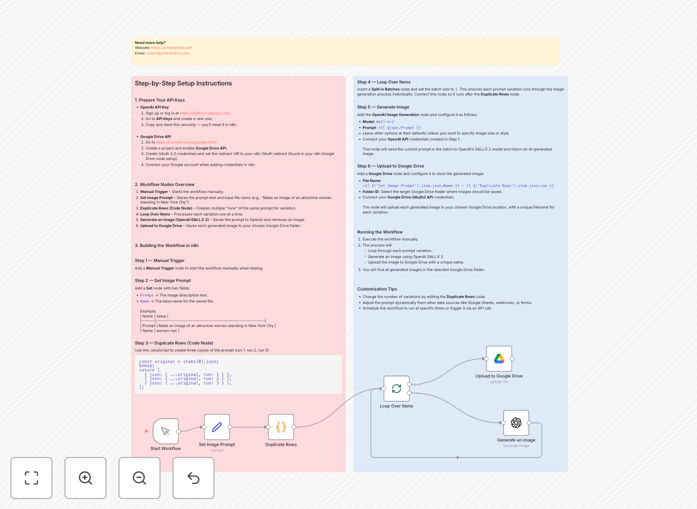
This n8n workflow solves a common bottleneck for creative teams and marketers: the manual process of generating AI images and managing the resulting files. Instead of repeatedly visiting OpenAI's platform, downloading images, and manually uploading them to cloud storage, this automation handles everything in one seamless flow.
The workflow takes a text prompt, sends it to OpenAI's DALL·E 2 to generate multiple image variations, then automatically uploads each generated image to a specified Google Drive folder with organized naming conventions. This transforms what could be hours of manual work into a fully automated process that runs in minutes.
Whether you're creating social media graphics, blog post illustrations, product mockups, or marketing materials, this automation ensures you have a steady stream of fresh visual content without the repetitive manual effort.
How It Works
The workflow follows a logical sequence that mimics what you would do manually, but with perfect consistency and speed.
1. Trigger & Input
The process begins with a manual trigger or scheduled execution. You provide a text prompt describing the image you want to create and specify how many variations you need. This could be triggered by a form submission, a spreadsheet update, or a regular schedule.
2. AI Image Generation
The workflow sends your prompt to OpenAI's DALL·E 2 API, which generates high-quality images based on your description. The automation can request multiple variations simultaneously, giving you different interpretations of your prompt to choose from.
3. File Processing & Organization
Each generated image is processed with metadata including the original prompt, generation timestamp, and variation number. The workflow creates descriptive filenames that make it easy to identify images later without opening them.
4. Automated Upload to Google Drive
The processed images are automatically uploaded to your specified Google Drive folder. The workflow can create subfolders by date, project, or category, maintaining perfect organization from day one.
5. Notification & Logging
Once complete, the workflow can send notifications via email, Slack, or other channels with previews of the generated images and links to the Google Drive folder. All activities are logged for tracking and auditing purposes.
Who This Is For
This automation is particularly valuable for marketing teams, content creators, digital agencies, e-commerce businesses, and anyone regularly producing visual content. Social media managers can generate daily post graphics, bloggers can create article illustrations, product teams can prototype concepts, and agencies can produce client assets at scale.
Small businesses without dedicated design resources benefit immensely—they can produce professional-quality visuals without design software or skills. Developers and tech teams can integrate this into larger applications to provide AI image generation as a feature to their users.
What You'll Need
- n8n instance (cloud or self-hosted)
- OpenAI API key with DALL·E 2 access
- Google Cloud Project with Drive API enabled
- Google Service Account or OAuth credentials
- Google Drive folder for storing generated images
- Basic understanding of API credentials setup
Pro tip: Create a dedicated Google Drive folder structure before setting up the workflow. Consider organizing by date, project, or content type to maintain clarity as your image library grows.
Quick Setup Guide
Follow these steps to implement this automation in your n8n environment:
- Download the template using the button above and import it into your n8n instance.
- Configure OpenAI credentials in the DALL·E 2 node with your API key.
- Set up Google Drive OAuth connection following n8n's documentation.
- Update the prompt field with your desired image description.
- Specify your target Google Drive folder ID in the Drive node.
- Test with a single image before scaling to multiple variations.
- Schedule or trigger the workflow based on your content needs.
Key Benefits
Save 80%+ time on visual content creation. What takes hours manually—prompting, downloading, renaming, uploading—happens automatically in minutes.
Ensure brand consistency by using standardized prompts and parameters across all generated images, maintaining visual coherence.
Scale content production infinitely without proportional increases in time or cost. Generate hundreds of images as easily as one.
Maintain perfect organization with automatically named, dated, and categorized files in Google Drive, eliminating file management chaos.
Integrate with other workflows—use generated images in email campaigns, social media scheduling, CMS updates, or client reports.