PDF Generation Document Automation n8n Supabase Gmail

Generate PDF documents from HTML with PDF Generator API, Gmail and Supabase

Automate professional document creation with dynamic HTML templates and seamless PDF generation

Download Template JSON · n8n compatible · Free
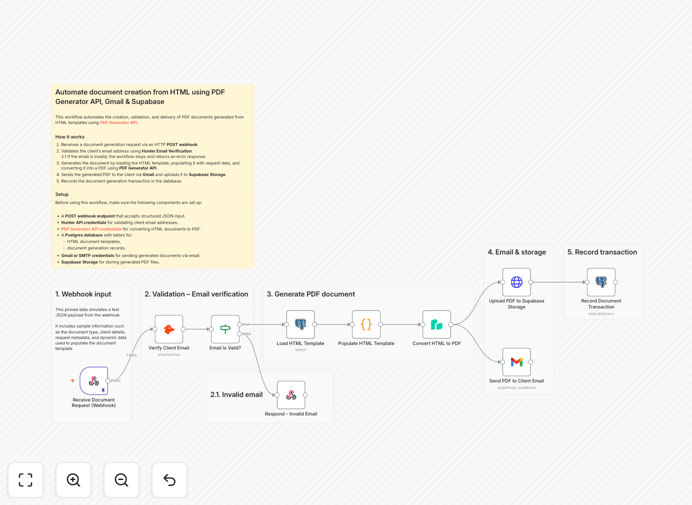
PDF generation workflow diagram

What This Workflow Does

This automation solution solves the common business challenge of manually creating PDF documents from HTML templates. Many companies waste hours each week converting contracts, invoices, reports, or other documents to PDF format, often requiring manual intervention and quality checks.

The workflow automatically converts HTML content to professional PDF documents using the PDF Generator API, stores them in Supabase for version control and easy retrieval, and can optionally email them to recipients via Gmail. It eliminates repetitive manual work while ensuring consistent document formatting and branding.

How It Works

1. HTML Template Processing

The workflow begins by processing your HTML template, which can include dynamic variables for personalized content. The template might be stored in Supabase, retrieved from a webhook, or pulled from another connected system.

2. PDF Generation

The processed HTML is sent to the PDF Generator API, which converts it to a high-quality PDF document with proper formatting, headers, footers, and page breaks. The API handles all the technical aspects of PDF rendering.

3. Document Storage

Generated PDFs are automatically stored in Supabase, creating a searchable archive with metadata like creation date, document type, and associated records. This provides version history and easy retrieval.

4. Distribution (Optional)

The workflow can optionally email the PDF as an attachment via Gmail, send download links, or trigger other actions based on your business requirements.

Who This Is For

This automation is ideal for businesses that regularly produce standardized documents like:

  • Legal firms generating contracts and agreements
  • Accounting departments creating invoices and statements
  • HR teams producing offer letters and policies
  • Marketing teams creating whitepapers and reports
  • Education institutions generating certificates and transcripts

Any organization that needs to convert HTML content to PDFs at scale will benefit from this automated solution.

What You'll Need

  1. An n8n instance (cloud or self-hosted)
  2. Access to a PDF Generator API (like PDFShift, PDFLayer, or similar)
  3. A Supabase account for document storage
  4. Gmail or other email service for distribution (optional)
  5. HTML templates for your documents

Quick Setup Guide

  1. Download the workflow template file
  2. Import it into your n8n instance
  3. Configure your PDF Generator API credentials
  4. Set up Supabase connection details
  5. Adjust Gmail settings if using email distribution
  6. Test with sample HTML content
  7. Deploy the workflow for production use

Key Benefits

Save 5-15 hours per week by eliminating manual PDF generation and document handling tasks. Automation ensures consistent output quality while freeing up staff for higher-value work.

Reduce errors by 90%+ compared to manual processes. Automated PDF generation follows the same standards every time, preventing formatting mistakes or missing information.

Instant document availability with automatic storage in Supabase. Generated PDFs are immediately available in your system with proper metadata and version control.

Scale document production effortlessly from dozens to thousands of PDFs without additional staffing. The workflow handles volume spikes with no extra effort.

Professional branding maintained across all documents. HTML templates ensure consistent fonts, colors, logos, and layouts in every generated PDF.

Pro tip: Create multiple HTML templates for different document types (invoices, contracts, reports) and use workflow logic to select the appropriate template based on your needs.

Frequently Asked Questions

Common questions about PDF generation automation and document workflows

Automating PDF generation saves significant time while improving accuracy and consistency. Manual conversion often leads to formatting errors, especially with complex layouts. Automation ensures every document follows the same professional standards.

For example, a law firm sending 50 contracts weekly could automate this process, saving 10+ hours while eliminating signature page formatting issues. The system handles scaling effortlessly during busy periods.

  • Eliminates repetitive manual work
  • Maintains brand consistency across documents
  • Reduces human error in document formatting

Yes, HTML templates can include dynamic variables that get populated with real data during PDF generation. This allows for personalized documents like invoices with client details or contracts with specific terms.

A common implementation is pulling customer data from your CRM to generate personalized proposals. The workflow replaces placeholders with actual names, dates, pricing, and other variables before creating the PDF.

  • Supports variables from databases or APIs
  • Enables conditional content blocks
  • Works with loops for repeating sections

PDF generation automation can be highly secure when properly configured. Reputable PDF APIs use encryption for data in transit and at rest. For sensitive documents, you can implement additional security measures.

Healthcare providers often use similar workflows for patient reports, adding password protection and audit trails. The key is choosing enterprise-grade tools and proper access controls for your document storage system.

  • Options for password protection
  • Watermarking for confidential documents
  • Access logs for compliance tracking

Structured documents with consistent layouts work best - contracts, invoices, certificates, reports, and forms. The system excels at high-volume, template-driven documents that require professional formatting.

Marketing teams frequently automate whitepapers and case studies, while universities handle diplomas and transcripts. Even complex documents like multi-page proposals with tables and images convert perfectly when the HTML template is properly structured.

  • Legal agreements and contracts
  • Financial statements and invoices
  • Certifications and educational documents

Yes, the workflow includes comprehensive tracking when using Supabase for storage. Each generated PDF gets metadata like creation timestamp, document type, generating user (if applicable), and status.

An accounting department might track invoice generations with client IDs and amounts, creating an audit trail. The system can also log delivery status when emails are sent, providing end-to-end visibility.

  • Full document history with timestamps
  • Searchable metadata for easy retrieval
  • Integration with analytics tools

Dedicated PDF APIs provide superior results to browser printing. They handle complex layouts, headers/footers, page breaks, and fonts consistently across all systems. Browser printing often has formatting issues and limited control.

For professional documents like legal contracts, the API approach ensures every recipient sees the document exactly as intended. Features like table of contents generation, watermarking, and PDF/A compliance aren't available in basic browser printing.

  • Precise control over page breaks
  • Support for print-specific CSS
  • Advanced features like digital signatures

Absolutely! GrowwStacks specializes in building tailored document automation solutions. While this template provides a starting point, we can develop custom workflows integrating with your specific systems and requirements.

We've built solutions for healthcare providers generating patient reports, schools creating transcripts, and manufacturers producing shipping documents. Each implementation addresses unique business rules, approval processes, and distribution needs.

  • Custom integrations with your existing software
  • Specialized templates for your document types
  • Workflows matching your business processes

Need a Custom PDF Generation Automation?

This free template is a starting point. Our team builds fully tailored automation systems for your specific needs.