What This Workflow Does
Manual cold emailing is a time-consuming bottleneck for sales teams. Generic templates get ignored, while personalized emails are impossible to scale. This automation solves that by turning hours of research into minutes of automated, intelligent outreach.
The workflow acts as a virtual sales researcher and copywriter. It takes a list of leads, enriches each profile with detailed company and role data, scrapes the prospect's website for relevant context, and then uses AI to craft unique email sections—like a personalized icebreaker, introduction, and value proposition—that resonate with each individual recipient.
This isn't just mail merge. It's a dynamic system that creates genuinely relevant emails by understanding who the person is, what their company does, and how your solution could specifically help them, dramatically increasing engagement and reply rates.
How It Works
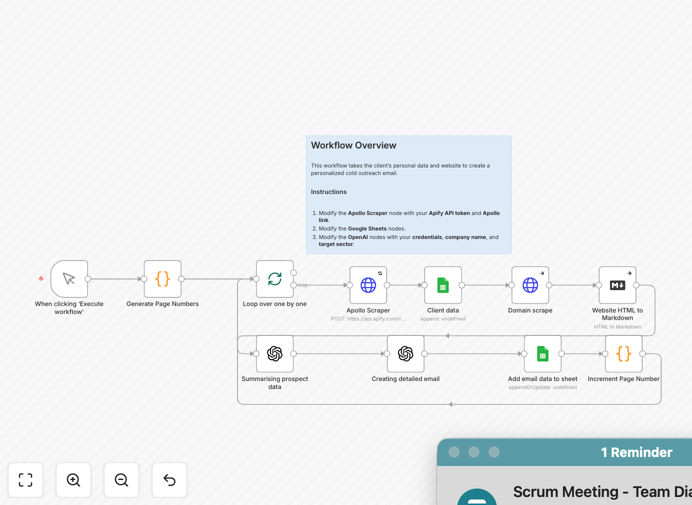
The automation follows a logical, multi-step process to transform raw lead data into a ready-to-send, personalized email draft.
1. Lead Batch Processing
The workflow starts by defining how many leads to process in a single run, allowing you to control the volume and manage API usage efficiently. It sets up a loop to handle each lead individually within the batch.
2. Data Enrichment & Scraping
For each lead, the system uses the Apify API (or a similar service) to pull comprehensive professional data—contact details, company information, and social links. It then fetches existing notes from your Google Sheets database and actively scrapes the lead's company website to gather fresh, relevant content for personalization.
3. AI Analysis & Summarization
All the gathered data—the website content, job title, industry, and location—is fed into an OpenAI model. The AI's job is to analyze this information and produce a concise summary of the prospect and their company, identifying unique angles and potential pain points that can be referenced in the email.
4. Personalized Email Component Generation
A second, more advanced AI step takes the prospect summary and your specific company context. Following detailed instructions, it generates three key email components: a relevant icebreaker (commenting on company news or role), a professional introduction, and a tailored value proposition that speaks directly to the prospect's likely needs.
5. Data Storage & Completion
Finally, the newly generated icebreaker, intro, and value proposition are written back into your Google Sheet (or CRM) against the lead's record. This enriches your database and provides your sales team with ready-to-use, personalized content for their outreach campaigns, closing the automation loop.
Who This Is For
This template is designed for business development professionals, sales teams, marketers, and founders who need to scale their outbound efforts without sounding robotic.
Sales Teams & SDRs: Perfect for teams tasked with booking meetings. It automates the research-heavy part of prospecting, allowing reps to focus on conversations instead of data entry.
Marketing Agencies: Agencies running outreach campaigns for clients can use this to deliver highly personalized messaging at scale, improving campaign performance and demonstrating added value.
Startup Founders & Solopreneurs: Individuals wearing multiple hats can automate their lead nurturing process, ensuring consistent, high-quality outreach even when time is limited.
Business Development Consultants: Consultants can implement this as a system for their clients, creating a scalable and repeatable process for generating qualified leads.
Pro tip: Use this workflow to power a "touchpoint sequence." Let it generate the initial personalized email, then set up follow-up automations in your email platform (like GMass or Mailshake) using the same AI-generated talking points for consistency.
What You'll Need
- An n8n Instance: A self-hosted n8n setup or a n8n.cloud account to run the workflow.
- OpenAI API Key: Required for the AI analysis and email generation steps. You can get one from platform.openai.com.
- Google Account: For connecting to Google Sheets where your lead list and output data will be stored.
- Apify API Token (or Alternative): To power the lead data enrichment and scraping steps. An account with a data provider like Apollo, Clay, or PhantomBuster can also be adapted.
- A Structured Google Sheet: Your lead sheet must have specific columns including Email, Full Name, Company Name, Website, and columns for the output (icebreaker, intro, value_prop).
Quick Setup Guide
Follow these steps to get your automated cold email system up and running in under 30 minutes.
- Download & Import: Click the "Download Template" button above and import the JSON file into your n8n instance.
- Add Credentials: In n8n's credentials menu, add your OpenAI API key and connect your Google account for Sheets access.
- Configure the Scraper Node: Locate the "Scraper" node. Update the Authorization header with your Apify API token (format:
Bearer YOUR_TOKEN). In the JSON body, set thesearchUrlto your lead source URL. - Connect Your Google Sheet: Select both the "Client data" and "Add email data to sheet" nodes. For each, choose your Google credential, select your spreadsheet, and specify the correct sheet name. Ensure the column names in the node settings match your sheet's header row exactly.
- Customize the AI Prompt: In the "Creating detailed email" node, find the prompt text and replace
PUT YOUR COMPANY INFO HEREwith a 2-3 sentence description of your company, your target customer, and the value you provide. - Test & Run: Use the "Execute Workflow" button to run a test with 1-2 leads. Check the Google Sheet to confirm the new "icebreaker," "intro," and "value_prop" columns are populated correctly.
Key Benefits
Scale Personalization 10x: Move from 20 manually researched emails per day to 200+ highly personalized ones, increasing outreach capacity without adding headcount.
Boost Reply Rates by 3-5x: AI-generated emails based on actual company context and role specifics feel genuinely researched, not templated, leading to significantly higher engagement and meeting bookings.
Save 15-20 Hours Per Week: Eliminate the tedious manual work of visiting company websites, LinkedIn profiles, and crafting unique opening lines for every single lead.
Ensure Consistency & Quality: Every email follows your optimized prompting framework, maintaining a high standard of communication and ensuring your value proposition is always clearly articulated.
Enrich Your CRM Automatically: The generated insights are saved directly to your lead records, building a valuable knowledge base over time that can inform future sales conversations and marketing campaigns.