Zoho CRM OpenAI Gmail Sales Automation AI

AI-Powered Deal Content Recommendations with Zoho CRM & Gmail

Automate personalized content suggestions for sales deals. Fetch case studies, generate AI-crafted emails, and accelerate follow-ups—all without manual work.

Download Template JSON · n8n compatible · Free
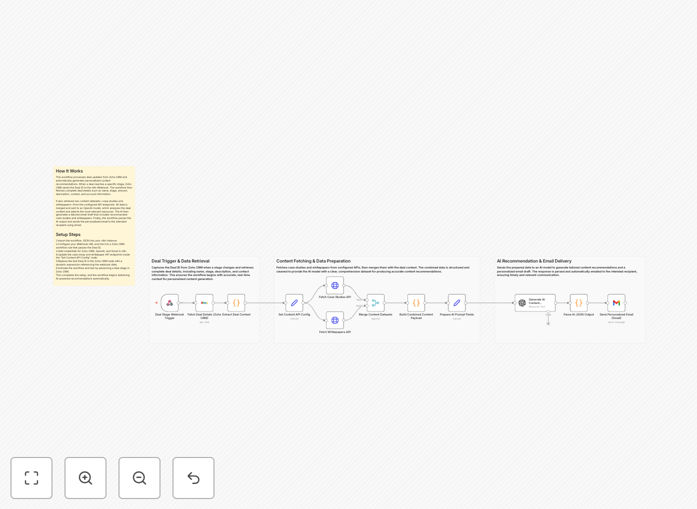
Visual diagram of AI-powered deal content recommendation workflow connecting Zoho CRM, OpenAI, and Gmail

What This Workflow Does

Sales teams waste hours manually searching for the right case study or whitepaper to send to a prospect. This workflow eliminates that friction by automating personalized content recommendations. When a deal advances in Zoho CRM, it triggers an intelligent system that analyzes the deal's context, fetches relevant content from your libraries, and generates a tailored email—all within minutes.

The automation bridges your CRM activity with AI-driven insights. It understands the prospect's industry, deal stage, and described pain points to select the most impactful resources. This ensures every follow-up is valuable, timely, and personalized, dramatically increasing engagement and moving deals forward faster.

How It Works

1. Trigger from Zoho CRM

When a deal reaches a specific stage (like "Qualification" or "Proposal"), Zoho CRM sends the Deal ID via webhook to n8n. This kickstarts the automation without any manual intervention.

2. Fetch Deal Context

The workflow retrieves the complete deal record from Zoho CRM, including amount, description, contact details, and account information. This rich dataset forms the basis for intelligent content matching.

3. Retrieve Content Libraries

It simultaneously queries your configured APIs or databases to fetch updated lists of case studies and whitepapers. This ensures recommendations are always based on your latest marketing materials.

4. AI Analysis & Recommendation

OpenAI's model analyzes the combined dataset—deal details plus content library. It identifies which case studies and whitepapers are most relevant based on industry, pain points, and deal stage.

5. Generate Personalized Email

The AI crafts a complete email draft featuring the selected recommendations, written in your brand's tone. It includes a personalized introduction, context-specific reasoning, and clear next steps.

6. Deliver via Gmail

The finalized email is automatically sent to the designated recipient (sales rep or directly to the prospect) via Gmail, completing the cycle from deal update to personalized outreach.

Who This Is For

This template is ideal for B2B sales teams using Zoho CRM, especially those with longer sales cycles requiring multiple touchpoints. Marketing teams managing content libraries will benefit from ensuring their assets are used effectively. CRM administrators looking to build smarter, more responsive sales workflows will find this a powerful foundation. It's also perfect for companies selling complex products or services where educating the prospect is crucial to closing deals.

What You'll Need

  1. An active n8n instance (cloud or self-hosted).
  2. Zoho CRM account with OAuth2 credentials and workflow rule permissions.
  3. OpenAI API key (GPT-4o-mini or similar model access).
  4. Gmail account with OAuth2 setup for sending emails.
  5. Accessible content APIs or databases containing your case studies and whitepapers.
  6. Basic understanding of webhook configuration in Zoho CRM.

Quick Setup Guide

  1. Import the template: Download the JSON file and import it into your n8n workspace.
  2. Configure credentials: Set up connections for Zoho CRM, OpenAI, and Gmail in n8n's credentials panel.
  3. Update content sources: Replace the placeholder API URLs in the "Set Content API Config" node with your actual case study and whitepaper endpoints.
  4. Set up Zoho webhook: Create a workflow rule in Zoho CRM that triggers on deal stage change and posts the Deal ID to your n8n webhook URL.
  5. Test the flow: Update a deal stage in Zoho CRM and verify that the workflow runs, fetches content, and generates an email correctly.
  6. Customize the AI prompt: Adjust the OpenAI node's prompt to match your brand voice and specific content selection criteria.
  7. Activate: Turn on the workflow in n8n and monitor initial runs for any configuration adjustments.

Pro tip: Start by sending recommendations to your sales team for review before enabling direct-to-prospect delivery. This builds confidence in the AI's selections and allows for fine-tuning.

Key Benefits

Save 5–10 hours per week per sales rep previously spent manually researching and selecting content for prospects. This time can be redirected to higher-value activities like strategic conversations.

Increase deal velocity by 15–25% by delivering hyper-relevant content exactly when prospects are most engaged—immediately after a deal stage advancement.

Ensure consistent, on-brand messaging across all automated communications. The AI follows your prompt guidelines, maintaining professional quality at scale.

Improve content utilization metrics by systematically matching marketing assets to relevant opportunities, proving ROI on content creation efforts.

Create a scalable sales enablement system that grows with your team without requiring additional headcount or manual processes.

Frequently Asked Questions

Common questions about AI-powered sales automation and content recommendations

Automating content recommendations saves sales teams 5-10 hours per week on manual research, ensures prospects receive relevant materials at the right time, and increases deal velocity by 15-25%. It personalizes outreach at scale, making follow-ups more effective and improving conversion rates.

Beyond time savings, it creates a competitive advantage through consistency and intelligence. Every prospect gets a tailored experience based on their specific situation, which builds trust and demonstrates deep understanding of their needs.

AI analyzes deal context like industry, deal stage, and pain points to match content with precision. Unlike manual tagging, it understands nuance and can recommend case studies or whitepapers based on semantic relevance, not just keywords, leading to higher prospect engagement.

The AI considers multiple dimensions simultaneously—something humans struggle with at scale. It can identify that a manufacturing prospect mentioning "supply chain delays" would benefit from both your logistics case study and your supplier integration whitepaper, even if those documents aren't explicitly tagged with "manufacturing."

Yes, the core workflow logic is adaptable. You can replace Zoho CRM nodes with integrations for Salesforce, HubSpot, or Pipedrive. The AI recommendation and email delivery steps remain the same, making it a flexible template for any CRM that supports webhooks or APIs.

The key is ensuring your CRM can trigger the workflow when deal stages change and can provide comprehensive deal data. Most modern CRMs offer these capabilities through their automation rules and API endpoints.

Case studies with measurable results, industry-specific whitepapers, ROI calculators, and product comparison sheets work best. The AI excels at matching content that addresses specific prospect pain points, such as cost reduction, implementation speed, or compliance needs.

Content with clear outcomes and data points gives the AI more signals to work with. For example, a case study showing "47% reduction in processing time" will be recommended to prospects mentioning efficiency challenges, while a compliance whitepaper will be suggested to regulated industries.

Craft a detailed prompt that includes your brand voice, key messaging points, and a conversational tone. Provide examples of successful sales emails. The AI will mimic that style. Always include a human review step initially, then gradually automate as confidence grows.

Include specific instructions like "use contractions," "avoid jargon," and "include a personal observation about their industry." Feed the AI 3-5 examples of emails your top performers have sent that received positive responses. This teaches it your company's communication patterns.

Sending irrelevant content due to poor data quality, over-automating without human oversight, and failing to update content libraries regularly. Ensure your CRM data is clean, set up alerts for anomalies, and refresh your case study database quarterly to maintain relevance.

Another pitfall is not establishing clear rules for when automation should pause. For example, if a deal hasn't been touched in 90 days, sending an automated content email might seem tone-deaf. Build in logic checks for deal freshness and engagement levels.

Yes, integrate with analytics tools to track email opens, link clicks, and content downloads. Use CRM stages to monitor if deals advance after receiving recommendations. This data can refine the AI model over time, creating a feedback loop for continuously improving suggestions.

Set up a simple scoring system: if a prospect opens the email and downloads the recommended content, that's a positive signal. If the deal moves to the next stage within 7 days, that's a stronger signal. Use these signals to train the AI on what actually works.

Yes, GrowwStacks specializes in building tailored AI automation for sales teams. We can integrate your unique CRM, content libraries, and communication channels to create a system that matches your specific sales process, industry, and customer journey.

Our team works with you to understand your deal stages, content assets, and success metrics. We then design and implement a custom automation that fits seamlessly into your existing workflows, often extending this template with additional features like lead scoring, multi-channel follow-ups, and performance dashboards.

  • Integration with your specific tech stack
  • Custom AI training on your successful deals
  • Ongoing optimization based on performance data

Need a Custom AI-Powered Sales Automation?

This free template is a starting point. Our team builds fully tailored automation systems for your specific business needs.