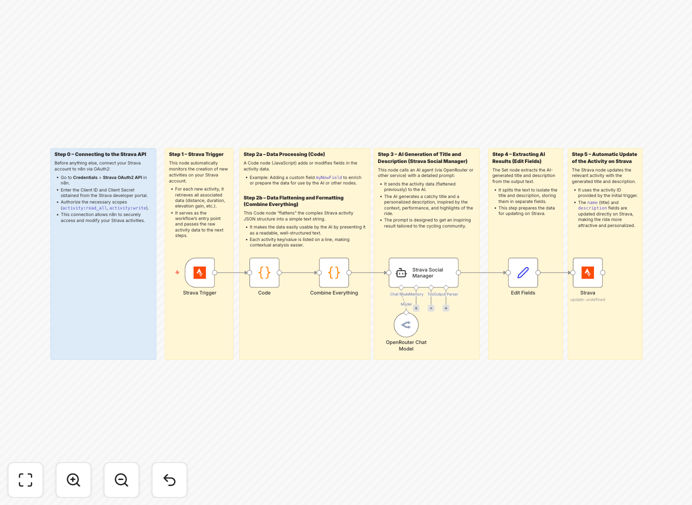
What This Workflow Does
Every cyclist knows the post-ride dilemma: you've just completed an amazing ride, but now you need to craft an engaging title and description for your Strava activity. This manual process consumes valuable time and often results in generic, uninspired content that doesn't capture the true essence of your experience.
This n8n workflow solves that problem by automating the entire content creation process. It connects directly to your Strava account, detects new activities automatically, extracts key ride metrics, and sends this data to an AI agent which generates personalized, creative titles and descriptions. The workflow then updates your Strava activity instantly, transforming raw data into compelling narratives that engage your followers and accurately reflect your achievement.
The automation handles everything from secure API connections to intelligent prompt engineering, ensuring each ride gets unique, context-aware content that would take minutes to create manually—all happening automatically in the background.
How It Works
The workflow follows a logical sequence that mimics how a thoughtful human would create ride content, but with AI-powered efficiency and consistency.
1. Activity Detection & Data Extraction
The Strava Trigger node monitors your account for new activities. When a ride is completed and uploaded, the workflow automatically captures comprehensive data including distance, duration, elevation gain, average speed, route location, and weather conditions if available through connected services.
2. Data Structuring & Enrichment
Raw metrics are processed and formatted into a coherent narrative structure. The workflow calculates notable achievements (personal records, significant climbs, consistent pacing) and identifies key story elements from the data that make for engaging content.
3. AI-Powered Content Generation
Structured ride data is sent to your configured AI agent (OpenAI, Claude, OpenRouter, etc.) with optimized prompts that guide the AI to generate both a catchy title (under 60 characters) and a descriptive paragraph (100-150 words) that tells the story of your ride.
4. Quality Validation & Formatting
Generated content is checked for appropriate length, tone, and relevance. The workflow can apply consistent formatting rules, add relevant hashtags, and ensure the output meets your personal or brand style guidelines before proceeding.
5. Strava Activity Update
The final step updates your Strava activity with the AI-generated title and description, completing the automation loop. The entire process typically completes within 30-60 seconds of your ride being uploaded.
Who This Is For
This automation delivers value to several distinct user groups within the cycling and fitness community. Serious amateur cyclists who regularly post rides and want to maintain engaging social content without the time investment will find immediate benefit. Cycling coaches and trainers managing multiple athletes' accounts can ensure consistent, professional activity descriptions across their team.
Fitness content creators and influencers who need to maintain high-quality, engaging Strava profiles as part of their personal brand will appreciate the automated creativity. Cycling clubs and group organizers can use this to maintain active community engagement with minimal administrative overhead. Even casual riders who want to better document their fitness journey without becoming social media experts can benefit from the automated storytelling.
What You'll Need
- Active Strava Account: A Strava subscription (free or premium) with activities being recorded and uploaded.
- Strava API Credentials: OAuth2 application credentials from the Strava API settings (Client ID and Client Secret).
- AI Service Access: An account with an AI provider like OpenAI, Anthropic, OpenRouter, or compatible alternative with API access.
- n8n Instance: A running n8n environment (cloud, self-hosted, or local) where you can import and execute workflows.
- Basic Configuration Knowledge: Understanding of how to set up API credentials in n8n nodes and adjust simple workflow parameters.
Pro tip: Start with OpenRouter as your AI provider—it offers access to multiple models (including free tiers) and typically has simpler pricing than direct provider APIs, making it ideal for testing and personal use.
Quick Setup Guide
Getting this automation running requires about 15-20 minutes of configuration. Follow these steps to implement the workflow in your environment.
- Download & Import: Download the template file and import it into your n8n instance via the workflow import function.
- Configure Strava Connection: Set up the Strava OAuth2 credentials in both the Trigger and Update nodes. Complete the authentication flow when prompted.
- Set Up AI Provider: Configure the AI node with your chosen provider's API key and select your preferred model (GPT-4, Claude, etc.).
- Customize Prompts (Optional): Review and adjust the AI prompt templates to match your preferred writing style, tone, and content preferences.
- Test & Activate: Trigger the workflow manually with an existing Strava activity to verify output quality, then activate the workflow for automatic execution.
Key Benefits
Save 5-10 minutes per ride on content creation. What typically requires thoughtful writing now happens automatically, freeing you to focus on recovery or your next activity rather than social media management.
Consistently high-quality, engaging content. AI-generated descriptions often outperform manual entries in creativity and engagement metrics, using narrative techniques and data highlights that humans might overlook.
Personalized storytelling at scale. Each ride receives unique content tailored to its specific metrics and achievements, creating a authentic record of your cycling journey that generic templates can't match.
Enhanced social presence with zero ongoing effort. Maintain an active, professional Strava profile that attracts followers and engagement without the constant time investment typically required.
Flexible integration with your preferred AI. The workflow works with multiple AI providers, allowing you to choose based on cost, quality, or specific model preferences without redesigning the automation.