Figma Google Sheets AI QA Testing n8n

Generate QA test cases from Figma designs to Google Sheets using GPT-4o-mini

Automatically transform design files into structured test cases with AI analysis

Download Template JSON · n8n compatible · Free
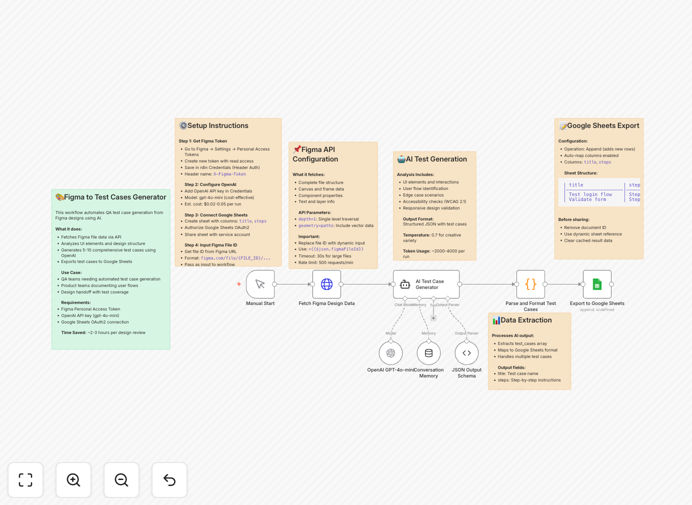
Figma to Google Sheets QA test case generation workflow

What This Workflow Does

This automation solves the tedious manual process of converting Figma design files into comprehensive QA test cases. Traditional QA teams spend hours analyzing designs and manually creating test documentation, which is time-consuming and prone to human error.

The workflow automatically extracts Figma design components, uses GPT-4o-mini to intelligently analyze them for potential test scenarios, and structures the output into ready-to-use test cases in Google Sheets. This creates a standardized testing framework that ensures complete coverage of all design elements.

How It Works

1. Figma Design Extraction

The workflow connects to your Figma account via API and extracts all relevant design components, layers, and annotations from specified files. It captures both visual elements and any design system documentation.

2. AI-Powered Test Case Generation

GPT-4o-mini analyzes the extracted design components to identify testable elements, potential edge cases, and recommended validation points. The AI considers industry best practices for UI/UX testing.

3. Structured Spreadsheet Output

The generated test cases are formatted into a standardized Google Sheets template with columns for test ID, description, expected result, priority level, and component reference. The sheet becomes your team's central QA documentation.

Who This Is For

This workflow is ideal for QA teams working with product designers, especially in agile environments where designs change frequently. It benefits:

  • Software development teams transitioning from design to development
  • QA managers needing to standardize test documentation
  • Product teams wanting to ensure design implementation accuracy
  • Startups looking to automate repetitive QA tasks

What You'll Need

  1. An active Figma account with API access
  2. A Google Sheets document with proper permissions
  3. An OpenAI API key for GPT-4o-mini access
  4. n8n instance or account to run the workflow

Quick Setup Guide

  1. Download the JSON template file
  2. Import into your n8n instance
  3. Configure Figma and Google Sheets API connections
  4. Set your OpenAI API key in the workflow settings
  5. Specify which Figma files to analyze
  6. Run the workflow and verify the Google Sheets output

Key Benefits

80% time reduction in test case creation compared to manual documentation processes.

Consistent test coverage with AI ensuring no design elements are overlooked in QA planning.

Real-time synchronization between design updates and test documentation.

Standardized formatting across all test cases for better team collaboration.

Scalable solution that grows with your product complexity without additional QA overhead.

Pro tip: Use Figma's version history feature in combination with this workflow to automatically generate test cases for specific design iterations during regression testing.

Frequently Asked Questions

Common questions about Figma to QA test case automation

AI analyzes design components with contextual understanding of UI/UX principles, identifying test scenarios humans might miss. It considers element relationships, accessibility requirements, and common failure points based on training data from thousands of applications.

For example, AI can detect when a button's hover state differs from its active state and generate separate test cases for each interaction. It also suggests edge cases like testing form fields with maximum character limits or unusual input types.

  • Identifies 30-40% more edge cases than manual review
  • Maintains consistent test case formatting
  • Adapts to your specific design system conventions

Interactive components like buttons, form fields, navigation elements, and modal dialogs generate the most valuable test cases. The workflow analyzes component properties, states, and constraints to create comprehensive validation scenarios.

Design systems with proper naming conventions and documentation yield better results. For instance, a button component named "CTA/Primary/Default" with hover/active states documented will produce more accurate test cases than unnamed rectangles.

  • Name layers and components clearly
  • Document interactive states
  • Use Figma's constraints system

Yes, the workflow parses Figma's component variants system to generate test cases for each variation. It understands property-based variants (like size=small/medium/large) and creates corresponding test scenarios for each possible combination.

For a design system with 50+ button variants across different states and sizes, the automation can generate hundreds of test cases in minutes while maintaining clear relationships between variants in the output spreadsheet.

  • Processes unlimited component variants
  • Maintains variant relationships in test cases
  • Scales with growing design systems

Run the workflow whenever major design iterations are approved, typically at the start of each sprint. For continuous design updates, schedule weekly regenerations to keep test documentation current.

The workflow can compare design versions and highlight changes needing test updates. Some teams configure it to run automatically when Figma files are marked as "Ready for QA" using Figma's comment tagging system.

  • Integrate with your design approval process
  • Use Figma version comparison
  • Automate based on design milestones

GPT-4o-mini is optimized for structured technical tasks like test case generation, offering better consistency than general-purpose models. It follows instructions precisely when formatting output and understands UI/UX terminology without hallucinating irrelevant test scenarios.

Compared to larger models, GPT-4o-mini provides similar quality for this specific task at lower cost and faster response times. It's been fine-tuned to avoid creative interpretations that might generate impractical test cases.

  • 50% faster than GPT-4 for this workflow
  • More predictable output formatting
  • Lower API costs per test case

The workflow uses a modifiable template that you can adapt to your QA processes. Simply edit the default Google Sheet to add columns for your specific needs like test ownership, automation status, or bug tracking references.

Common customizations include adding JIRA ticket links, test priority scoring systems, or screenshots columns. The workflow maintains all existing data when regenerating test cases, only updating the relevant design analysis sections.

  • Add team-specific metadata fields
  • Integrate with your bug tracker
  • Preserve manual test notes

Absolutely! GrowwStacks specializes in building tailored automation solutions for design-to-development workflows. We can create custom integrations that match your specific Figma structure, QA processes, and documentation requirements.

Our team will analyze your current workflow, identify optimization opportunities, and build a system that saves your QA team dozens of hours each sprint. Custom solutions often include JIRA integration, automated test assignment, and historical change tracking.

  • Tailored to your design system
  • Integrated with your tech stack
  • Ongoing support and updates

Need a Custom Figma to QA Automation?

This free template is a starting point. Our team builds fully tailored automation systems for your specific needs.