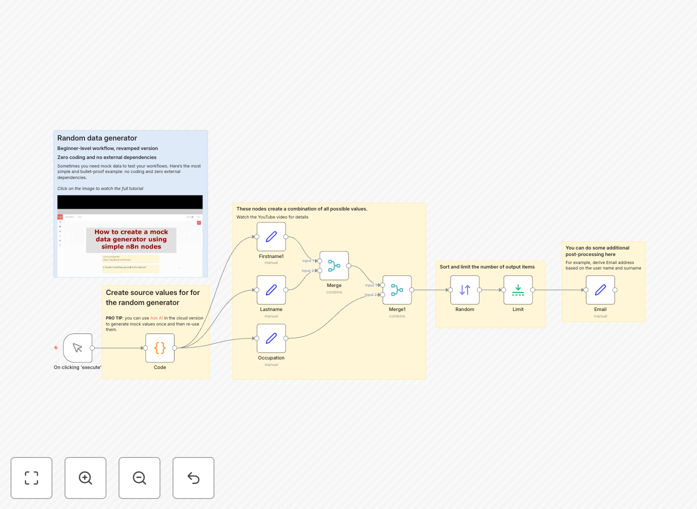
What This Workflow Does
This workflow solves a common bottleneck in business automation: the need for realistic test data. When developing new workflows, integrating systems, or testing dashboards, teams often struggle with finding appropriate datasets. Manual data entry is time-consuming, and using production data risks privacy violations.
This no-code template generates fully customizable mock data—customer profiles, transaction records, product information—with zero programming required. It uses built-in n8n nodes to create, combine, shuffle, and limit datasets, producing consistent outputs for reliable testing. You can adjust field values, data volume, and output formats to match your specific testing scenarios.
The automation eliminates dependency on developers for test data creation, accelerates prototyping cycles, and ensures your automation logic works with realistic inputs before deployment.
How It Works
Step 1: Define Data Templates
A Code node stores default values for first names, last names, occupations, and other fields as simple JSON. You can edit these directly or use n8n's AI assistant to generate realistic value sets. These templates become the foundation for all generated records.
Step 2: Extract and Combine Variables
Separate nodes extract individual variables from the template. Merge nodes then create every possible combination of these values, ensuring comprehensive dataset coverage. This mimics real-world data diversity where multiple attribute combinations exist.
Step 3: Randomize and Limit Output
A Random node shuffles the combined dataset to eliminate pattern bias. The Limit node controls final output volume—generating 10, 100, or 1000 records based on your testing needs. This step ensures scalable testing from small prototypes to large-volume simulations.
Step 4: Post-Processing and Export
Additional nodes derive calculated fields like email addresses from name combinations. The final dataset exports as JSON, CSV, or feeds directly into your testing systems. The entire flow runs with a single trigger, producing ready-to-use data in seconds.
Who This Is For
Business Analysts & Process Owners who need to test automation workflows before implementation. This template lets them validate logic with realistic data without waiting for IT resources.
Software Development Teams requiring consistent test inputs for APIs, databases, and UI components. It provides reproducible datasets that accelerate testing cycles and improve bug detection.
Marketing & Sales Operations professionals prototyping CRM integrations, lead scoring models, or campaign automation. They can generate customer-like data to verify segmentation and workflow accuracy.
Startups & Product Teams building new features that depend on data-driven logic. Mock data allows risk-free experimentation with different data scenarios before collecting real user information.
What You'll Need
- A running n8n instance (cloud or self-hosted)
- Basic understanding of n8n's interface (no coding skills required)
- Clear testing objectives—know what data fields you need to generate
- Target systems where mock data will be used (CRM, database, analytics tool)
Pro tip: Use the "Ask AI" feature in n8n Cloud to generate industry-specific value sets. For example, ask for "realistic software company job titles" or "common e-commerce product categories" to create domain-relevant mock data.
Quick Setup Guide
- Download the template JSON file using the button above.
- In your n8n instance, go to Workflows → Import → Upload the JSON file.
- Open the imported workflow and examine the Code node. Edit the JSON values to match your desired data fields.
- Adjust the Limit node to set your required record count.
- Connect the output to your testing system or add an output node (like "Write to File") to save the data.
- Click "Execute Workflow" to generate your first mock dataset.
Key Benefits
Accelerated Testing Cycles: Generate test data in seconds instead of hours. Reduce dependency on manual entry or developer scripts, speeding up workflow validation by 80–90%.
Risk-Free Prototyping: Experiment with automation logic using realistic but safe data. Avoid privacy concerns and production system impacts while thoroughly testing edge cases.
Consistent Quality Assurance: Produce reproducible datasets for regression testing. Ensure every test run uses the same data characteristics, making bug identification more reliable.
Empowered Non-Technical Teams: Business teams can create and modify test scenarios without coding skills. This democratizes automation testing and reduces IT backlog.
Scalable Data Volume: Easily adjust from 10 to 10,000 records to test system performance under different loads. Identify scalability issues before deployment.