What This Workflow Does
Cold emailing is broken. Generic templates get ignored, while personalized outreach is painfully slow to create. This automation solves that by combining web scraping, AI analysis, and spreadsheet management into a single, powerful workflow.
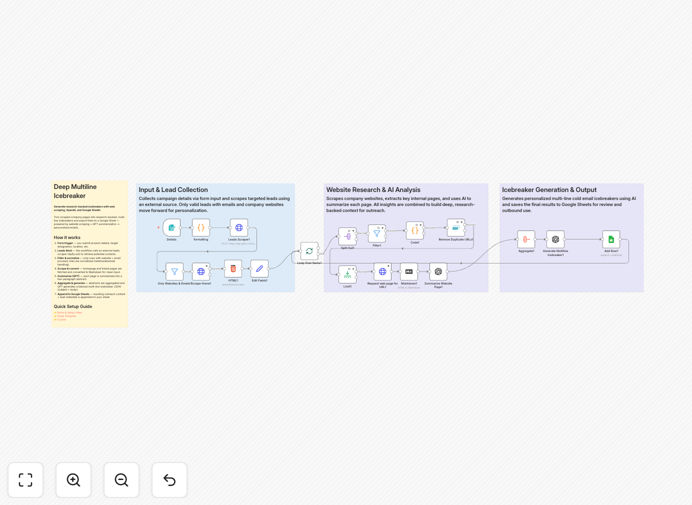
You feed it a list of leads (names, emails, company websites). It automatically visits each website, extracts key content, uses OpenAI to generate a concise summary of what the company does, and then crafts a unique, multi-line icebreaker email referencing specific details it found. All results—including the generated email subject and body—are neatly appended to a Google Sheet for your review and sending.
This turns hours of manual research into a fully automated process, enabling sales and marketing teams to scale personalized outreach without sacrificing quality or burning out.
How It Works
The workflow is a sequenced pipeline that transforms raw lead data into actionable, personalized outreach content.
1. Trigger & Data Input
The process starts with a form or manual trigger where you input your product/service details and upload a list of leads. The workflow can also be scheduled or triggered from a CRM.
2. Lead Enrichment & Filtering
It fetches additional lead data from a source (like Apify), then filters to ensure each record has a valid website and email address. Invalid or incomplete entries are filtered out.
3. Web Scraping & Content Extraction
For each qualified lead, the workflow sends an HTTP request to the company's website, scrapes the page content, and converts it into clean, structured markdown text for the AI to analyze.
4. AI-Powered Summarization
The scraped content is sent to OpenAI's GPT model with a custom prompt, instructing it to produce a two-paragraph abstract highlighting the company's core offering, recent updates, or unique differentiators.
5. Icebreaker Generation
Using the AI-generated summary and your original product brief, a second AI call crafts a personalized cold email. The output is structured JSON containing a compelling subject line and a multi-paragraph body that references the specific research.
6. Output to Google Sheets
The final step appends a new row to your designated Google Sheet for each lead. The row includes the lead's contact info, the website summary, and the fully generated email ready for your outreach sequence.
Pro tip: Use the "Limit" node in the workflow to control batch size. Start with 2-3 leads to test prompts and cost, then scale up once you're satisfied with the output quality.
Who This Is For
This template is designed for business professionals who need to initiate conversations at scale but want to avoid the spam folder.
Sales Development Reps (SDRs) & Account Executives: Perfect for teams that need to book more meetings by moving beyond generic templates. It allows them to personalize at scale.
Marketing & Growth Agencies: Agencies running outreach campaigns for multiple clients can use this to deliver highly personalized, research-backed messaging that outperforms standard blasts, improving client ROI.
Startup Founders & Solopreneurs: Individuals wearing multiple hats can automate their lead outreach, saving dozens of hours per week while maintaining a personal touch that builds genuine connections.
Recruiters & Talent Acquisition: The same principles apply to sourcing candidates. Scrape a candidate's portfolio or LinkedIn (via public data), generate a personalized outreach message, and log it for follow-up.
What You'll Need
- An n8n Instance: You can use n8n.cloud (easier) or self-host n8n on your own server.
- OpenAI API Key: Required for the GPT calls that summarize websites and generate emails. Costs are based on token usage.
- Google Sheets Access: A Google account to create the destination spreadsheet and grant OAuth permissions for the workflow to write data.
- Lead Source: The template uses an Apify actor as an example. You'll need an Apify account and API token, or you can replace this node with your own lead source (CSV upload, CRM query, Airtable, etc.).
- Basic Prompt Customization Skills: While not required, familiarity with adjusting AI prompts will help you tailor the tone and output format to your specific industry and voice.
Quick Setup Guide
Follow these steps to get your automated icebreaker system running in under 30 minutes.
- Download & Import: Click the "Download Template" button above to get the JSON file. In your n8n instance, go to Workflows > Import from File and select the downloaded file.
- Configure Credentials: Set up the required credentials within n8n: your OpenAI API key and Google Sheets OAuth connection. The workflow will guide you to create these if they don't exist.
- Set Your Lead Source: Configure the "Leads Scraper" node. You can use the provided Apify actor (requires an Apify token) or replace this node with your own data source, like a "Read from CSV" node.
- Customize the AI Prompts: Open the "Summarize Website Page" and "Generate Multiline Icebreaker" nodes. Review and tweak the system and user prompts to match your desired tone, length, and focus areas.
- Connect Your Google Sheet: In the "Add Row" node, paste the ID of your Google Sheet and specify the sheet name where you want the data to appear. Ensure your Google account has edit permissions.
- Test with a Single Lead: Activate the workflow and run it with a single test lead (your own company website is a good start). Check the Google Sheet to see the generated output.
- Scale & Integrate: Once testing is successful, connect your real lead source. Consider adding a "Schedule Trigger" node to run this automation daily or weekly for new leads.
Important: Always respect website terms of service and robots.txt files when scraping. Use reasonable delays between requests to avoid overloading servers.
Key Benefits
Increase Reply Rates by 3-5x: Personalized emails that reference a prospect's specific business context have dramatically higher engagement than generic templates. This automation makes that level of personalization scalable.
Save 10+ Hours Per Week per Rep: Eliminate the manual cycle of visiting websites, taking notes, and drafting emails from scratch. What used to take 15 minutes per lead now happens in seconds, freeing your team for higher-value conversations.
Ensure Consistency & Quality: Every outreach email follows your optimized prompt structure and tone of voice. This removes variability and ensures your messaging is always on-brand and effective, even when scaling.
Centralize Your Outreach Pipeline: By logging all generated content directly into Google Sheets, you have a single source of truth for your outreach campaigns. This makes it easy to review, sequence, and track performance.
Future-Proof Your Process: The workflow is built in n8n, a flexible, open-source platform. You can easily extend it—add a step to send emails via Gmail or SendGrid directly, integrate with your CRM, or trigger follow-up sequences based on replies.