Explorium Slack Sales Automation n8n

Generate sales emails based on business events with Explorium MCP & Slack

Automate outbound prospecting by monitoring Explorium event data and triggering personalized sales emails via Slack

Download Template JSON · n8n compatible · Free
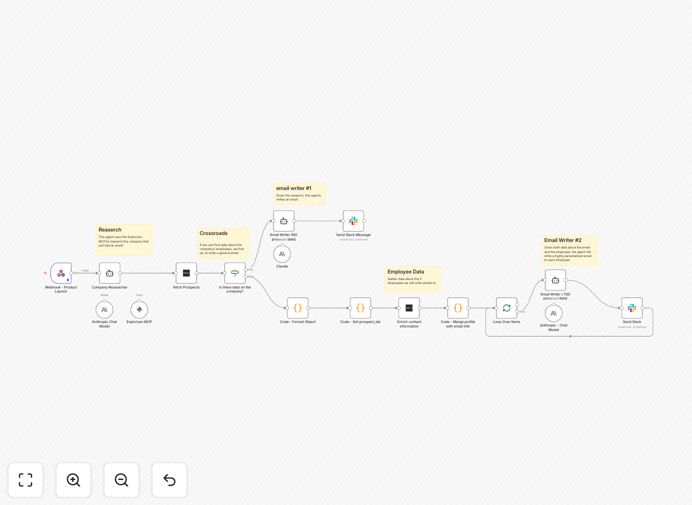
Explorium and Slack sales email automation workflow diagram

What This Workflow Does

This automation solves the challenge of timely outreach when important business events occur with your prospects. Traditional sales teams often miss valuable opportunities because they don't have real-time visibility into trigger events like funding rounds, leadership changes, or product launches.

The workflow connects Explorium's Market Change Platform (MCP) with Slack to create an automated system that detects relevant business events, generates personalized outreach emails, and delivers them to your sales team via Slack for immediate action. This ensures your team always reaches out at the most opportune moments.
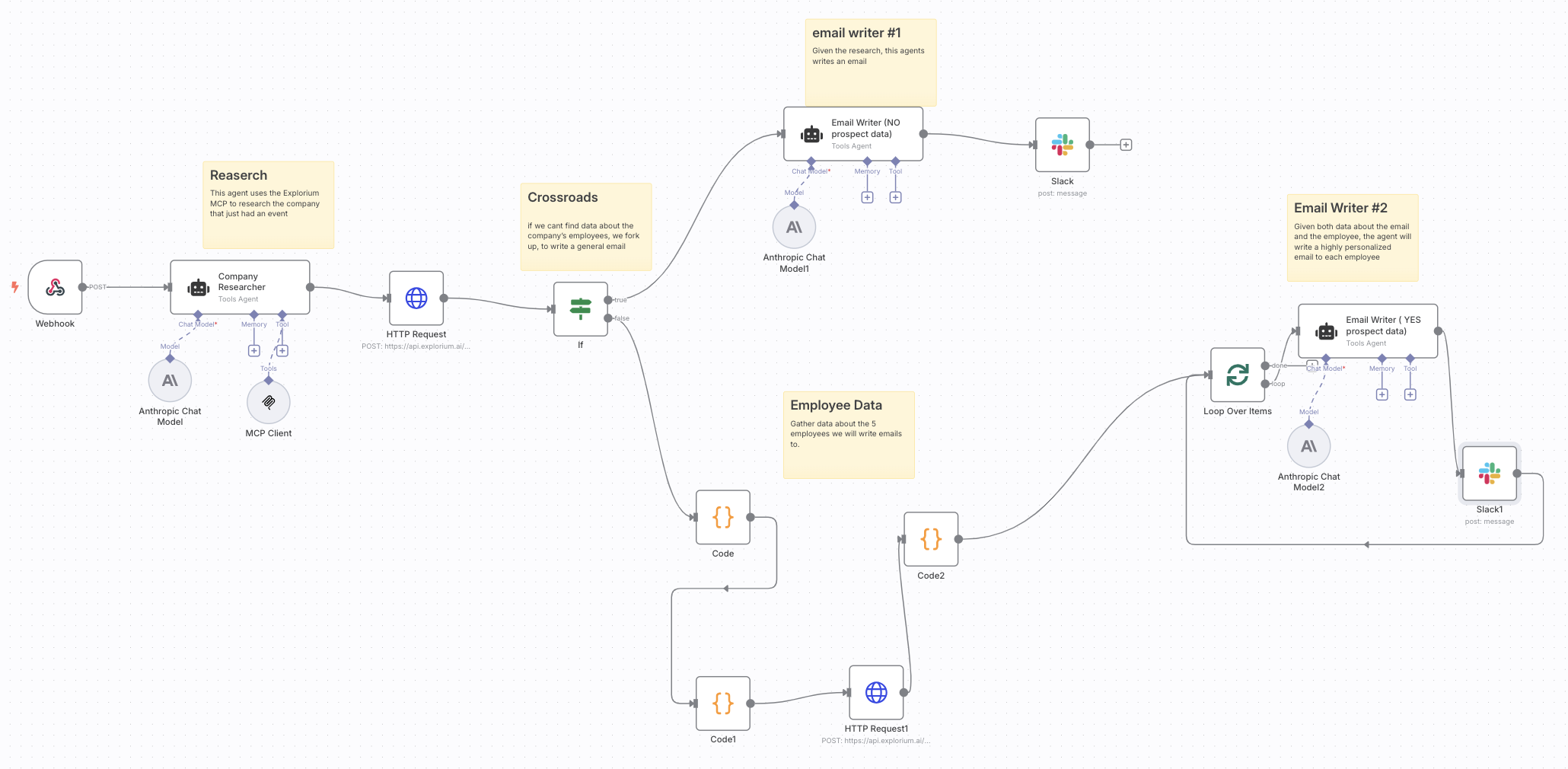
Screenshot of the sales email automation workflow in action
The workflow automatically generates sales emails based on Explorium event data

How It Works

1. Event Detection

The workflow continuously monitors Explorium MCP for specified business events like funding announcements, executive hires, or product updates. When a qualifying event occurs, the workflow captures all relevant details.

2. Prospect Matching

Each detected event is matched against your CRM or prospect list to identify which accounts should receive outreach. The workflow verifies contact information and ensures no duplicate outreach occurs.

3. Email Generation

Using predefined templates with dynamic fields, the workflow creates personalized emails that reference the specific event. Templates can include variables like company name, event details, and personalized value propositions.

4. Slack Notification

The completed emails are sent to a designated Slack channel where sales reps can review them before sending. This human-in-the-loop approach maintains quality control while still automating the heavy lifting.

Who This Is For

This workflow is ideal for B2B sales teams that want to capitalize on timely events but lack the resources to constantly monitor every prospect. It's particularly valuable for:

  • Enterprise sales teams targeting high-value accounts
  • SaaS companies selling to tech startups
  • Investment firms tracking portfolio companies
  • Business development professionals in competitive industries

Pro tip: Combine this workflow with your CRM to automatically log outreach attempts and track response rates for different event types.

What You'll Need

  1. An active Explorium MCP account with API access
  2. Slack workspace with permissions to post messages
  3. n8n instance (self-hosted or cloud)
  4. Email templates for different event types
  5. List of target accounts (optional: CRM integration)

Quick Setup Guide

  1. Download and import the JSON template into your n8n instance
  2. Connect your Explorium MCP account in the first node
  3. Configure event filters to match your ideal triggers
  4. Set up your Slack webhook URL in the notification node
  5. Customize email templates with your branding and messaging
  6. Test with sample events before activating

Key Benefits

75% faster response time to important business events compared to manual monitoring, ensuring your outreach happens while the event is still fresh.

30% higher open rates on emails that reference timely, relevant events versus generic outreach.

5-10 hours saved weekly per sales rep by automating event monitoring and initial email drafting.

Consistent messaging quality across your team with standardized templates that incorporate best practices.

Frequently Asked Questions

Common questions about Explorium and sales automation

The most effective events for automated outreach are those that indicate immediate business needs or changes. Funding rounds, executive hires, product launches, and partnership announcements all create natural openings for relevant conversations.

For example, a company that just received Series B funding likely has budget for new tools, while one hiring a new CTO may be evaluating technology stacks. The key is matching your offering to the specific opportunity created by each event type.

  • Prioritize events that align with your solution's value prop
  • Avoid overly generic events that don't create urgency
  • Test response rates for different event categories

Explorium's Market Change Platform aggregates data from thousands of sources including SEC filings, news sites, job boards, and social media. Machine learning algorithms analyze these sources to identify significant events and classify them by type and relevance.

The platform can detect subtle signals like changes in hiring patterns or mentions in industry reports that might indicate upcoming shifts. For sales teams, this means getting alerts about opportunities before they become widely known in the market.

  • Data sources include both public and proprietary feeds
  • Events are verified across multiple sources
  • Custom filters help focus on your ideal triggers

Event-triggered outreach performs better because it's inherently relevant and timely. Recipients are more likely to engage when your message references something currently top-of-mind for their business.

A study by SalesLoft found that emails referencing specific events have 2-3x higher response rates than generic outreach. The automation ensures your team can capitalize on these moments consistently, rather than only when someone happens to notice the event.

  • Demonstrates your knowledge of their business
  • Creates natural conversation starters
  • Shows you're paying attention to their needs

Effective personalization goes beyond just inserting names and company details. The best automated emails connect your solution directly to the implications of the specific event.

For a company that just hired a new CFO, you might reference common priorities like cost optimization. For a product launch, focus on how your solution helps with scaling operations. Always tie back to how your offering solves challenges created by the event.

  • Create templates for each major event category
  • Include specific details from the event
  • Show understanding of their new situation

Using Slack as an intermediary maintains human oversight while still automating the heavy lifting. Sales reps can quickly review and customize emails before sending, ensuring quality and appropriateness.

This approach also allows for team collaboration - reps can tag colleagues for input or reassign leads. The Slack notifications serve as a real-time activity feed showing which events are generating outreach opportunities.

  • Maintains personal touch in outreach
  • Enables quick team collaboration
  • Creates visibility into automation activity

Track both efficiency metrics and conversion metrics. Count hours saved on research and email drafting, plus track response rates, meeting bookings, and pipeline generated from event-triggered outreach.

Compare these results to your standard outreach efforts. Most teams see significant improvements in both productivity (more touches per rep) and effectiveness (higher conversion rates). Over time, refine which event types produce the best results.

  • Measure time saved per rep
  • Track response rates by event type
  • Calculate pipeline value from these leads

Absolutely. GrowwStacks specializes in building tailored automation systems that match your specific sales process and tech stack. We can create custom workflows that integrate with your CRM, marketing tools, and unique data sources.

Our team works with you to identify the highest-value events for your business and design outreach sequences that reflect your brand voice. We handle all the technical implementation so your team can focus on selling.

  • Custom integrations with your existing tools
  • Tailored to your ideal customer profile
  • Ongoing optimization based on results

Need a Custom Sales Automation Solution?

This free template is a starting point. Our team builds fully tailored automation systems for your specific sales process and tech stack.